Ongoing topic · Compiled September 7, 2026
What changes with Astra: task comparisons and real work
Examine Astra through shared drawings, handwritten edits, furniture errors and a tax workbook, then explore editable scenes, family memories, interactive websites and video editing.

01Capabilities and context中文
A leading model: which work moves forward?
Astra is OpenAI’s GPT-6 model. It connects reading, coding, software use and file creation across longer tasks. For everyday users, the useful question is how far a request can progress toward a document, webpage or scene they can open and edit.
On September 19, Artificial Analysis lists Astra max at 53 and third among the 200 comparable models on its model card; Sol max scores 47. Claude Fable 5.1 also displays 53 and ranks first. Both Astra and Claude are leading options, making the task-level differences below useful for choosing between them.
OpenAI’s launch table highlights professional software tasks: Astra scores 59.3% on Agents’ Last Exam, versus 53.6% for Sol. Those are OpenAI’s reported evaluations. The independent examples below compare actual drawings and edits, followed by work readers can explore.
- · Available in GitHub Copilot
- · An author shares Blender scenes and the build process
- · Creators share an educational site and a personal blog
- · Enterprise workflows and new plugins announced
- · A family home rebuilt from photographs, then improved for visitors
- · Basis reports same-task time on a 50-tab tax workbook
| Model and setting | Index | Position |
|---|---|---|
| GPT-6 Astra · max | 53 | 3 / 200 |
| GPT-5.6 Sol · max | 47 | 14 / 200 |
| Claude Fable 5.1 · max, default fallback | 53 | 1 / 200 |
- Explore Opus 5.5 outputs and changesCompare another model through communication, outputs and costs.
- Which entry works with your GPT account?Plus, Pro and Work/Codex access.
Sources and notes
- Artificial Analysis: Astra model card ↗Independent evaluation · Read September 19Index, comparable-model position and evaluation scope.
- Artificial Analysis: Sol model card ↗Independent evaluation · Read September 19The previous-generation reference on the same index version.
- Artificial Analysis: Fable 5.1 model card ↗Independent evaluation · Read September 19Retains the max-effort and default-fallback configuration.
- OpenAI announcement ↗Official introductionComputer use, software development and office deliverables.
- GitHub Copilot release note ↗September 4Plans and gradual rollout details.
- Astra launch record →Existing coverageStart with official positioning and access conditions, then explore the work below.
- Astra in enterprise workflows ↗OpenAI announcement · September 9New enterprise plugins, cross-application workflows and customer accounts.
02Across generations中文
Already using GPT? Compare Astra and Sol on one drawing



If you know Sol, start with the same request: draw a pelican riding a bicycle as an SVG. With the two max outputs side by side, the legs, pedals and frame make the difference easier to inspect than a version name.
For existing GPT users, a structural illustration that previously needed repeated corrections is a useful task to retry with Astra. Check the object relationships and the revisions saved; everyday short questions can stay with the model that already serves them.
Simon Willison’s personal experiment asks models to produce an SVG of a pelican riding a bicycle. The record compares GPT-6 Astra with GPT-5.6 Sol, Terra and Luna at different reasoning settings.
The author shows the generated graphics alongside input and output token counts and example cost. The retained original grid has four model columns and three rows—MAX, XHIGH and HIGH—so readers can inspect each output and its recorded usage.
The author preferred Astra’s overall drawings, while noting that levels below max still do not reliably place the legs on opposite sides of the frame. Inspecting the actual SVGs makes this spatial difference visible beyond simply recognizing a bicycle.
The images and numbers belong to this single-prompt personal experiment. Sol rates differ between the article and comparison grid; the amounts are preserved as the author’s examples rather than converted into a current price ranking.
The source is dated September 4, 2026. The following appendix reuses the retained original image, without regenerating pelicans or cropping comparison entries. A transcript preserves its small print.
- Open the complete comparisonInspect models, effort levels and original SVGs.
Sources and notes
These are the author’s published outputs, not new tests. Use them to inspect specific differences; open the complete grid for other models and effort levels.
- Original pelican comparison grid ↗Author’s examples · Rechecked September 19Inspect all models and effort levels; costs retain the grid’s own assumptions.
- Simon Willison’s comparison article ↗Author’s observations · September 4Read the author’s judgments; the Sol rates differ from those in the grid.
- Astra prompts and outputs ↗Author’s public transcriptFive independent generations use the same request with different effort settings. We did not rerun the models.
03Across models中文
Using Claude or another model? Compare the same editing task

Little Dorrit Editor asks models to locate handwritten edits on a printed page and recover the intended replacement text. Its public board on September 19 lists F1 of 0.7778 for Astra, 0.7316 for Claude Fable 5.1 and 0.6904 for Opus 5. This helps identify options to try for entering annotations.
The image and table use the author’s public sample page 001 and each model’s first output on September 6. Both turn wine bottles into wine-bottles. For the handwritten mark after fed near the foot of the page, the reference expects a semicolon; Astra returns a semicolon and Fable 5.1 a comma.
If entering paper annotations is recurring work, Astra is worth trying alongside Claude on one real page, comparing missed edits and incorrect changes. For clean digital text, this visual task offers no reason to replace an everyday assistant. Check the intended punctuation and locations as you accept changes.
| Original text | Reference | Astra output | Fable 5.1 output |
|---|---|---|---|
| Line 11: wine bottles | wine-bottles | wine-bottles | wine-bottles |
| Line 36: fed looking | fed; looking | fed; | fed, looking |
- Open the handwritten pageInspect wine-bottles at the right and the mark after fed near the bottom.
Sources and notes
The three entries were evaluated September 6 through OpenRouter at high reasoning effort with two demonstration answers. Claude images are resized and recompressed. Close scores may be indistinguishable; the public sample illustrates outputs without recalculating the benchmark.
- Little Dorrit Editor board and examples ↗Project leaderboard · Read September 19Inspect metrics and input-processing notes.
- Benchmark technical report ↗Authors’ methodsExplains scoring, sample size and interval estimates.
- Sample reference edits ↗Author’s public dataCheck punctuation, original text and line numbers.
- Astra: sample 001, run 1 ↗Author’s output · September 6Original edit fragments, without rewritten model output.
- Fable 5.1: sample 001, run 1 ↗Author’s output · September 6Actual output corresponding to the same input page.
04In practice · manuals and photos中文
Can AI spot a reversed bed rail from a photo and manual?
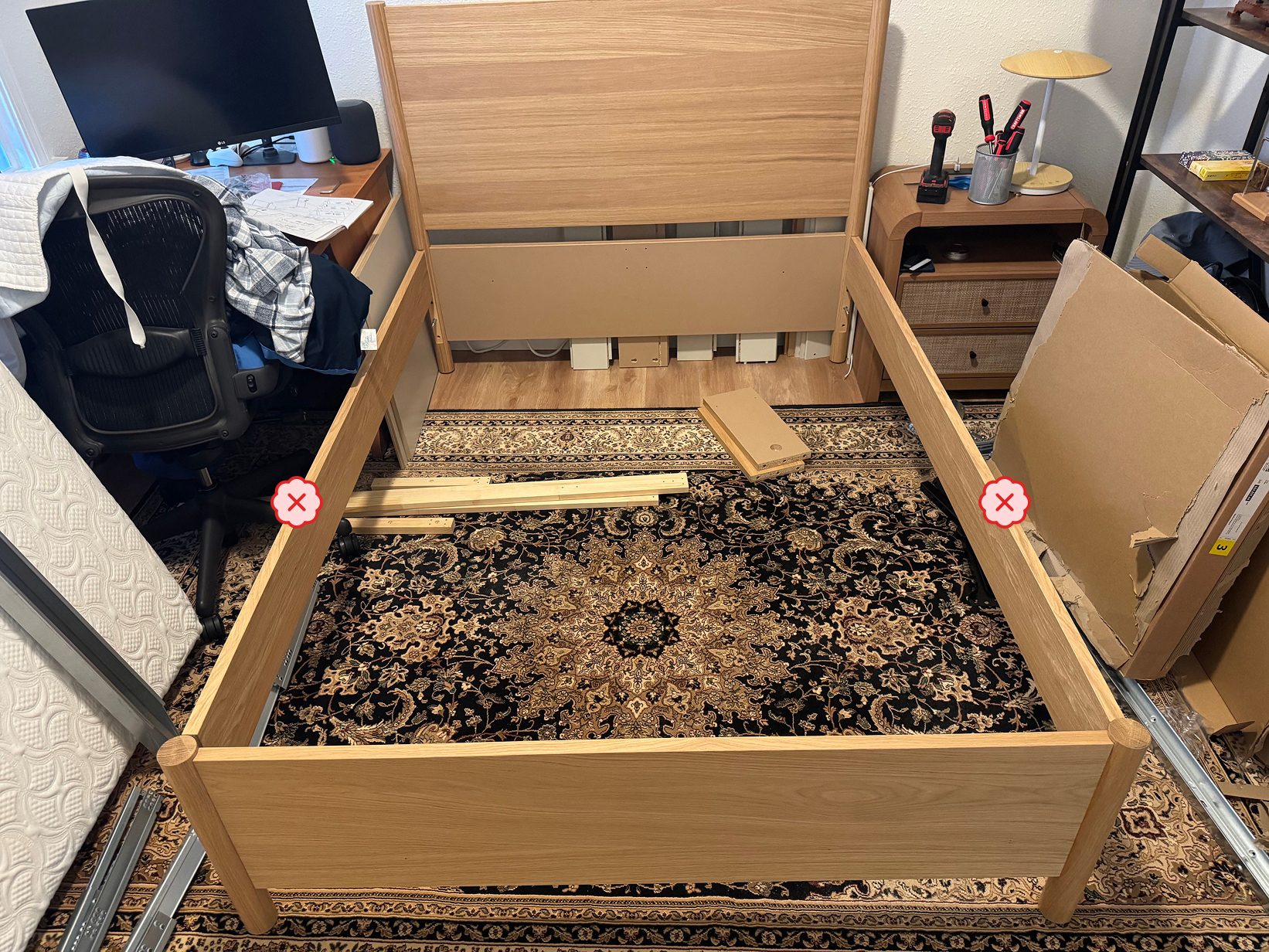
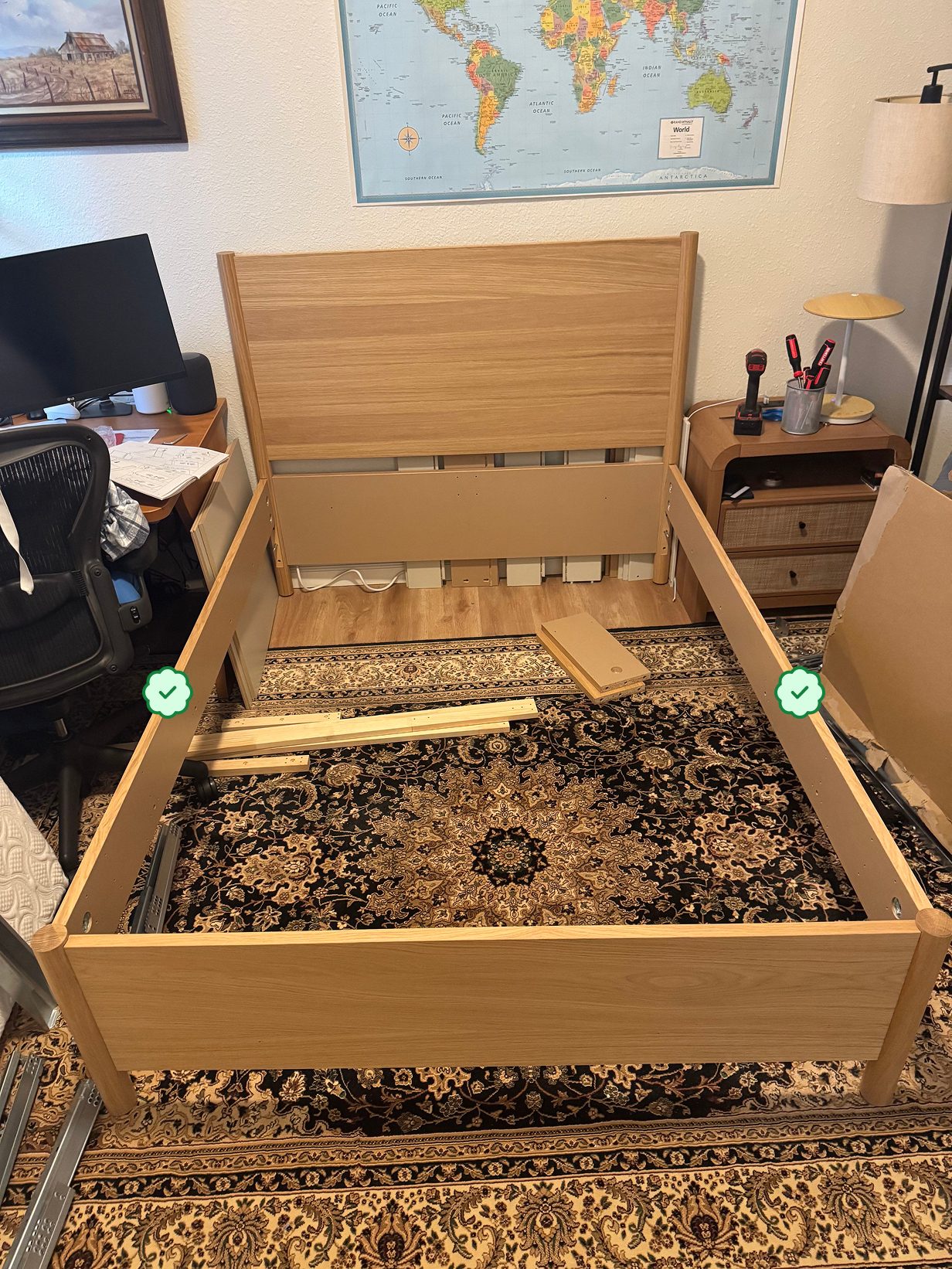
Samaritan Research published a test on September 23 using everyday objects. Researchers photographed 60 stages while building three IKEA products, deliberately making mistakes in some. A model received the photo, the official PDF manual, the last completed step, and tools to zoom and run Python. It had to say whether the build was correct and, if not, identify and explain the mistaken step. In the researchers’ bed-frame example, the laminate on both side rails faces inward rather than outward. The red crosses and green checks below are the researchers’ annotations, not markings generated by a model.
Astra was correct on 80% of these 60 photos, versus 70% for Claude Fable 5.1 and 61% for Claude Opus 5 in the same study. Opus 4.5, tested ten months earlier, scored 28%. These are results for particular furniture, camera angles and grading rules—not an eight-in-ten guarantee for furniture in your home. The researchers also did not measure human performance on these photos.
This test supplied more than an image in an ordinary chat: the product name, the last completed step, a complete manual, a zoom tool and an agent environment with up to 80 steps per photo. The answer first had to locate the mistaken step; GPT-5.6 Sol then graded whether its description was roughly right under a lenient rubric. Astra took a median of about three minutes per photo. The study does not establish real-time assembly guidance or performance on car and appliance repairs.
If you are assembling furniture, you can provide the model name, manual, current step and a clear photo, then ask AI to point to any visible mismatch with a specific manual step. Check the physical parts and load-bearing joints yourself. The useful change is that a model can connect technical diagrams with real photographs and offer a lead for inspection; it cannot certify that an assembly is safe. BitShovel has not rerun the benchmark or verified that an ordinary chat product offers the same tools or results.
This connects to the TDM850 interactive mechanical atlas covered earlier here. The atlas turns manuals into visible relationships between parts; this test uses a manual to inspect a physical object. Both move from reading instructions toward understanding an object, but one is a creator’s explanatory work and the other a controlled error-detection benchmark.
- Compare the researchers’ incorrect and correct examplesThe crosses and checks are researcher annotations; read the method alongside them.
- See how TDM850 turns manuals into an atlasCompare explaining parts with checking a physical build for errors.
Sources and notes
- Samaritan Research: furniture-assembly report ↗Independent research · September 23Original example, model scores, time, limitations and image licence.
- Furniture Assembly Benchmark methodology ↗Research team’s benchmark pageThe 60-photo sample, inputs, grading rules and model settings.
05Added October 8 · From creations to everyday answers中文
ChatGPT answers become interactive: who gets access?
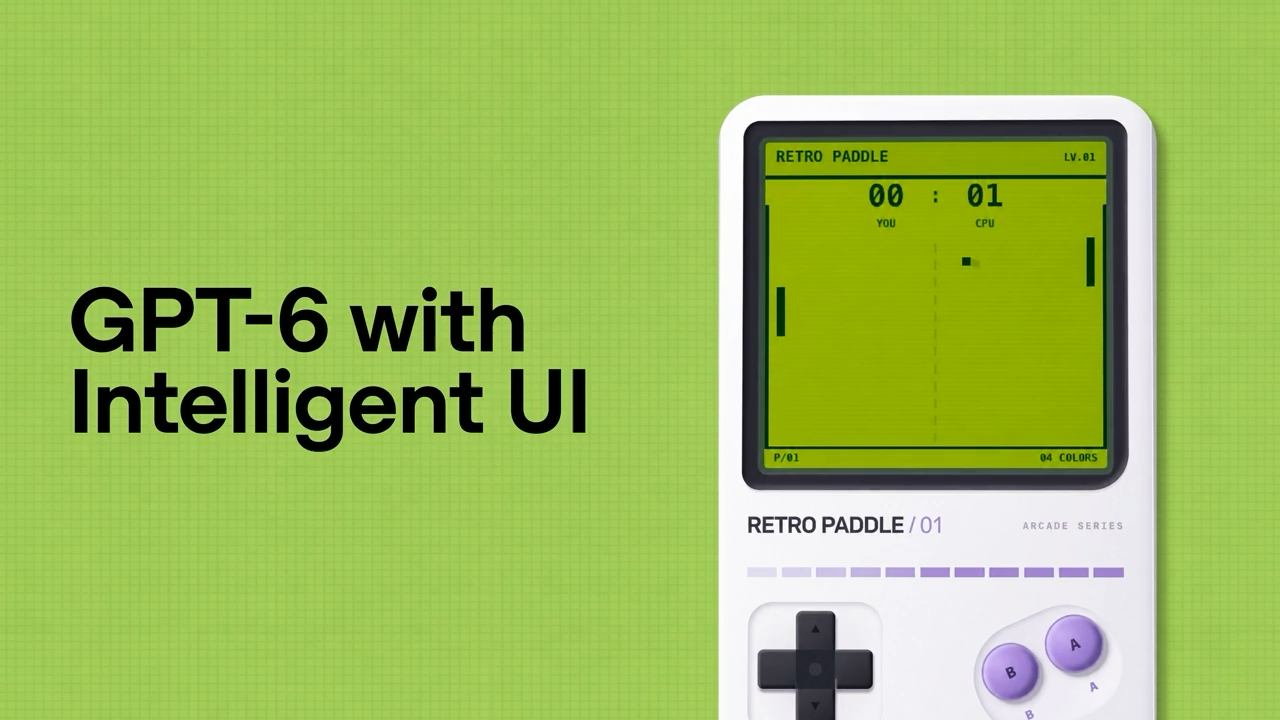
On October 7, OpenAI announced GPT-6 with Intelligent UI in ChatGPT's Chat. Answers can include interactive diagrams, forms and small tools; official demos show games, bill splitting and explanations. Plain-text answers remain possible.
This connects to the bicycle explainer previously covered here. That creator built a separate page for changing gears and observing results; similar interaction can now appear inside a chat answer. A standalone work remains useful for saving, sharing and editing, while an in-chat tool addresses the immediate question. This comparison does not attribute OpenAI's demo to that creator.
The release schedules rollout from October 7 for Plus, Pro, Business and Enterprise, then Free and Go from October 8. The first group uses conversational GPT-6 Sol; the second uses GPT-6 Luna. Enterprise settings also apply. This schedule does not establish availability in every account.
Help documentation places Intelligent UI at GPT-6 Instant through Extra High. Pro effort remains Astra-powered and does not support this interface; the announcement leaves Work and Codex models unchanged. A Pro subscription and the Pro effort setting are different things.
A suggested trial is a two-person bill splitter on the web, changing amounts to check the result. Older macOS and Windows desktop apps lack the new interface; mobile requires a supported updated version. Some Free/Go help sections still describe older models, so the documentation has not fully caught up with the release schedule. Check the account's actual access.
Sources and notes
- OpenAI · GPT-6 and Intelligent UI release ↗Official release · October 7Chat changes, model mapping and rollout schedule.
- OpenAI Help · GPT-6 effort levels and access ↗Official help · checked October 8Effort and client requirements; some Free/Go text still differs from the new release schedule.
- OpenAI Developer Community · announcement demos ↗Announcement demonstrations · October 7The image is the announcement's demo poster, not a test in our own account.
06Version progress · Comparing the same work中文
GPT-6.1 Sol approaches Astra. Which work should move?
Released September 29, GPT-6.1 Sol gives Astra users a lower-cost option. OpenAI positions it near Astra for coding, computer use and professional work. In its DeepSWE 1.1 tests, it exceeds the previous Sol’s best result by 6.4 percentage points at lower effort. That is a vendor finding to compare against your own work.
In the Artificial Analysis comparison read on September 30, both models use max effort. Sol 6.1 scores 52 versus Astra’s 53, at weighted costs of $0.72 versus $3.26 per task. Average task times are about 547 versus 483 seconds. Lower cost does not mean faster delivery. These are benchmark results, not a quote or wait estimate for an everyday request.
Similar overall scores do not make the models interchangeable. The page reports 65% versus 68% on AutomationBench-AA and 56% versus 59% on Terminal-Bench 4.0; Sol 6.1 is closer or ahead elsewhere. For a webpage edit, spreadsheet or document review, inspect the relevant output and rework rather than generalizing from a one-point gap.
The API documentation lists standard input/output rates of $2/$10 per million tokens and cache-hit input at $0.10. One-fifth of Astra refers to standard input and output unit prices, not subscriptions or a guaranteed bill reduction. Requests above 272K input tokens and modes such as Fast have different pricing rules.
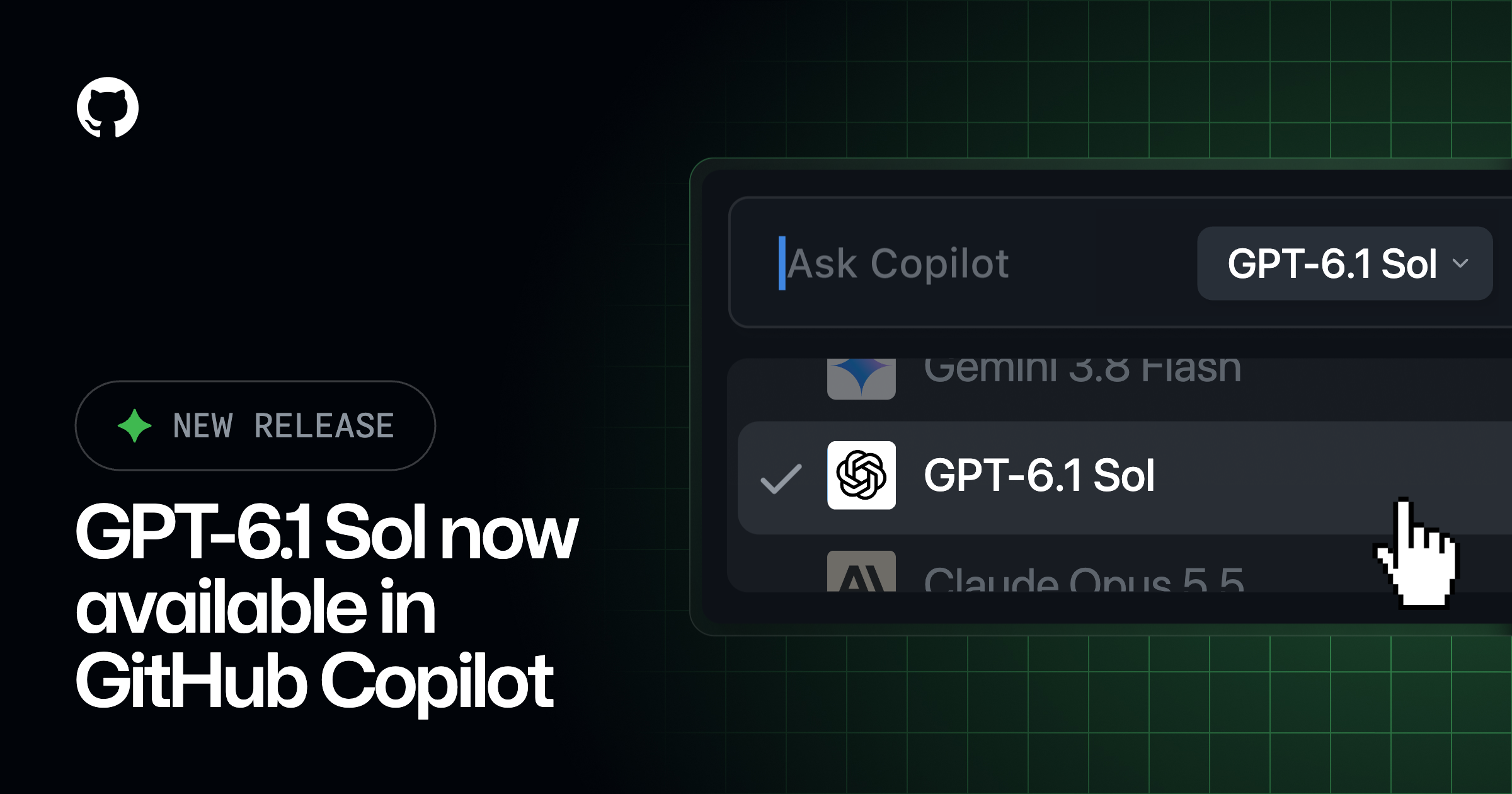
The official release lists ChatGPT Work and Codex on supported paid plans, plus the API; ordinary Chat does not yet offer it. GitHub is rolling it out to Copilot Pro+, Max, Business and Enterprise, with organization controls. The image is GitHub’s integration artwork, not a test of our account.
Our suggestion is to keep the input and acceptance criteria fixed, try Sol 6.1 on a familiar small task, and compare the result, revisions, waiting and usage. Sonnet or Opus users can use that same task as a reference; this section does not declare a cross-brand winner. The Basis workbook comparison uses GPT-5.6 Sol, so its result does not establish performance against Sol 6.1.
| Measure | GPT-6.1 Sol | GPT-6 Astra |
|---|---|---|
| Intelligence Index (higher is better) | 52 | 53 |
| Weighted cost per task | $0.72 | $3.26 |
| Average time per task | 546.64 seconds | 483.09 seconds |
Sources and notes
- OpenAI: GPT-6.1 Sol release ↗Official release · September 29Positioning, prior-model comparison and availability.
- Artificial Analysis: matched effort comparison ↗Independent evaluation · Read September 30Index, weighted task cost, time and component scores.
- GPT-6.1 Sol API documentation ↗Official product documentationStandard rates, caching and long-input conditions.
- GitHub: GPT-6.1 Sol in Copilot ↗Product integration · September 29Plans, gradual rollout and official artwork.
07Added October 9 · Speed choices for the same model中文
Sol Ultrafast: which part of the wait are you paying to shorten?
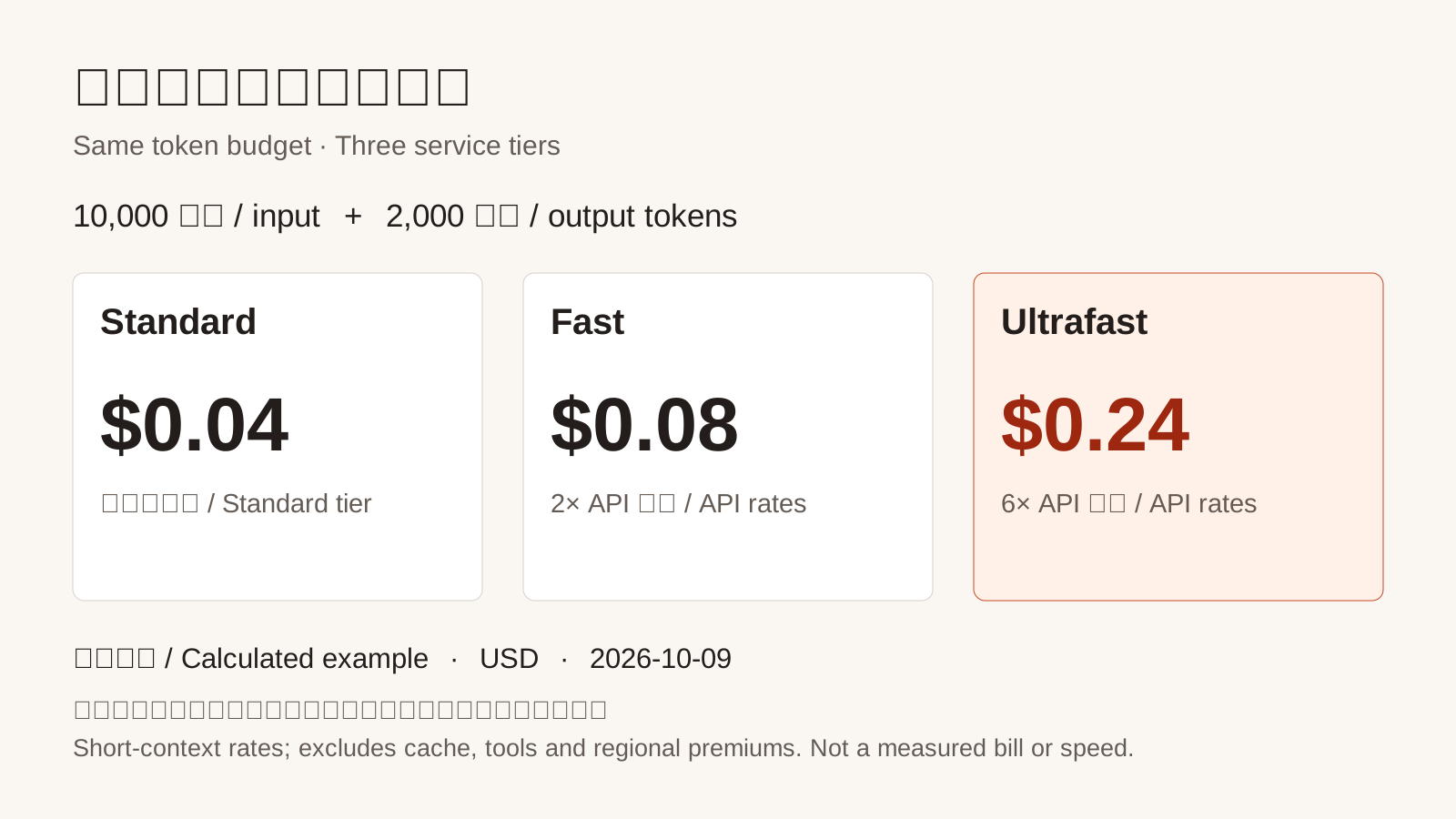
OpenAI's October 8 API update adds Ultrafast to GPT-6.1 Sol. Requests retain the model name and change the service tier, rather than selecting a new capability version. After comparing Sol and Astra for the task, consider whether a shorter wait merits the cost.
For an illustrative 10k input and 2k billed output tokens, including reasoning, the short-context rates give approximately $0.04, $0.08 and $0.24, excluding caching, tools and regional premiums. This is a calculation, not a measured request bill. Above 272k prompt tokens, Ultrafast's long-context rates are $24 input and $90 output per million for the full request.
The documentation describes reduced time between generated tokens and notes connection overhead in repeated tool calls. A researched report still waits for pages, tools and checks. Faster output does not establish the same speedup for the complete task; this is an explanation of its waiting stages.
API access is available to API users subject to separate limits. Codex and ChatGPT Work require Pro $500 or eligible Enterprise/Edu plans: purchased credits use 6x Standard billing, while included limits are consumed at 8x. Enterprise access is off by default. These are different billing systems, not universal access in ordinary Chat or every subscription.
For iterative page or draft revisions, compare complete-task time and actual cost on the same work. Speed may matter while waiting to make the next edit; unattended source processing can remain on the original tier. A service tier does not earn a new capability rank.
| Service tier | Input | Output |
|---|---|---|
| Standard | $2 | $10 |
| Fast | $4 | $20 |
| Ultrafast | $12 | $60 |
Sources and notes
- OpenAI · October 8 API update ↗Official changelogRelease date and unchanged model identity.
- OpenAI · Ultrafast documentation ↗Official documentation · checked October 9Output timing, connection overhead, API access and rate limits.
- OpenAI · API pricing ↗Official pricing · checked October 9Three tiers, the context boundary and the basis for our calculation.
- ChatGPT Learn · Work/Codex speed tiers ↗Official product guidance · checked October 9Plans, purchased credits, included usage and enterprise settings.
08Added October 10 · Models inside a company's workflow中文
Asana's browser test: lower cost, but was the table delivered?
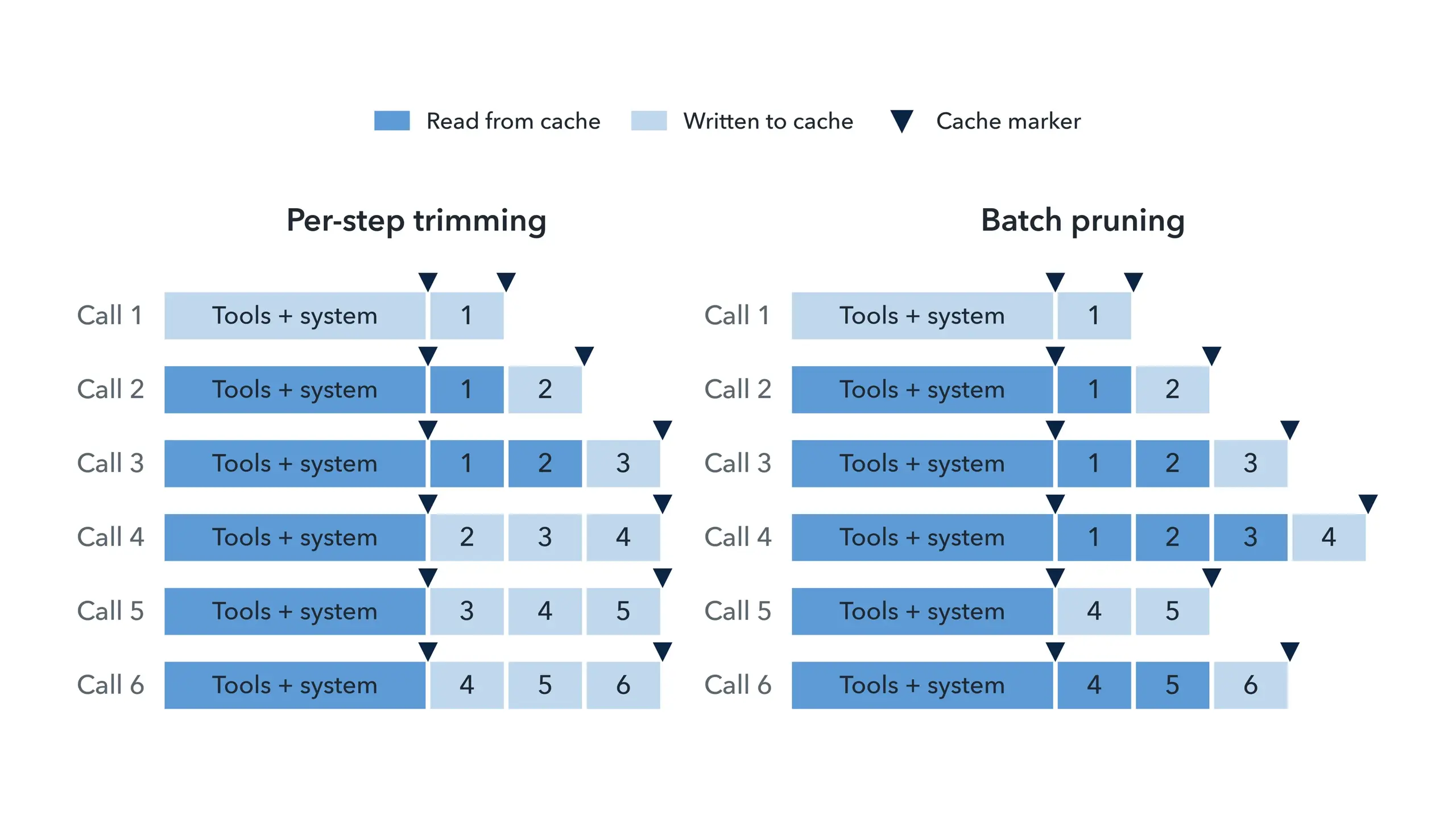
Asana's agent collected six fields for each of 32 books from a public demo store, with a table and price total requested. Astra investigated the code and experiments in Codex; Sol was one of four browsing models. Engineers directed and reviewed the work before changes reached StackAI.
The original agent resent page text and screenshots, caching only fixed instructions and tools. Frequent screenshot removal and text trimming changed the reusable history and prompted repeated visits. The team tested more retained text, history caching and batch pruning at 120k and 480k characters—not token context windows.
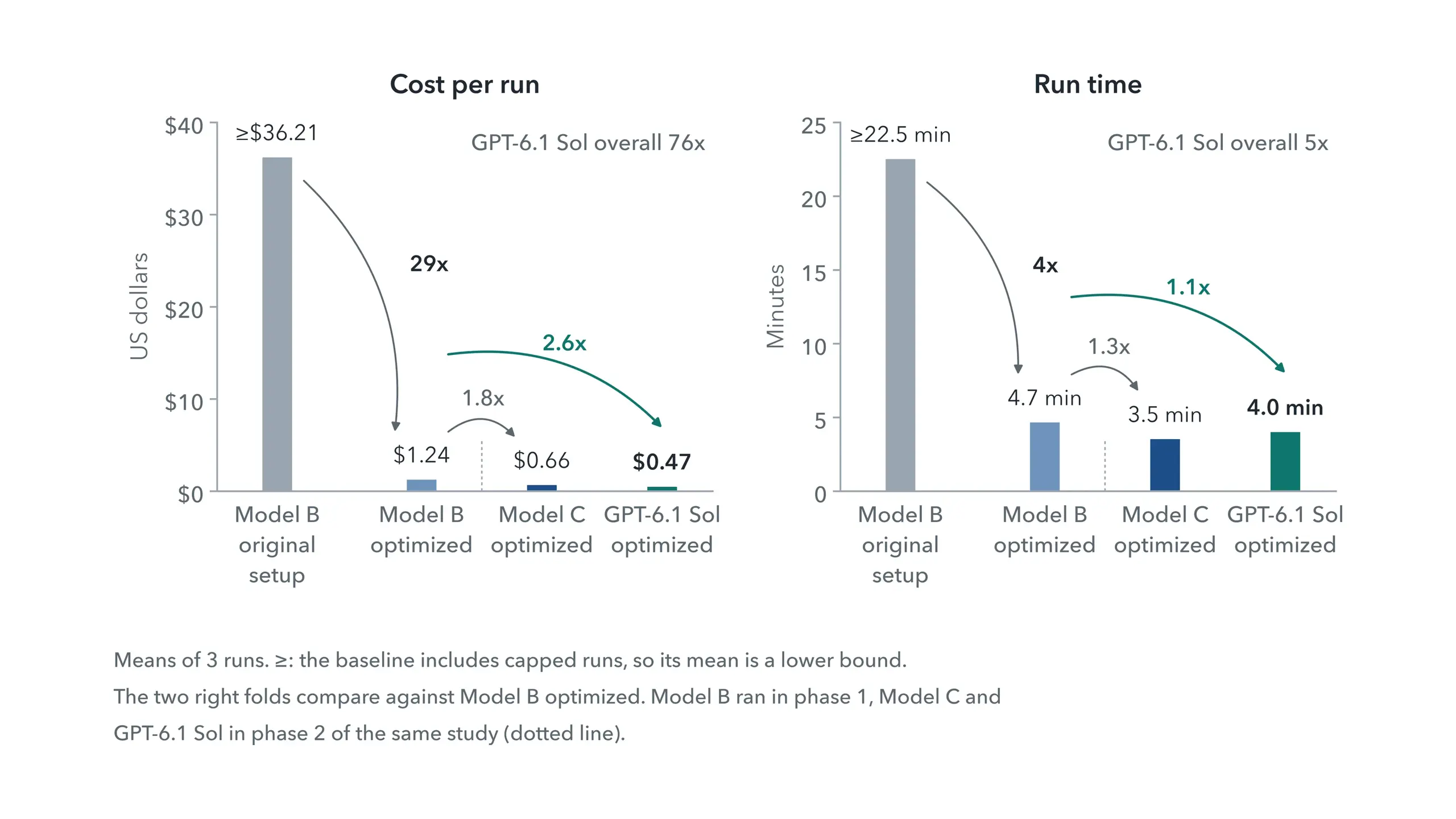
The 76x headline compares original Model B with optimized Sol, changing both workflow and model. Optimizing B alone yielded about 29x. At the same larger budget, Sol's own policy comparison was $1.97 to $0.47, around 4x. Optimized Sol costs about 2.6x less than optimized B; different effort, tools, adapters and caching conditions make that comparison descriptive.
These are estimated model costs, excluding servers and sandboxes. Capped baseline runs make means lower bounds. The main 144-run study had four models, two budgets and six policies, with three runs per condition, plus 12 follow-up runs. B's best policy pruned screenshots from over 20 down to 10; Sol's down to one. Published production changes do not establish the same savings on every live customer's bill.
The detailed study adds a crucial output distinction. Sol's 18 larger-budget runs saw and retained all 192 facts and reported the correct £1,164.91 total. Yet it returned a total and cheapest/most-expensive summary instead of the requested full table. Factual coverage, a correct total and a reusable complete deliverable are separate checks.
After considering service-tier cost and waiting time, examine the history and tools as well. Reusing retained material can reduce repeated cost; the finished artifact still needs its fields, format and omissions checked. Compare complete time, cost and output on the same task, beyond a lower number or a completion claim.
| Model and workflow | Model cost | History and screenshots |
|---|---|---|
| Model B original baseline | ≥ $36.21 | 120k characters; per-step trimming |
| Model B lowest-mean condition | $1.24 | 480k; history cache; 20:10 |
| Sol original policy, larger budget | $1.97 | 480k; fixed-prefix cache; per-step trimming |
| Sol lowest-mean condition | $0.47 | 480k; history cache; 20:1 |
Sources and notes
- Asana · Author's experiment account ↗Original engineering account · October 8Caching, pruning and the roles of the engineer, Astra, Command and StackAI.
- Asana · Complete 32-page study ↗Original study · Two phases and §4.10 output qualityChecked October 10 for budgets, best settings, means and the missing table; not a BitShovel rerun.
- OpenAI · Asana customer case ↗Vendor customer summary · October 9Place the 76x/5x headline in the study's baseline and output scope.
09Added October 10 · Creation in everyday life中文
A newsletter index while cooking: what changed before launch?
- Open the author's published newsletter indexWeekly issues link to Substack; public monthly issues can be read on the blog, while the latest remains for sponsors.
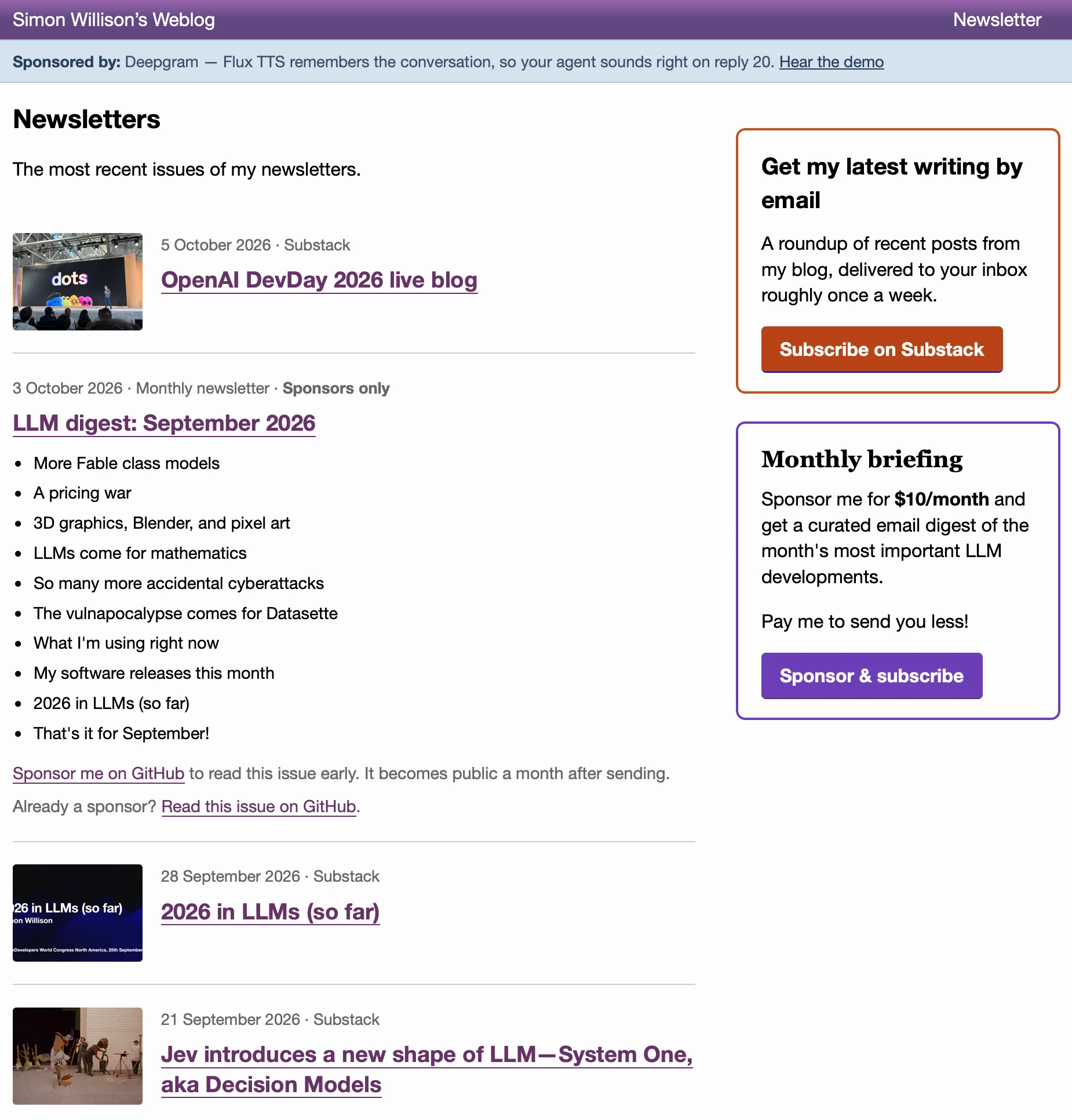
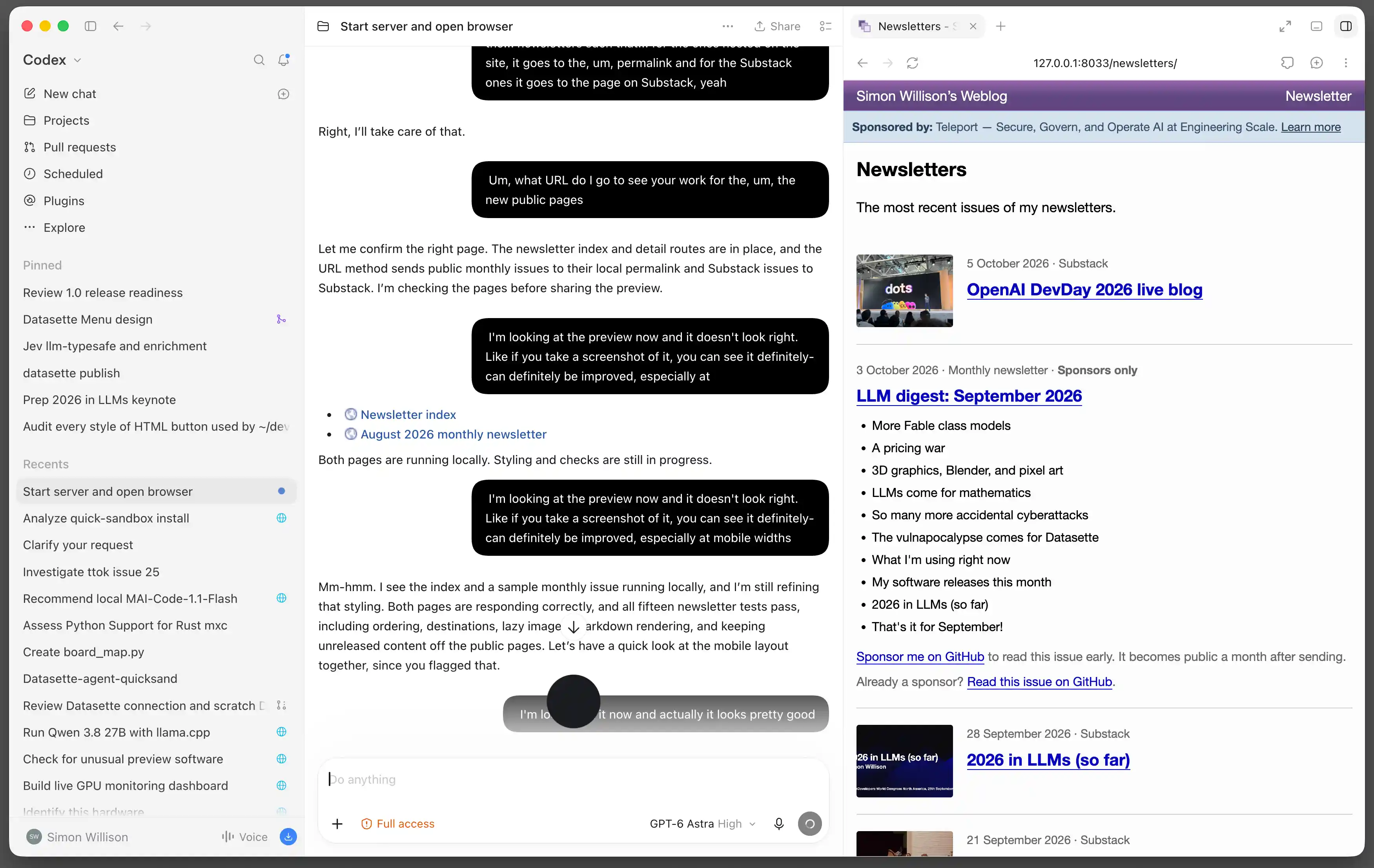
Simon Willison's new index puts weekly Substack and monthly newsletters on one timeline. Readers can browse by year, read public monthly issues on his blog, and follow the latest sponsor-only issue to GitHub. It adds a useful entry to an existing blog, bringing previously scattered content together.
In his October 9 account, he says he first typed a request to open the local preview, then talked with GPT-6 Astra High in Codex while cooking. About half an hour produced most of the feature: Django data, imports and pages, refined through the preview. That duration is his report, with no matched typing comparison to establish time saved.
The full transcript turns spoken ideas into specific rules. An issue may have a public listing while its body remains sponsor-only; when an older monthly issue becomes public, it enters search while keeping its original send date. The author also distinguishes date archives, tags and the homepage. The work is in clarifying those relationships and fitting them into an existing site.
After dinner, he reports another half hour of typed prompts and code review before deployment. One concrete revision changed imports: the first version invoked Git as a subprocess, but his PR review identified extra build configuration needed on Heroku. It switched to HTTP and the GitHub API, with private access configured by him. Familiarity with the project still shaped the implementation and release.
PR 719 preserves eight commits and was merged on October 9; later commits add HTTP imports and remove the legacy Git mechanism. The index, year archive and a public monthly issue are accessible now. The two images show the author's finished-index view and his local voice-session preview. We checked the public record and pages without recreating the development or testing his private admin.
This connects to the same author's three Blender scenes: Astra leaves an editable work that a person can inspect and refine. Here, cooking changes when the conversation happens, while review and a usable reader entry still determine the result. A creator can start by explaining the relationships they want, then refine a visible first version; returning to the keyboard is part of that process.
- Find an issue in the author's year archive
- Read an actual public monthly issue
- Explore the same author's three Blender scenesCompare how two kinds of work preserve a first version for human refinement.
Sources and notes
- Simon Willison · Account of building a blog feature by voice ↗Creator's account · October 9Astra High, an existing Django project and the voice/keyboard stages; durations are reported, not a time-saving test.
- Complete public session and voice transcript ↗Creator-published process recordSpoken revisions, listing/publication rules, preview feedback and import discussions; logged tool results are not our replication.
- PR 719 · Revisions from first version to merge ↗Original repository review and eight commitsHeroku's Git requirement, HTTP/API import changes and the October 9 merge.
- Author's published newsletter index ↗Accessible result · Checked October 10Inspect both newsletter types, year archives and public issue pages without accessing private content.
10Company integration · professional workpapers中文
A 50-tab tax workbook: why did Basis's agent finish in half the time with Astra?
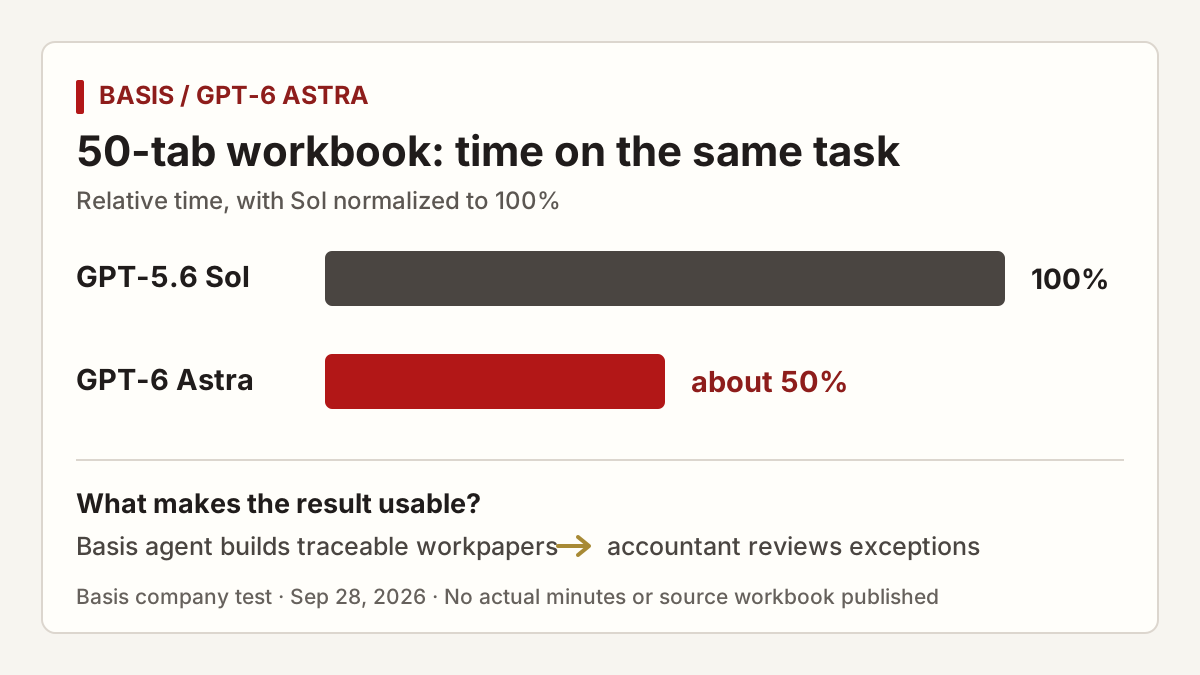
A 50-tab tax workbook has to be completed and remain reviewable by an accountant. In an OpenAI case study published September 28, Basis ran its agent on the same complex workbook task with GPT-6 Astra and the earlier GPT-5.6 Sol. Basis reports that Astra took about half as long. The chart below normalizes Sol's time to 100%; actual minutes and the source workbook were not published.
Basis co-founder Mitch Troyanovsky attributes the difference to understanding intent earlier, taking a more direct route and spending less time on correction. He also says the agent can vary reasoning effort across hard and easy steps while retaining its cache. These are the testing company's explanations of its own workflow, not a general speed result for tax work. Basis also reports roughly 20% higher internal evaluation scores, but the public case gives no sample size, scoring rubric or full costs. Half the time does not establish half the bill or twice the accuracy.
The model is not completing the entire business process merely by opening a spreadsheet. Basis describes the surrounding product work: read client and prior-year files, build workpapers to firm standards, record sources, assumptions and exceptions, then pass them to professionals for review and decisions. Basis also says its platform routes tasks to different frontier models. This Astra-versus-Sol result applies to the agent and workbook in the case study, not every Basis tax return.
This case moves the Astra topic from model capability to a company-integrated result. In a long task, avoiding wrong turns can matter more than a faster single answer; a traceable workpaper and human review determine whether the result can enter real work. It resembles the invideo timeline case: a model helps plan, a specialist product keeps an inspectable artifact, and a person makes the final call. The public material does not include an anonymized source workbook, full task trace or independent replication, and BitShovel has not verified tax accuracy.
- See how Astra helps edit videoCompare how two specialist products keep the model's work reviewable.
Sources and notes
- OpenAI: Basis's 50-tab workbook comparison ↗Company case study · September 28Same-task time, company explanation, internal evaluation and missing details.
- Basis for Tax product description ↗Company product materialThe roles of client files, workpapers, traceable figures and professional review.
- Basis: supervising long-running agent work ↗Team engineering article · July 29Explains why the final answer alone cannot establish trusted tax sources and process.
- Basis: product description for smaller firms ↗Company product materialBasis says it routes by task; this case should not be generalized to every job on the platform.
11Use: editable creation中文
From a rendered picture to an editable 3D scene

Simon Willison used Astra with Blender on a Mac to build a pelican riding a bicycle, publishing scenes, scripts and a session across three stages on September 5. The first version establishes the character and bike; later versions add the setting and detail.
This is a different task from the SVG drawings above. The deliverable is an editable .blend scene retaining objects, materials, lighting and cameras. For product demonstrations or teaching scenes, the author’s process shows a route from describing a scene to using a tool and refining the result.
- Explore the three scenes and editable filesThe author provides .blend files, scripts and the session.
Sources and notes
We read the process and file links without reproducing the scene. The three versions document this work, not all complex modeling tasks.
- Using Blender with coding agents on macOS ↗Author’s record · September 5Includes scene files, code and the session transcript for comparing iterations.
12Use: personal memories中文
Turn a family photograph into a place to explore
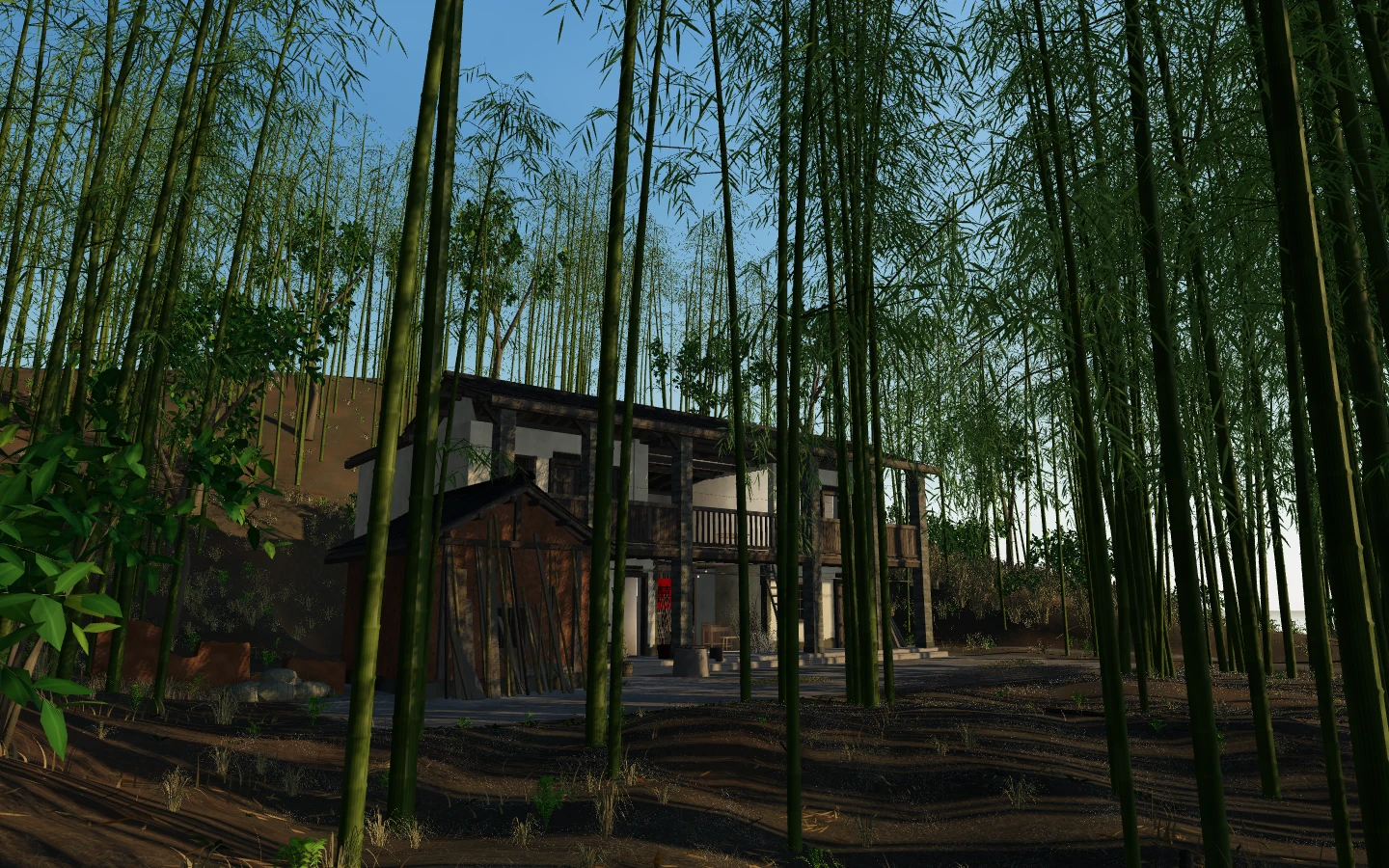
Take the editable scene one step further: the input can be a treasured photograph, and the result a place that family and friends can visit.
On September 13, creator dirstart shared Bamboo Old House on V2EX. They describe using older photographs and Astra to recreate their grandmother’s home in Longyan, Fujian, and have published the website and source. The author recalls living there as a child; the village later relocated and the old home became difficult to visit.
The Three.js project presents bamboo, wooden corridors and rooms in a browser. Its current README describes a guided route, selected indoor and outdoor viewpoints, 360-degree viewing, day-to-night settings, weather and natural sounds. Visitors can change the view of the house or listen to rain in the bamboo, extending the experience beyond a single photograph.
Several visitors reported slow loading, heat or stuttering. The author has posted performance updates and acknowledged a reader contribution. The current README records rendering changes; making a scene comfortable to visit across devices remains part of the creative work. Use “Explore Bamboo Old House” beside the article to open the website, or explore its construction in the public repository.
- Explore Bamboo Old HouseOpen the creator’s website to change the viewpoint, light and weather. The first visit may take a moment to load.
Sources and notes
The original story and project documentation retain build details, September 14 performance discussions and device differences. Author responses do not establish smooth performance on every phone.
- Read the story of the old house →BitShovel storyFrom family photographs and viewpoints to visitor feedback.
- The creator’s post and follow-up replies ↗V2EX · Read September 14Read the motivation, performance discussion and author responses.
- Project documentation ↗Documentation at a pinned revisionScene assets, export steps, web interaction and optimization notes.
- Visit Bamboo Old House ↗The creator’s public workExplore the scene on your device; loading and smoothness can vary.
13Use: literature and interaction中文
How does a literary text become a walk-through webpage?
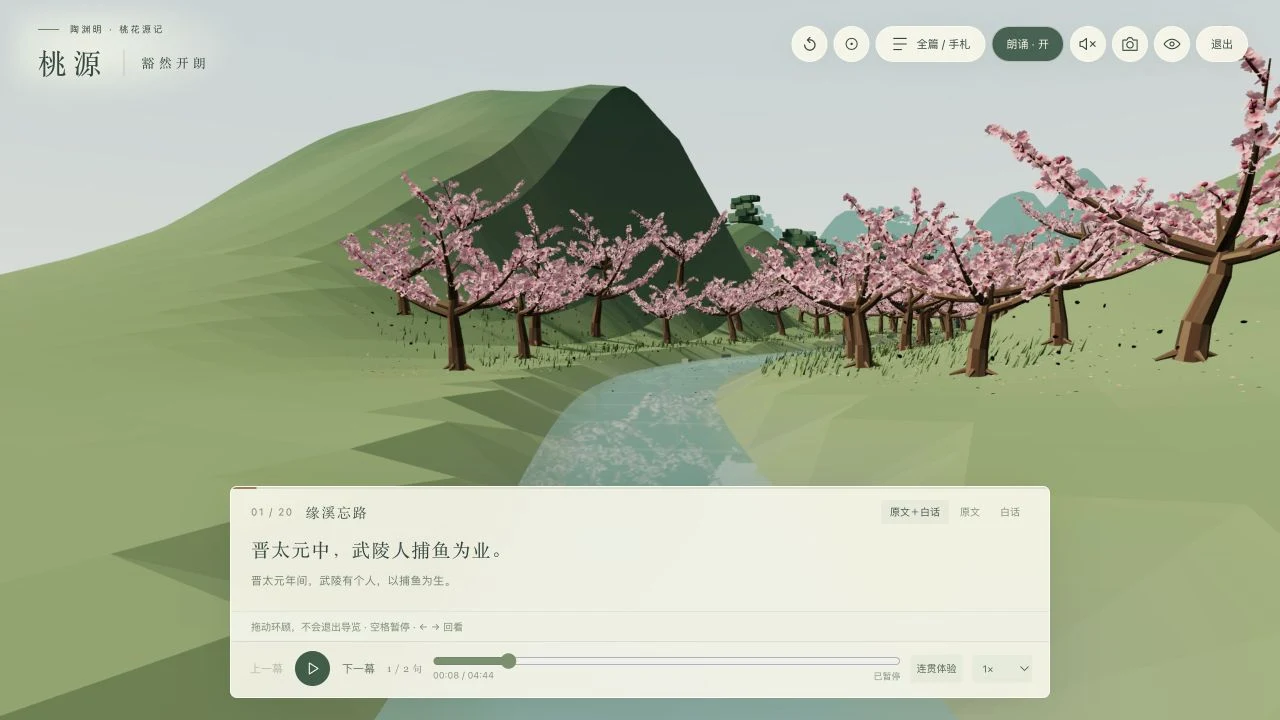
Photographs can become scenes; literature adds a narrative route. Baoyu describes building a Peach Blossom Spring webpage with Astra in ChatGPT Pro, supplying narration and SRT timing, then using Codex to separate media files. The handoff connects the prototype to delivery through sound, timing and file organization.
Open the creator’s work and choose 循文入境 to follow twenty scenes, switch between the original Chinese and a modern paraphrase, or revisit chapters. We opened the tour and paused it; the image shows that visit, not a test of every scene or device. A browser supporting JavaScript and WebGL is required.
For your own material, first decide the reader’s sequence and stopping points, then refine controls and assets. AI helped create this webpage; the example does not imply that each visitor calls Astra or establish superiority over other models.
- Open the creator’s twenty-scene tourChinese-language work; pause and revisit scenes after entering.
Sources and notes
- Baoyu: process and prompt ↗Creator account · Read September 22Prototype, narration timing and Codex handoff.
- Peach Blossom Spring ↗Creator’s public workTour controls, reading modes and runtime notes.
14Use: learning and explanation中文
Make an explanation interactive: gears and an old motorcycle
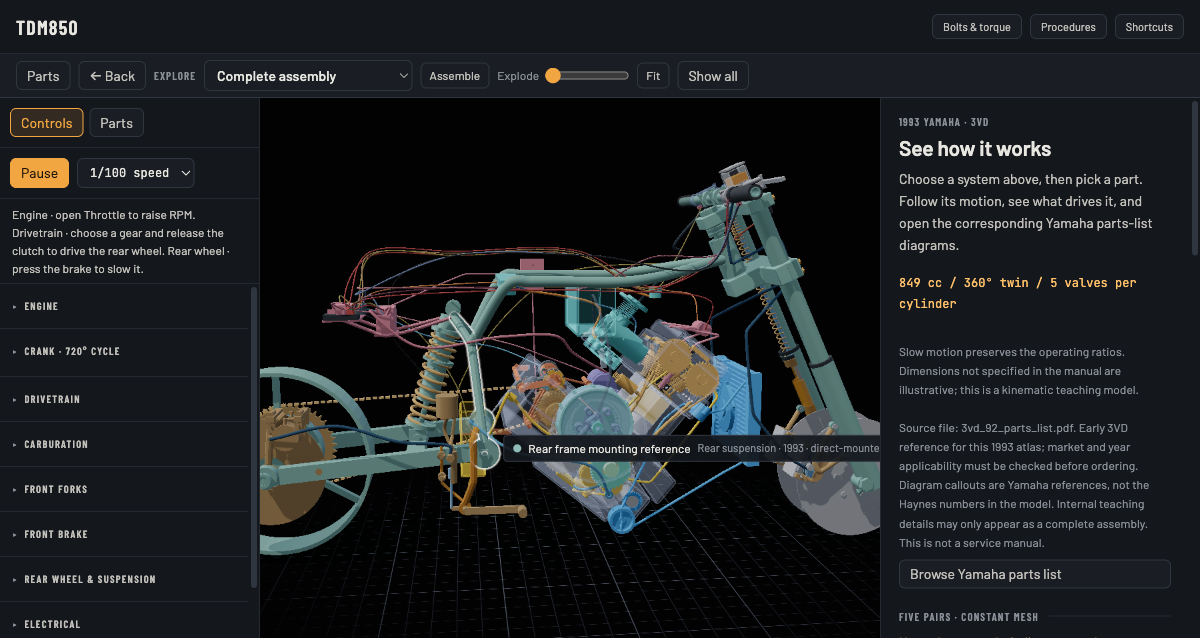
int64ago used Astra to create the open-source vistep educational site, turning everyday mechanisms into adjustable experiments. Our earlier visit to its bicycle page led to an explanation of gears, cadence and gradient: predict, change a parameter, then examine the readout.
Another route starts with existing material. jackdoe used a manual and parts lists for a 1993 Yamaha TDM850 to create an atlas that moves from the full bike into the forks, engine and other systems. Both replace part of a written explanation with visible relationships and interaction; the useful idea is how a visual helps someone understand.
- Try the bicycle gearing experimentChange the gear ratio and inspect cadence, distance and speed.
- Explore the TDM850 mechanical atlasMove from the full assembly into forks, engine and other parts.
Sources and notes
- What makes AI science explanations work? Start with bicycle gears →New explanation · with an interactive experimentExplore one concept: easier pedaling, energy use and the model’s conditions.
- The author’s build post ↗V2EX · September 6The author’s account of tool use and the project’s purpose.
- vistep source ↗Author’s repositoryExplore the work, models and production material; repository claims do not establish learning outcomes.
- TDM850 Mechanical Atlas ↗Author’s work · Viewed in a desktop browserExplore parts such as the forks from the complete assembly and inspect how they fit together.
- jackdoe’s build and use account ↗Author’s post · September 9Turning a manual and parts list into an atlas, including explanations that needed correction.
15Use: interaction and expression中文
A world to play in, a website to meet its creator
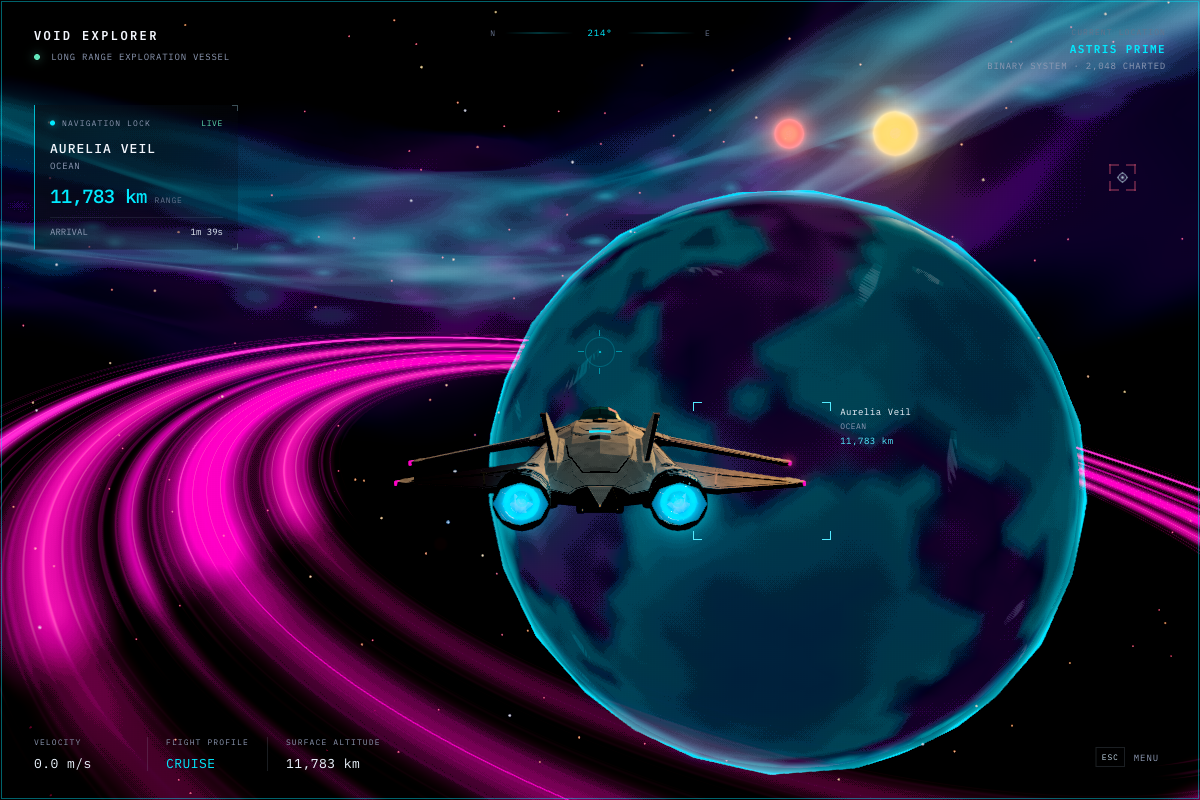

Thomas Ricouard designed Void Explorer to connect spaceflight, landing and walking. Our earlier short trial reached orbital flight: holding Space increased speed and reduced target distance; it did not complete landing. The author combines repeatable starting scenes and state checks with continued playtesting.
Justin3go’s homepage uses projects, experience and illustration to introduce a particular person. It suggests another use: give an assistant real work and the qualities you want visitors to understand, so a personal site has something to express. Both examples concern what happens after someone opens the work, beyond an attractive screenshot.
- Play Void ExplorerTry thrust and exploration, then return to the build notes.
- Visit Justin3go’s personal siteSee how the model contributed to an actual personal-site update.
Sources and notes
These are retained observations from earlier browser visits. We did not rerun every interaction in this edit. The authors do not separate every human and model contribution, so these are not claims of fully automated production.
- Void Explorer · Try the work ↗Author’s public work · Bounded desktop-browser trialFocus the view and use Space for thrust. Controls in the Esc menu lists the full reference. This trial reached the orbital scene and changing flight readouts.
- Building games with Astra ↗Thomas Ricouard’s build account · September 4Read how the author iterated from art direction to repeatable interaction tests.
- Void Explorer · Official showcase ↗Work and build-process linksIncludes the build sequence and live-work link.
- Author’s post ↗V2EX · September 6Identifies the tool used for the rebuild; inspect the result separately.
- Justin3go’s website ↗Live work · Viewed September 7Explore the homepage narrative and project links.
16Video making · model, editor and human roles中文
How Astra helps edit video: planning changes on an editable timeline
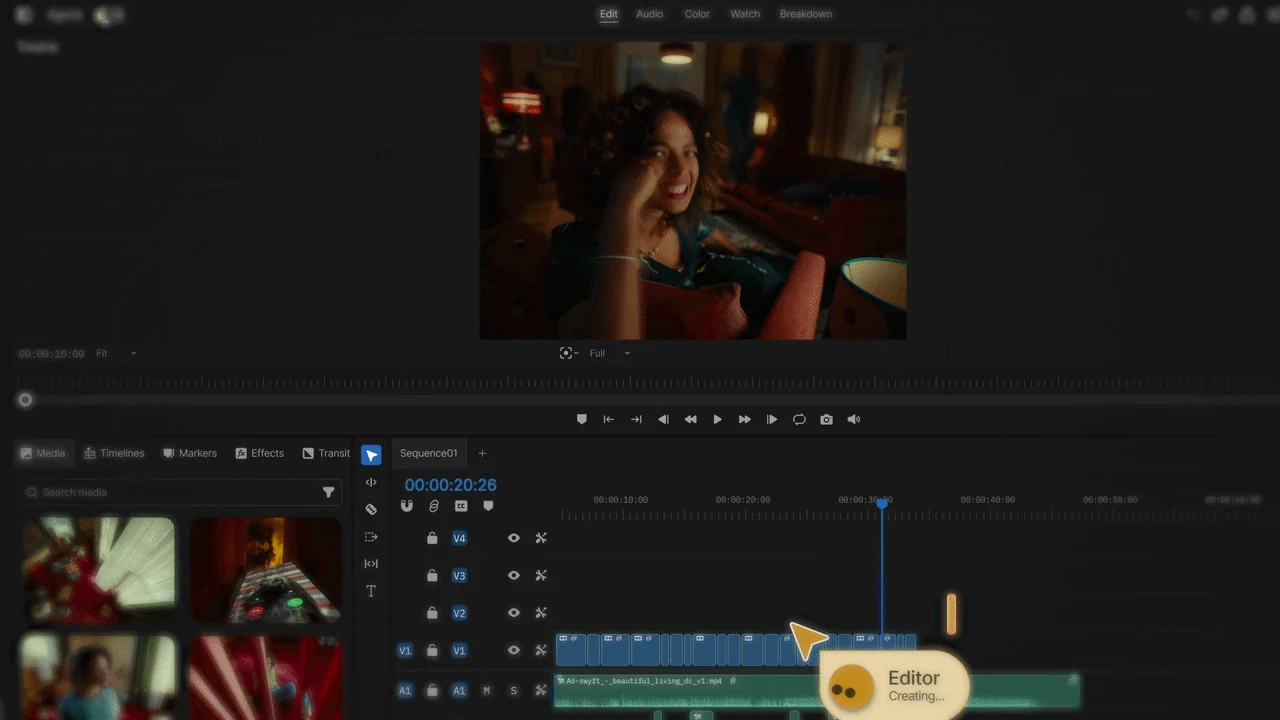
Making video with AI does not always mean generating frames from text. In a September 23 case study, OpenAI describes invideo using Astra to plan edits, choose tools and place changes accurately on the timeline. The starting point is existing footage and an editing project: the model helps organize the work, while invideo’s editor executes it and keeps the result editable.
Color work makes the roles clearer. To change a background while preserving skin tone, the agent must isolate and track the person across frames, then choose among correction, grading, LUTs or another method and apply the change in the right place. Astra helps plan those operations; this does not mean it generates the whole film frame by frame, or removes the need to watch and correct the cut.
In the OpenAI case study, invideo’s CEO reports that the success rate of color-grading and correction tasks improved about threefold; a few editors also created around 50 adjustable effects in one day. These are company-reported results, not BitShovel’s or an independent test. The public case study does not provide the baseline rate, sample size or evaluation rubric, so “threefold” cannot be read as editing speed, visual quality or a success rate for every user.
This capability sits inside a specific product. The browser-based invideo Editor, introduced September 1, has a multitrack timeline. The assistant places ordinary clips and reversible changes there; creators can still move shots, adjust pacing, grade manually and decide on the final cut. Invideo says the manual editor is free, while the AI agent and generative models use credits. The OpenAI case study does not say ordinary users can select Astra inside the product, so the integration should not be mistaken for a model button available to everyone.
If you already have two recorded clips, try a small task: ask the agent to “make the two shots’ colors consistent while keeping skin tones natural and the shot order unchanged.” Then inspect each section in the monitor and on the timeline, give a focused correction or edit it yourself. This adapts invideo’s help-center example with explicit constraints and review steps. It is a suggested trial, not a test BitShovel has completed.
Compared with Opus 5.5 writing browser animation from typography and graphics before encoding a video, this route edits existing shots. Both can produce a video file, but the model, software and person do different work. To choose, ask whether you have footage to organize and revise or need motion graphics from scratch, then whether you need an editable source project afterward.
- See invideo’s editing stepsStart with color consistency across two clips and inspect the timeline before continuing.
- Compare Opus 5.5’s video routeAnother route writes browser animation and renders it as a video.
- Explore practical AI video usesConnect existing-footage editing with other works and production routes.
Sources and notes
- OpenAI · invideo and Astra case study ↗Vendor case study · September 23Read the editing tasks, color-work roles and company-reported success rate; the baseline and sample size are not public.
- invideo · Editor announcement ↗Official product announcement · September 1Check the multitrack timeline, manual editability, free manual editing and AI credit usage.
- invideo · How to direct the editing agent ↗Official help · steps and examplesShows how to specify footage and constraints, then review the monitor and timeline.
17Start with your existing account中文
Choose the right entry and use the allowance for a deliverable
Plus users can first look for Astra in Work or Codex, which include limited usage, before deciding on a Pro upgrade. Work handles reports, spreadsheets and presentations; Codex handles code and software projects. GPT-6 Pro in ordinary Chat is a separate entry with the allowances below.
Work and Codex share an allowance separate from Chat. Astra can consume it faster than Sol, depending on task length and reasoning settings. A useful split is to keep short rewrites with your familiar model and try Astra for work combining sources, revisions and a finished file.
For a first task, switch to Work, select Astra, attach source material and specify an output. For example: “Turn these three meeting documents into an editable five-slide deck with sources. Check charts, text overflow and missing information, and fix issues before handing it over.” This is our suggested trial. Choose local work in the desktop app for local files or apps; availability is still rolling out.
When moving from Sol, revisit old prompts: retain the goal, necessary constraints and completion criteria, and remove step-by-step directions you no longer need. OpenAI’s Astra prompting article emphasizes defining completion so the agent continues through inspection and fixes beyond a first draft.
| Plan | Astra in Chat | Work / Codex |
|---|---|---|
| Plus | GPT-6 Pro not included | Limited Astra usage included |
| Pro $100 | 50/week shared with Sol Pro | Can use the full plan allowance |
| Pro $200 | 200/week; 200/day combined with Sol Pro | Can use the full plan allowance |
- Open ChatGPT and check available modelsUse your existing account and choose a task and model in Work or Codex.
Sources and notes
The API is a separate usage-billed route: standard rates are $10 per million input tokens and $50 per million output tokens. Long inputs, caching, Fast mode and tools have separate rules; API rates are not ChatGPT subscription prices.
- Models and allowances in ChatGPT ↗Official help · Read September 19Plus/Pro access and Chat message allowances.
- ChatGPT Work and Codex ↗Official help · Read September 19Work/Codex allowances, accounts and rollout.
- Get started with Work ↗Official guideLocal/cloud work, source material and deliverables.
- Rethink prompts for Astra ↗OpenAI DevelopersSimplify old instructions and define completion.
- Astra API pricing ↗OpenAI API documentationStandard rates and long-context, caching and Fast-mode rules.
18Connect it to your choices中文
What to try and what can stay with your current tools
Across these examples, structural drawings that need repeated corrections, paper annotations and longer tasks with a deliverable are useful Astra trials. Everyday chat, short rewrites and workflows already working well can stay where they are. For a poster or photo edit, an image tool is a closer fit; the webpages and 3D works here also require organizing code, assets and interaction.
After a work is generated, revision and handover matter. In a September 7 retrospective, Armin Ronacher described leaving Astra to modify the Python interpreter and judging the code unacceptable after about 35 hours; he also questioned his setup. Unlike the short creative examples, this asks whether a long-running task leaves something understandable, reviewable and maintainable.
Robot trials make completion concrete too. Robocurve reported 19/20 completions for putting a block in a bowl and 2/20 for fitting a puzzle. One puzzle log ended with the model saying done while the human marked it partial. Such results connect executing actions and generating files with actually completing a task.
- Only editing an image? See successive editsTargeted changes to an existing image are a different task from building an interactive webpage.
- Already using DeepSeek? See its image and tool entry pointsCheck your version and tools before adding another option.
Sources and notes
The robot tasks used different rigs, manual resets and graders who knew the model. These are the authors’ reported results, not our replication. OpenAI’s internal research observations likewise distinguish more code and experiments from scientific progress.
For discussions of generalization, monitoring and development pace, follow Jakub Pachocki’s An Alien Mind and our existing explanation. They address observations and arguments developed separately.
- Research acceleration: The view inside OpenAI ↗OpenAI internal observations · September 6Includes methods and measurement limits to read alongside the charts.
- Armin Ronacher’s coding retrospective ↗Author’s account · September 7An unattended long-running task, code examples and reflection on the setup.
- Robocurve experiment report ↗Third-party experiment · September 4Tasks, results and limitations.
- Block trial record ↗Published trial logAn example judged successful by the operator.
- Incomplete puzzle trial ↗Published trial logThe termination signal and human verdict differ.
- An Alien Mind ↗Signed article by Jakub Pachocki · September 6The original connects capability, monitoring and development pace.
- Why seeing AI “think” is not enough →BitShovel further readingDistinguish reasoning oversight, self-reports and actual results.
Block into bowl · 19 / 20
Puzzle into groove · 2 / 20
Filled cells count completions out of 20 trials per row. Source: Robocurve, September 4, 2026. The tasks used different rigs; this is not a controlled causal comparison.
What we are following
19What comes next中文
What we are following
- Does new evidence change the judgment on a particular task?
- How far do existing tools and new approaches get on the same job?
- Which works and methods are worth exploring, using and improving?
See how these changes connect
Connect model tests to your photos, recordings and creations by choosing the result you want.
 Topic · Updated
If you use DeepSeek, follow changes in visual tasks, tool access and pricing.