Ongoing topic · Compiled September 11, 2026
DeepSeek V4.1 Flash: from images to projects with web tools
Connect images, files and web tools with 1017 evaluations and the DeepInfer engine. Distinguish model capability, service deployment and real tasks; the latest addition explains offline scope and remaining online components.
01Reading images中文
A screenshot can become part of the question
- Event screenshot
List the date, place and things to bring
- Lesson or work chart
Explain the largest change
- Error screenshot
Suggest what to check next
Suggested questions to use with your own images. Read the source ↗
DeepSeek V4.1 Flash reads images together with text and answers in text. Beyond describing a picture, the official guide lists reading screenshot text and analyzing charts. An event page, a lesson chart or an error screenshot can accompany a specific question.
Start with a specific question: which dates and places appear in an event screenshot, where a chart changes most, or what an error message means. The image preserves the details; the question tells the model what to look for.
Sources and notes
The questions and workflows are suggested uses; this article does not present model outputs from BitShovel tests.
- DeepSeek Vision guide ↗Primary sourceRead the full details.
- DeepSeek V4.1 Flash model card ↗Primary sourceRead the full details.
02Working with tools中文
After reading, continue into the files
With tools attached, an answer can lead into the next step of a task. DeepSeek Harness asks users to configure a model and choose a workspace. It can read and edit files, run commands, delegate work and maintain a plan. A developer might begin by understanding an unfamiliar project, then continue into edits and checks.
This is where vision and coding meet: a screenshot explains what should change, while project files contain the implementation. Together, they can make a request clearer than a long verbal description of an interface. This is a suggested workflow; the connected tool performs the actual actions.
Sources and notes
- DeepSeek Harness Web UI guide ↗Primary sourceRead the full details.
- Official DeepSeek Harness repository ↗Primary sourceRead the full details.
- DeepSeek Vision guide ↗Primary sourceRead the full details.
03Speed and usage中文
More reasoning can mean more output

Flash is designed for faster inference and higher throughput, but task duration also depends on input length, reasoning effort and tool interactions. Reasoning effort is adjustable. The technical report plots task scores alongside output usage: greater effort generally produces more output, while scores do not rise at every step.
Speed and cost become tangible in repeated revisions, long-document work and tasks with several steps. How much the model reads, reasons and writes accumulates across the whole job.
Sources and notes
- Official DeepSeek V4.1 Flash release ↗Primary sourceRead the full details.
- Official technical report, Figure 9 ↗Primary sourceRead the full details.
- DeepSeek V4.1 Flash model card ↗Primary sourceRead the full details.
04One benchmark release · Differences by task中文
Close overall scores, different task profiles
On October 5, we read LiveBench’s default 2026-06-25 benchmark release. DeepSeek V4.1 Flash Max Effort scored 81.1 overall versus 83.4 for Claude Fable 5.1 Max Effort: a 2.3-point gap, or about 2.8% relative to the latter. That locates Flash overall, then raises a practical question for existing GPT or Opus users: will their own tasks show the same gap? June 25 identifies the benchmark release; October 5 is our observation date.
LiveBench averages questions within each subtask, then subtasks within a category, then the seven category averages. Flash scores 80.0 in Coding and 77.3 in Agentic Coding; Opus 5.5 Max scores 89.3 and 71.7, and Astra Max 80.4 and 57.3. Generating or completing code and resolving a problem inside a repository are different tests. Close overall scores can still conceal different profiles across those jobs.
For Agentic Coding, all four rows have 22 JavaScript, 30 TypeScript and 20 Python questions. Flash scores 81.8, 60.0 and 90.0; Opus scores 81.8, 63.3 and 70.0; Astra scores 63.6, 43.3 and 65.0. Matching JavaScript scores and differing TypeScript and Python results make the comparison more specific. Existing-tool users can pick a familiar generation or repository-repair job, hold inputs, tools and completion criteria steady, and assess whether combining or switching models helps. This small-sample reference still needs connection to a real project.
These Max labels do not represent equal resource budgets. Public configurations cap Flash output at 384,000 tokens and Fable and Astra at 128,000; the matching Opus cap was not confirmed here. Caps are not actual usage, so this same-release table cannot establish equal compute or directly compare running cost.
| Measure | DeepSeek V4.1 Flash · Max | Claude Fable 5.1 · Max | Claude 5.5 Opus Thinking · Max | GPT-6 Astra · Max |
|---|---|---|---|---|
| Overall | 81.1 | 83.4 | 83.2 | 82.2 |
| Reasoning | 86.7 | 91.7 | 92.2 | 92.7 |
| Coding | 80.0 | 86.4 | 89.3 | 80.4 |
| Agentic Coding | 77.3 | 66.1 | 71.7 | 57.3 |
| Mathematics | 93.3 | 97.0 | 97.1 | 96.8 |
| Data Analysis | 79.3 | 80.3 | 80.3 | 83.0 |
| Language | 81.2 | 89.5 | 86.3 | 89.4 |
| Instruction Following | 70.0 | 73.0 | 65.7 | 75.6 |
Sources and notes
The four rows are labeled Max, with different budgets. LiveBench configures Flash through deepseek-flash with reasoning.effort=max and a 384,000-token output cap; Fable 5.1 uses adaptive thinking at max with a 128,000-token cap; Astra uses max with a 128,000-token cap. The inspected repository does not provide the matching Opus 5.5 configuration, so its output cap remains unconfirmed here. Max does not establish equal compute, time or cost.
Agentic Coding’s 77.3 is the equally weighted mean of three language-subtask scores, rather than the pooled pass rate across 72 questions. Python contains only 20 questions; 90.0 corresponds to 18 completions in that set. That scope does not represent all Python projects or yield a universal coding ranking. BitShovel organized external public tests without running these models.
Flash’s expanded row identifies its model version as 2026-09-10. Benchmark release, model version, our observation and the published addition have separate dates. This chapter does not establish an October 5 first update to the scores or combine them with another leaderboard.
- LiveBench current leaderboard ↗Evaluator’s primary page · observed October 5Default benchmark release, full configuration names, scores and expanded tasks.
- LiveBench subtask-score CSV ↗Official data · 2026-06-25 benchmark releaseThe four model IDs and raw scores for 23 subtasks.
- LiveBench category mapping ↗Official dataHow 23 subtasks form seven categories.
- LiveBench subtask sample counts ↗Official data · nq fields22 JavaScript, 30 TypeScript and 20 Python questions; only counts are used here.
- LiveBench score aggregation code ↗Official GitHub · pinned revisionAverages across questions, subtasks and categories.
- Flash Max evaluation configuration ↗Official GitHub · pinned revisionFirst-party Responses route, max reasoning and the 384,000-token output cap.
- Fable 5.1 Max evaluation configuration ↗Official GitHub · pinned revisionAdaptive thinking, max and the 128,000-token output cap.
- Astra Max evaluation configuration ↗Official GitHub · pinned revisionMax and the 128,000-token output cap.
05Cost中文
Frequent small tasks are easier to budget

The official USD API rates effective September 10 are $0.30 per million uncached input tokens, $0.006 for cached input and $1.20 for output at peak times. Off-peak rates are half. The current pricing page defines peak periods as Monday–Friday, 09:00–12:00 and 14:00–18:00 Beijing time, excluding Chinese statutory holidays. Weekends and statutory holidays are off-peak all day.
The September 19 clarification also includes weekends designated as make-up working days. This clarifies the schedule rather than cutting the unit price again: batch processing through the direct API uses off-peak rates during these periods. An app that integrates DeepSeek sets its own charges.
If a request is billed for 100,000 uncached input tokens and 10,000 output tokens, the cost is $0.042 at peak rates or $0.021 off-peak. This is a calculation from published rates, not a fixed word count or task price. For batch document processing or repeated revisions, the bill depends on actual input and output usage.
Sources and notes
This example uses DeepSeek’s direct API USD rates. The Chinese edition uses the separately published CNY rates. Gateway, app subscription and tool charges are separate.
- DeepSeek CNY pricing · read September 20 ↗Official rulesPeak hours, statutory holidays and CNY rates.
- ITHome: September 19 billing-schedule clarification ↗Announcement coverageRecords the clarification that make-up working weekends retain off-peak rates.
- Current API pricing ↗Primary sourceRead the full details.
- Official DeepSeek V4.1 Flash release ↗Primary sourceRead the full details.
06Access中文
Start in an existing tool
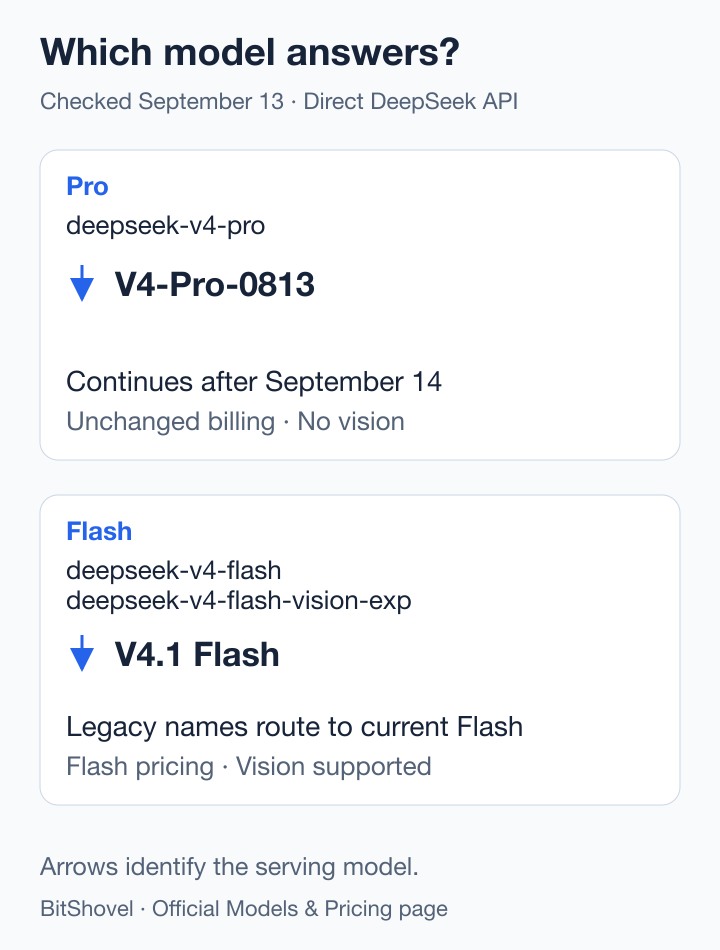
The current direct DeepSeek API name is deepseek-flash. DeepSeek’s release also confirms integration with WorkBuddy, CodeBuddy and OpenCode. Existing users can check the models available in their tool and begin with a screenshot or project material. The connection between model and app determines which actions can follow an answer.
Vercel AI Gateway is another documented route. Its September 9 announcement describes requests combining text and images. The current model page uses deepseek/deepseek-v4.1-flash and provides playground and AI SDK entry points. Developers can start with their own material before integrating it into an application.
For existing API integrations, the model name matters. DeepSeek now confirms that deepseek-v4-pro will continue serving V4 Pro after September 14 with unchanged billing. The pricing page still lists V4-Pro-0813, without vision support. The legacy Flash names route to V4.1 Flash. Check the model you actually call before sending images or estimating costs.
Sources and notes
Vercel requires gateway credentials and uses its own billing rules; DeepSeek Harness remains a developer preview. This research checked public sources and entry points without running model inference.
- Official DeepSeek V4.1 Flash release ↗Primary sourceRead the full details.
- Vercel integration announcement ↗Primary sourceRead the full details.
- Vercel current model and playground ↗Primary sourceRead the full details.
- Current models and legacy names ↗Primary sourceThe pricing page now confirms continued V4 Pro service.
07Tool access · October 15中文
Free in OpenCode: how does this route differ from the direct API?
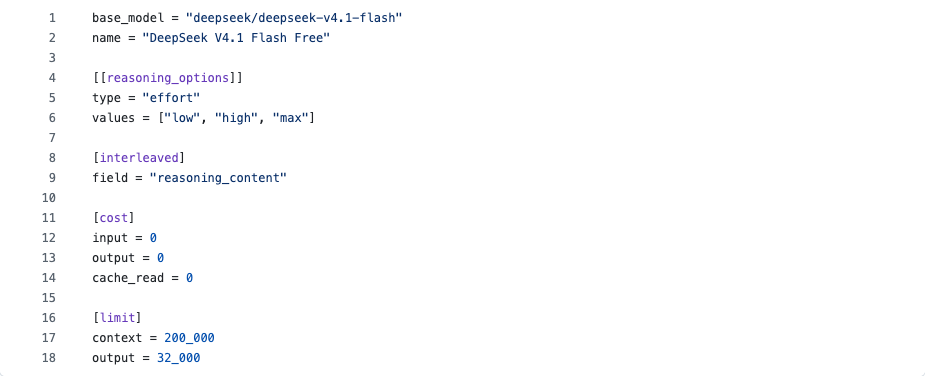
On October 15, OpenCode's current documentation and public catalog list a separate Free route: opencode/deepseek-v4.1-flash-free, with zero input, output and cache-read prices. OpenCode calls it a limited-time offer, with a provider policy of zero retention and no model training on submitted data; no end date is specified. Existing OpenCode users can consider it for a task of their own. DeepSeek's direct API remains separately billed.
The Free route has its own limits. A pinned October 15 configuration in OpenCode's model-data repository specifies 200,000 context tokens and a 32,000-token output cap, while DeepSeek's direct API page still lists a 1M context. The smaller window belongs to this route, not a demonstrated regression in the model. For a long task, consider project material, conversation and tool results against the route actually selected.
Check the Free entry in OpenCode's current model picker and begin with a clearly bounded task. We inspected public documentation, configuration and catalog data without generating an answer or comparing this route's quality or speed with the direct API. Our reading is that the offer reduces the cost of trying a task; it does not establish identical performance across deployments.
Availability is a separate observation. DeepSeek's official incident record runs from 00:11:35 to 05:04:04 UTC on October 15, affecting chat, the V4.1 Flash API and the V4 Pro API; it is marked resolved. The record does not establish whether OpenCode's free route was affected, so the two announcements do not demonstrate a tested fallback between services.
- Inspect OpenCode's current Free model and terms
- Inspect the route's original 200K configuration
- Check DeepSeek's current service status
Sources and notes
October 20 follow-up: this retains the October 15 free-route and configuration observation. The later chapter distinguishes the Console incident, Free options and local credentials.
- OpenCode current models and free-use policy ↗Official documentation · Read October 15Free model ID, zero pricing, limited duration and this provider's data policy; not a policy for every free model.
- OpenCode's Free-route configuration ↗Team-maintained model data · Pinned revision 14dc64dContext 200,000, output 32,000 and three zero token prices. This is configuration, not a throughput or quality test.
- DeepSeek direct models and pricing ↗Official pricing · Direct routedeepseek-flash identifies V4.1 Flash; its 1M context and peak/off-peak pricing apply separately.
- DeepSeek's original incident record ↗Official status · October 15, resolvedIncident times, three affected services and restoration; it does not disclose OpenCode-route availability.
08New snapshot · From a scene to the task中文
A Forbidden City scene: following the 1017 project update
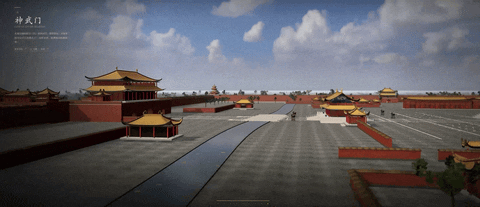
On October 17, DeepSeek illustrates Flash 1017 with a Forbidden City scene, a browser racing game and a Godot game. Walls, courtyards and water make the project-development update visible. These are official animations; the release page supplies no public source or playable links for them. Their appearance does not establish how a project was revised, tested and delivered.
1017 is a minor V4.1 Flash update, with the same configuration as the September model but different public weight objects. DeepSeek confirms the website, app and API now serve it. The API name remains deepseek-flash, with unchanged model prices, 1M context and a 384K output cap. The earlier September model and LiveBench results remain separate from this snapshot.
The results have separate scopes. DeepSeek reports Terminal-Bench 4.0 rising from 31.2 to 42.3 with Claude Code, and DeepSWE v1.1 from 74.2 to 77.0 with Mini-SWE-V2. Independently, Ibragim lists 1017 at 100% pass@1 using Pi 0.85.1/high across ten tasks with three runs each; low scores 90%. The high result joins four existing 100% rows, without establishing a winner or representing all coding. On October 17, AA had no separately named 1017 row, so the older model's 39 was not transferred. The later chapter on AA45 explains the independent result observed October 19.
The card and original license cover the repository and weights under MIT. Self-hosting materials are available, but the inference guide describes a reference implementation with weight conversion. Its TP8 example is not a verified minimum system or an ordinary-computer promise. Existing API users can check the served version, then compare the same material and completion criteria.
| 1017 configuration | pass@1 | Average cost/task | Average time/task |
|---|---|---|---|
| Pi · high | 100% | $0.0450 | 2 min 38 sec |
| Pi · low | 90% | $0.0257 | 1 min 31 sec |
- See the official project animations and release
- See the Pi source table and configurations
- Read the pinned card and inference guide
Sources and notes
Cache-hit rates are 97.9% and 96.3%. Task, caching and retries affect cost. We read the evaluation and official demonstrations without calling the model, running case code or downloading weights.
- DeepSeek: the 1017 release ↗Official release · October 17Project animations, vendor evaluations and website/app/API rollout.
- Pinned 1017 model card ↗Official weight repository · pinned revisionMinor-update identity, evaluation harnesses and sampling/context recommendations.
- 1017 original license ↗Original MIT licenseThe card identifies MIT for both repository and weights.
- Original inference reference ↗Official guide · pinned revisionWeight conversion and a TP8 example, not minimum hardware or our inference result.
- Ibragim source coding table ↗Independent engineering evaluation · read October 17The 1017 high/low configurations, usage, cost and time.
- Ibragim benchmark method ↗Evaluator's methodTen tasks, three runs per configuration; private tasks and effort labels do not establish equal compute.
- Current direct API model and prices ↗Official documentation · checked October 17The deepseek-flash route now serves 1017, with the existing name, model prices and window.
09Tool access · Bring current pages into a task中文
Find a page, then fetch it: how are the tools charged?
Search and Fetch are separate tool APIs: Search returns web results for a query; Fetch retrieves a chosen page as Markdown. Both require a DeepSeek API key. They supply material to agents and retrieval apps, whose model and workflow still decide how to use it. For a webpage project, one could find current engine documentation and pass the relevant text into a coding tool. This is a suggested workflow, not one we ran.
Integration depends on the client version. DeepSeek recommends Harness 0.2.1-rc.1 or later; the rc.2 release checked here explicitly adds 1017 and Search/Fetch support, enabled in Web Search settings. Harness remains a developer preview. Model, tools and client are separate integrations; changing a model name does not give every app identical capabilities.
Model prices did not fall again with 1017. Each standalone tool API charges successful requests, rather than result count or tokens; failures, empty searches and timeouts are not billed. For server-side tool calls while using the DeepSeek API through Harness, Claude Code or Codex, these search/fetch charges are currently waived. Per-request billing starts November 1, 2026 at 00:00 Beijing time (October 31, 16:00 UTC). Model input/output charges remain separate.
| Standalone API | Billing unit | Published price |
|---|---|---|
| Search: find pages | 1,000 successful requests | $0.75 |
| Fetch: retrieve page text | 1,000 successful requests | $0.75 |
Sources and notes
- Official Search/Fetch guide ↗Original API and billing terms · checked October 17Search results, Markdown content, successful-request billing and the server-tool waiver.
- Original CNY Search/Fetch terms ↗Official Chinese documentationCNY5 per thousand calls per endpoint and the November 1 Beijing-time boundary.
- Harness 0.2.1-rc.2 ↗Official prerelease · October 171017 and Search/Fetch support with the Web Search setting.
- DeepSeek Harness repository ↗Official developer-preview noticeThe client is still changing rapidly, separately from the model's capabilities.
- Current model and tool prices ↗Official pricing · checked October 17Model tokens and successful tool requests are billed separately.
10Independent results · Separate model snapshots中文
1017 now scores AA45. How does that relate to the older 39 and Pi 100%?
On the evening of October 19, Artificial Analysis lists DeepSeek V4.1 Flash 1017 separately at max effort with an Intelligence Index of 45. The older V4.1 Flash/max row remains at 39. No separate row was visible when we prepared the October 17 chapter; the new snapshot now has its own result. October 19 dates our observation, not an inferred AA publication time. The older model is not renamed.
Under the same evaluator and current methodology, 45 is six index points above 39: evidence of an improvement across this suite, rather than a six-percent accuracy gain or improvement on every task. AA v4.3.2 combines ten evaluations and primarily measures English text tasks. A scene’s appearance, Chinese-document work and image understanding need separate evidence. Our board adds 1017 while retaining the older identity and release date; its included-model ranks are not global ranks.
Pi’s 100% answers a different question: 1017 and four included models pass all runs in a ten-task suite, three runs each, using Pi 0.85.1/high. It neither converts AA45 into perfect coding ability nor separates the five tied results. Max and high belong to different evaluation environments and do not establish equal compute. Together the sources show stronger aggregate results and success on this small coding suite, without guaranteeing a complex project will finish in one attempt.
For an existing deepseek-flash workflow, revisit one task that previously failed with the same input, tools and acceptance criteria. Check completion and rework, then total cost and time. The API now serves 1017, so two calls to the same route today are not an old-versus-new comparison. Without a pinned older snapshot or a historical run, report only the current result. We compared published evaluations here; we did not execute these tasks with the model.
| Model and configuration | Source result | What it measures |
|---|---|---|
| Older Flash · AA max | 39 index points | Older-model reference under the current AA suite |
| Flash 1017 · AA max | 45 index points | Separately listed aggregate result for the new snapshot |
| Flash 1017 · Pi high | 100% · 30 attempts | Pass rate on one small coding suite; four others also score 100% |
Sources and notes
October 20 follow-up: AA’s current source no longer lists older Flash at 39. This retains the dated October 19 observation. The model board reflects the current included set; an absent row does not rewrite its historical score.
- Artificial Analysis model leaderboard ↗Independent table · checked October 19Separately lists 1017/max at 45 and older Flash/max at 39.
- The separate AA page for 1017 ↗Independent source · fully read October 19Names the Max configuration at 45 with a 1M context; not a renamed older score.
- AA Intelligence Index methodology ↗v4.3.2 · ten evaluationsIndex units, primarily English text scope and differing compute settings.
- Ibragim Pi table and method ↗Independent small engineering suitePi/high with three runs on ten tasks; separate from the AA aggregate index.
11Connecting the service · October 20 source material中文
With DeepInfer open, what remains between an engine and a service?
Why can the same model feel quick through one service and slow through another? Request handling, hardware allocation and reuse of previously computed context matter alongside the model. DeepSeek's October 20 initial code commit and deployment account introduce DeepInfer, opening the inference engine behind V4.1 Flash. This advances the engineering that delivers a model to users. It does not release another set of model weights or establish a new capability score for 1017.
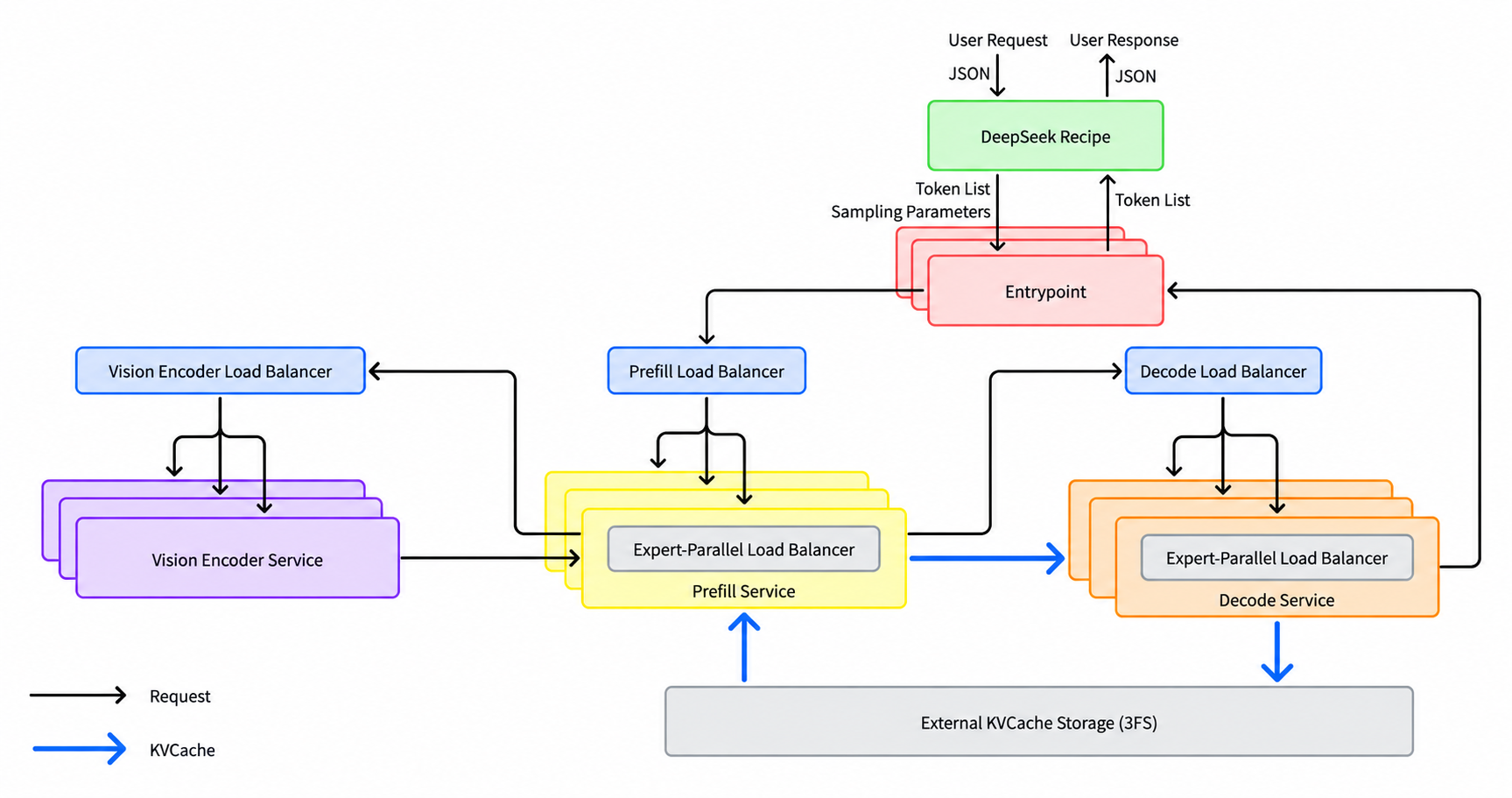
Follow a request through the original architecture: Recipe converts supported API conversations into model tokens; a vision encoder handles images, prefill processes the supplied material, and decode generates the answer. KV caching retains computed context so a matching prefix can avoid repeated work. This differs from long-term memory for names, preferences or working experience, and does not mean pasting an old answer into another person's reply. The diagram depicts the complete service, including components not fully released in this code.
What is available now is an Apache-2.0 offline inference engine whose default checkpoint is DeepSeek-V4.1-Flash-1017. The README lists NVIDIA SM100 GPUs and Huawei Ascend 950 NPUs, with Linux, Python 3.12 and CUDA 13 or CANN 9.2 respectively. A complete online service still needs a KV-cache system, separate vision/prefill/decode deployment, and load balancing across prefill and decode replicas. Recipe handles request and response conversion; the caller still supplies inference, tool execution and HTTP transport. These are building blocks for service teams. Ordinary API users need not build a server to benefit from the model.
Read the performance figures with their deployment conditions. The README's offline curves use four SM100 GPUs for prefill and 64 for decode, each within one scale-up domain. The deployment Q&A separately recommends an efficient online unit of 64 prefill plus 64 decode GPUs; it does not say that fewer than 128 GPUs cannot run. Its reported 155 trillion tokens served per cluster per day and US$38 revenue per GPU-hour at off-peak pricing describe the team's production deployment. They do not establish profit or payback for every installation, or guarantee latency through a third-party API.
The next question is whether providers can use this engine to deliver comparable quality, steadier latency and accountable total cost under stated hardware, concurrency and cache-hit conditions. A model board compares capability; DeepInfer concerns delivering that capability continuously. The two inform each other. We reviewed pinned code, architecture and deployment material, without acquiring a cluster, running inference or reproducing throughput. The earlier chapter retains 1017's independent evaluations; the engine release is not another capability result.
Sources and notes
- Pinned DeepInfer README ↗Official code · checked October 21Offline scope, default 1017 checkpoint, license, hardware and missing components; each performance curve has a configuration.
- V4.1 Flash deployment Q&A ↗Team engineering account · English update October 20Full architecture, online deployment and vendor-reported throughput/revenue; not our load test.
- deepseek-recipe protocol conversion ↗Official code · pinned revisionRoles of conversations, tokens, tools and supported API formats; callers still provide inference, execution and transport.
12Integration follow-up · Beyond the model name中文
OpenCode Console’s key incident: first locate the credential
In a statement dated October 18 Beijing time, OpenCode reported a breach affecting a subset of Console users with external providers,1.4% of Console users, and said it emailed them. Cofounder Dax distinguished Console from the open-source client. We found and followed these statements on October 20. The reported cause and “distillation attack” purpose are not independently established here.
The provider guide separately says credentials added through the client’s /connect command are stored in local auth.json. Console is a model service; Free is a class of models within it. A model name alone does not establish credential custody, incident exposure or the billed account. The statement does not provide a route-by-route status for free models.
Before revisiting the free route, identify the provider, connection method, key issuer and whether an external key was saved in Console. If it was, check the team’s notice and provider usage, and follow provider guidance on revoking and replacing credentials. Refund completion needs the account’s receipt. We did not inspect user accounts, local credentials or individual bills.
| Entry | What to check | What the material establishes |
|---|---|---|
| Client connected to an external provider | Local /connect configuration and key issuer | The guide describes local credentials; the team distinguishes this from Console |
| External provider keys saved in Console | Console workspace, notice and provider usage | The team’s reported affected subset, not every user |
| Free models served by Console | Actual provider, terms and account | Free is an option inside the service; no per-route incident finding is supplied |
Sources and notes
- OpenCode’s original statement ↗Official post · October 18 Beijing timeThe team’s Console/external-provider scope,1.4% and notification claim, read through the official embed endpoint without inventing truncated text.
- Dax’s Console/client clarification ↗Cofounder’s original replyDistinguishes Console from OpenCode itself; the parent post includes a provider’s revocation statement.
- OpenCode provider and credential guide ↗Official guide · read October 20/connect and local auth.json, without opening private credentials.
- Console model service and Free options ↗Current official documentationSeparate service, provider and Free model options, with their own terms.
13Timeline中文
From the vision experiment to current access
From the early vision experiment to the released model and tool integrations, follow the key dates.
Correction, September 13: this timeline previously retained the plan to route the Pro name to Flash on September 14. It now reflects the updated official arrangement. Continuing V4 Pro service and routing an old Flash name are distinct decisions.
- · Vision experiment reaches the API: V4 Flash Vision Exp provided an earlier API vision route; that old model has now been retired.
- · Vercel announces integration: AI Gateway announced image-and-text requests and app integration. This is the Vercel announcement date, not DeepSeek’s official release date.
- · V4.1 Flash officially released: DeepSeek released native image-and-text understanding and model weights. The API uses deepseek-flash; new pricing took effect at 12:00 Beijing time.
- · V4 Pro service continues: DeepSeek reversed the planned retirement and confirmed that V4 Pro API access will remain after September 14 with unchanged billing. The current official pricing page reflects this decision.
- · The Flash 1017 update reaches the website, app and API under the same deepseek-flash name and model prices. Pi results and search/fetch tools have separate scopes.
Sources and notes
- September 10 release coverage →Earlier coverageOriginal coverage and publication date.
- September 11 continuation report ↗Media reportDates the reported announcement; current terms are confirmed by the official pricing page.
What we are following
14What comes next中文
What we are following
- Which examples of image understanding, file reading and real tasks are worth seeing?
- Which everyday tools will adopt it, and how will using them change?
- How will pricing, speed and long-task performance evolve?
- How does Flash compare with familiar GPT/Opus choices on one generation or repository-repair task with comparable inputs, tools and budgets?
See how these changes connect
 Topic · Following
For reading images and processing material, compare another annotation task’s actual results.
To keep some work local, examine the handoff between local and cloud assistants.