
HISTORICAL DIG · JUL—AUG 2026
Can meeting transcription stay on my computer?
Meetily keeps meeting capture and transcription on the device and offers local or external summarization. But “local” is not one master switch: summary providers, analytics, update checks, recordings, the database, exports, and deletion each follow a different path.
WORKFLOW 001 · NODE POSITION
Current node 037 nodes total
Turn “local” into a data path
HOW IT RELATES TO WORKFLOW 001
Relation to the current subject
It turns “where does it run?” into one concrete task.
Workflow 001 chooses a workflow through the deliverable, environment, cost, and permissions first. This historical record supplies a task-level example: capture and transcription can stay on the device while the summary provider, analytics, and update checks follow different paths. Its strongest link is Q01. Multiple models and providers also enlarge the Q02 checking surface, but the old record did not measure that cost.
Record state at the time
- Work and handoff
- Checkable work results
- Standard record
- Developing · corrected
- E1 · pinned code and first-party material rechecked · not installed or tested
THE GUIDANCE AT THE TIME
Judgment at the time
Separate every data path before deciding whether it fits this meeting.
Open full rationale and return rules
Meetily is a candidate for local meeting transcription—not a validated privacy solution. Check transcription, summarization, analytics, updates, storage, export, and deletion separately, and leave every unobserved step unconfirmed.
- Who it was for
- Individuals and small teams that want control over meeting files, will inspect each setting, and can start with a non-sensitive sample
- Why it mattered then
Open note
A “local-first” label can collapse several separate questions into one: whether meeting content leaves the device, whether the app makes any network request, which model summarizes, and whether deletion reaches every copy.
- Where the judgment stops
Open note
BitShovel only rechecked the pinned v0.4.0 repository, code, documentation, and maker interface. It did not install the app, record a meeting, or verify accuracy, network traffic, summary quality, or deletion. Maker material is not an independent privacy audit, compliance proof, or user outcome.
CHECK BEFORE READING ON
Fit check
The record becomes actionable only when each step can be checked with a non-sensitive sample.
This record may help
- You can obtain consent from everyone involved and begin with a short, self-made, non-sensitive audio sample in one specific configuration.
- You are willing to treat transcription, the summary provider, analytics, updates, storage, and deletion as separate checks.
Do not use it yet when
- Recording consent is missing or organizational policy requires an approved meeting tool.
- The first trial would use a real client meeting, confidential content, or access that cannot be cleanly revoked.
- Your decision requires an accuracy result, a fully-offline guarantee, complete deletion, or a compliance conclusion—this record has none of them.
UNRUN, UNFROZEN HISTORICAL TRIAL
Historical trial
Fix one configuration, then inspect visible paths with 20–30 seconds of self-made audio.
- Time needed
- Earlier estimate: 15–30 minutes plus model download; not timed in practice
- Likely cost
- The repository is MIT licensed; hardware, storage, downloads, and external summary services may add cost
- Permission boundary
- Obtain recording consent; use only a non-sensitive sample; do not connect an external summary service first
- 01
First step
Open this step
Use a self-made 20–30-second non-sensitive sample. Before recording, note the app version, transcription model, summary provider and endpoint, analytics state, and any network requests you intend to allow.
- 02
What should exist
Open this step
Keep the source audio, transcript, summary, and export, plus a list of the database, recording directory, export location, observed traffic, and before-and-after deletion state.
- 03
If run, what this one success would mean
Open this step
If run, success would mean the preset facts in this one sample can be checked and no unauthorized meeting-content transfer was observed during the test. It would not establish accuracy, fully-offline operation, or complete deletion.
- 04
Stop when
Open this step
Stop if consent or policy approval is missing, or if the summary endpoint, allowed traffic, storage locations, or deletion scope cannot be explained.
- 05
How to back out
Open this step
Delete the database record, recording directory, and export; revoke audio permission and uninstall; then recheck known locations for remaining copies.
MAKER INTERFACE · NOT A BITSHOVEL RUN
Method and interfaces
Visible capture and transcription controls do not place every path on the device.
Open method boundary
The only retained interface is a pinned maker demo with device and EXIF metadata removed. It helps locate capture, live transcription, model, device, and language controls; it is not evidence of accuracy, privacy, offline operation, or deletion.
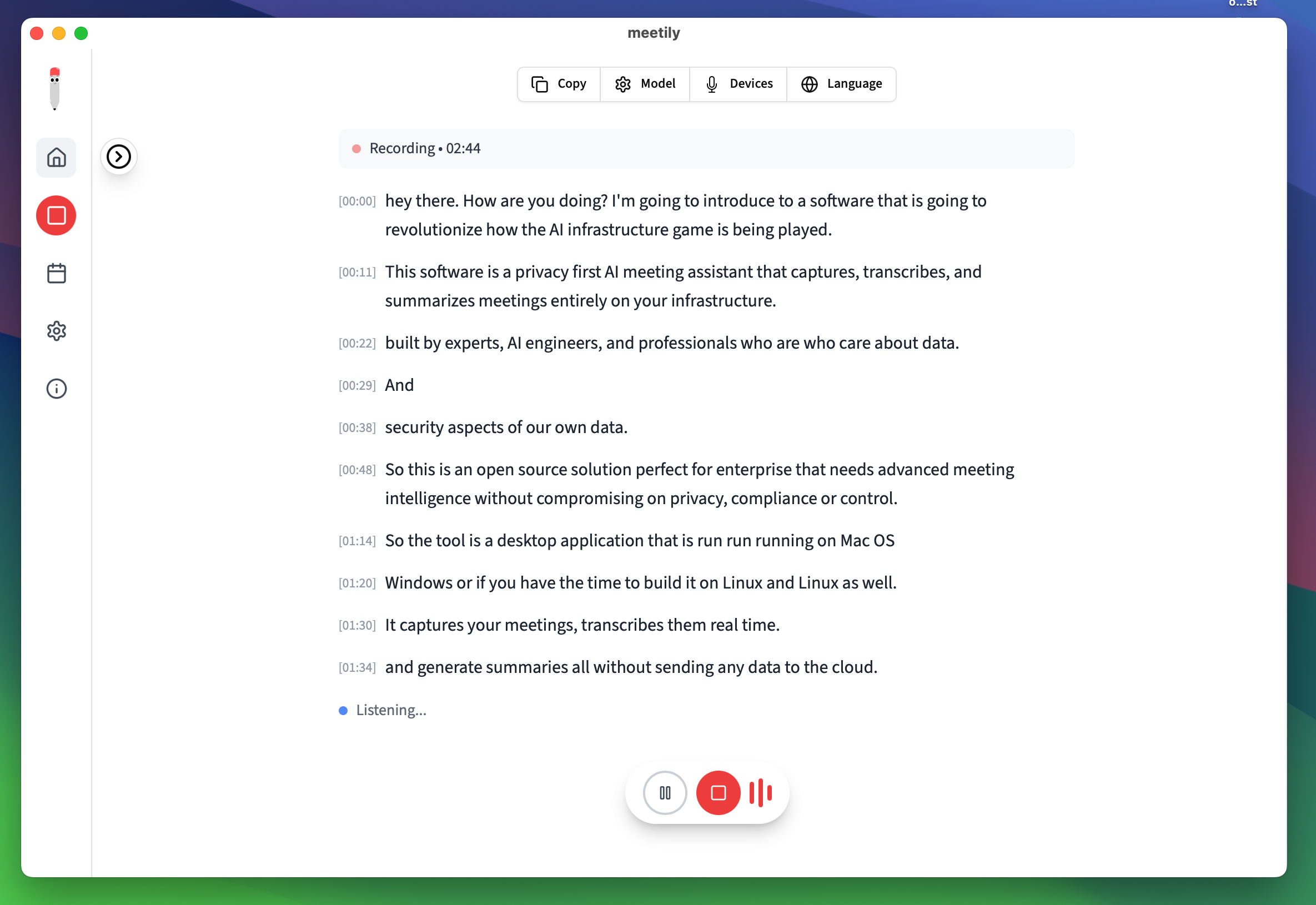
The transcript shown is a maker product-introduction demo. It only shows how the pinned version presents capture and transcription controls; it does not establish accuracy, fully-offline configuration, complete deletion, or a BitShovel run.
About this image and its source
Copyright (c) 2024 Zackriya Solutions · MIT. BitShovel only removed ICC and EXIF metadata from the pinned source PNG, preserving its original 2370×1630 pixels, aspect ratio, and visible content. The project did not participate in, approve, or endorse BitShovel.
Open source page ↗Read use and attribution guidelines ↗SOURCES AND EVIDENCE
Sources and evidence
As of August 15, 2026, the record still contains pinned v0.4.0 maker code and documentation—not a BitShovel install, real meeting, traffic observation, accuracy result, or deletion result.
Open evidence boundary
Pinned first-party code supports local transcription, local SQLite storage, and selectable summary providers. It also shows that analytics, update checks, and deletion scope need separate review. With no independent reproduction or real-meeting result, the evidence remains E1.
- 01Pinned maker material · Pinned source rechecked
Meetily v0.4.0 README
Open source boundary
Checks maker descriptions of local transcription, the Community Edition, and summarization. These are product claims, not a BitShovel run result.
Open original source ↗ - 02Pinned source code · Pinned source rechecked
Summary provider and endpoint settings
Open source boundary
Pinned code lists Ollama, Claude, Groq, OpenRouter, and OpenAI-compatible options. The choice changes the summary data path.
Open original source ↗ - 03Pinned source code · Pinned source rechecked
Analytics and update checks follow separate paths
Open source boundary
Analytics are disabled by default in the pinned code and connect to PostHog when enabled; the app also checks GitHub for updates. Local meeting-content processing is therefore not the same as zero app traffic.
Open original source ↗ - 04Pinned source code · Pinned source rechecked
Update check after app startup
Open source boundary
Pinned code shows a latest-version request after startup. This non-content traffic should be recorded separately in a trial boundary.
Open original source ↗ - 05Pinned source code · Pinned source rechecked
Database deletion and recording files have different scope
Open source boundary
The delete command covers meetings, transcript chunks, summary processes, and transcripts in SQLite. Recording directories, exports, and other copies still require separate checks.
Open original source ↗
REVISION RECORD
Revision record
R3 corrected the product identity; R4 separates “local” into paths that can be checked one by one.
Open 2 revisions
- Revision 3
Corrected the mistaken browser-AI-search description and rechecked what Meetily actually offers for local meeting transcription.
- What the record said before
- Meetily was described as local browser AI search without browsing-data uploads.
- What changed
- Meetily is a meeting capture and local-transcription tool; summaries, telemetry, and deletion must be checked per configuration.
- Revision 4
Rechecked the same pinned v0.4.0 code, separated local meeting-content processing from app network behavior, and returned accuracy and deletion from product promises to unrun checks.
- What the record said before
- Selecting local transcription and summarization was treated as enough for a short test to confirm that files stayed on the computer and could be deleted.
- What changed
- Local transcription is only one step. The summary endpoint, analytics, update requests, database, recording directory, exports, and deletion scope each need observation, with no outcome claim before a run.
WHAT THIS RECORD LEAVES
What this record leaves
Make “local” observable at each step instead of leaving it as a label.
This record preserves an unrun checking method. The current Workflow continues with primary-workflow choice, while Q01 places runtime, permissions, and network boundaries in one decision frame.
Back to the Dig index