Ongoing topic · Compiled September 20, 2026
Jev: fast decisions, flight searches and paper classification
Which control should a browser use next, and where should a thousand papers be filed? Connect official capabilities, independent tests and real projects to see how Jev works alongside chat models.
01What it does
Deciding where an email goes is an AI task too
- Read the material
Email content and category definitions
- Make a decision
Choose support, billing or partnerships
- Continue the workflow
Software routes it; generate a reply when needed
Editorial illustration of a possible workflow, not a result from our testing. Read the source ↗
An incoming email needs to reach support, billing or partnerships before anyone writes a reply. Jev is built for repeated decisions like this. TypeSafe AI released it on September 15, 2026, calling this class of focused decision models System One.
Give it the material, the questions and the allowed answers. It can choose a category, score against defined levels or estimate whether a statement is true. Several questions can be evaluated together. Software uses those answers to continue the workflow; another model can write the reply.
Sources and notes
- TypeSafe: introducing Jev ↗Official release · September 15The first public release and its intended role.
- TypeSafe quickstart ↗Official usage exampleClassification, scoring and true-or-false questions about shared material.
02A useful comparison
Where rules, Jev and a language model fit
A rule can check whether an attachment exceeds 20 MB. Recognizing a request for a progress update requires interpreting language. Writing a considerate reply requires generating text. These steps make Jev’s role easier to see. The table illustrates a possible division of work.
| The step | A possible approach | The output |
|---|---|---|
| Check attachment size | A fixed rule | Above or below the limit |
| Identify intent and destination | Jev; an LLM can also classify | Defined options and probabilities |
| Draft a reply | A language model that generates text | Editable prose |
Sources and notes
Probabilities and confidence help software decide when to proceed or hand off. They do not guarantee an individual answer is correct; an answer can fit the required format and still choose wrongly.
- System One inputs and outputs ↗Official definitionDecision types and why calibration does not guarantee an individual answer.
- Using confidence in a workflow ↗Official documentationConfidence for Choice and Score, and possible handoffs.
03Claims and measurements
Read speed and cost alongside the work actually handled
The vendor’s 193.6× speed and 444.6× cost claims come from its own workflow evaluations, using averaged Astra and Fable predictions as references. These measure particular decision workflows, not every kind of task.
Nexus compared agent checks on the same 469 cases. Jev handled 58%, handing the rest to rules. Including fallback, it made 90 mistakes against Sonnet 5’s 92; latency and cost differed more clearly in this experiment.
| System | Model coverage | Total errors | Typical latency / cost |
|---|---|---|---|
| Rules only | Rules handle all | 148 | ~50 ms / $0 |
| Sonnet 5 + rules | 67% | 92 | 6.3 s / $0.0178 |
| Jev + rules | 58% | 90 | 0.66 s / $0.00008 |
Sources and notes
Author’s test, not rerun here. Labels were chiefly AI-generated; threshold tuning differed, and LLM timing included tool startup. Results concern these checks.
- TypeSafe workflow evaluation notes ↗Vendor evaluationThe tasks, references and conditions behind the claims.
- Nexus: testing Jev on agent checks ↗Author’s test · September 17The comparison includes fallback errors, latency and cost.
04Build one
A flight search splits choosing controls from writing text
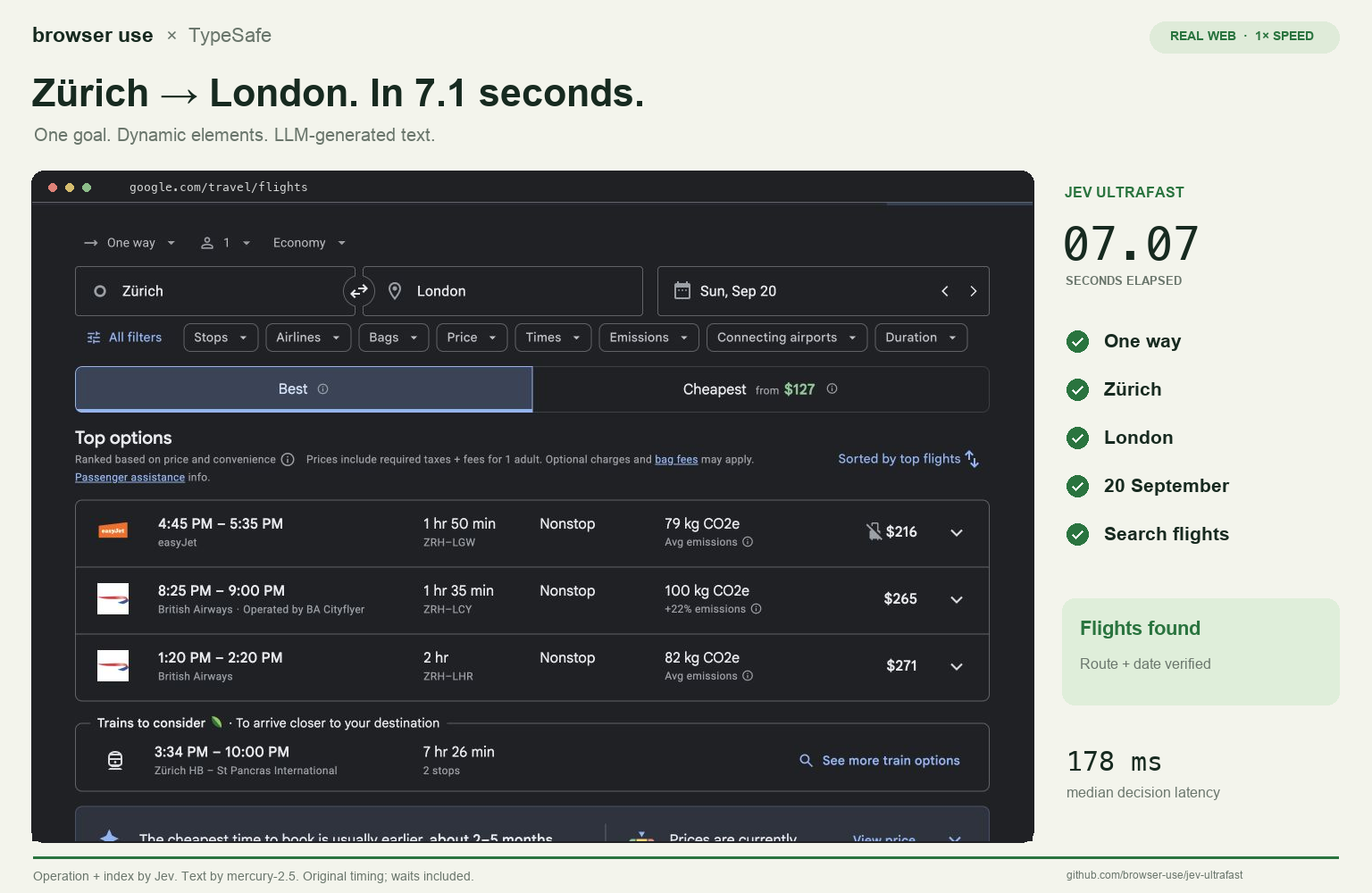
Browser Use’s public demo starts with one request: a one-way economy flight from Zürich to London on September 20 for one adult. Jev chooses the next action and control from a page-element list. Mercury 2.5 writes the city names when needed. The result shows matching flights without selecting or booking one.
The author records 7.073 seconds, timed after the initial homepage observation and including model calls, text entry and page loading. The video, measurements and code show how a decision becomes an on-screen action.
- Watch the author’s flight-search demoRecorded at normal speed, ending at visible results.
- Open the project and running instructionsModel roles, source code and reproduction instructions.
- Browser Use licenseMIT · Copyright 2026 Browser Use.
Sources and notes
This is the author’s recorded task; we did not rerun the paid models. Jev receives page text and control information, not the video pixels.
- Browser Use · jev-ultrafast ↗Author’s code and demoThe task, model roles and demonstration.
- Flight-demo measurements ↗Author’s measurement conditionsInitial navigation and independent result verification are outside the task clock.
05Build two
A thousand papers: summarize first, then try faster classification

1kpapers is a browsable collection of 1,018 papers, organized by research topic, lab and date. On September 17, Hassan reported a Jev experiment using titles, DeepSeek V4 Flash summaries and 24 topic options: $0.08 for classification and 256 ms median latency per paper.
Summarizing and classifying are separate jobs: the existing 1,000-paper summary experiment cost $3.99 in DeepSeek inference. The public classification code read on September 20 still uses its earlier model pipeline. This pairs the existing atlas with a new experiment; it does not establish that its live labels have all switched to Jev.
- Explore the paper atlasChoose a familiar topic and see how summaries support browsing.
- Read the author’s Jev classification reportClassification cost and latency are author-reported.
Sources and notes
- Hassan’s original classification report ↗Author’s report · September 17Paper count, 24 topic options and classification usage.
- 1kpapers: the existing atlas and summary experiment ↗Author’s public workThe live collection, summary costs and methodology.
- 1kpapers public classification code ↗Code · read September 20The public pipeline still uses DeepSeek and Qwen through Together.
06Access and price
Where to try it and how to read today’s pricing
As of September 20, TypeSafe lists direct API input at $0.042 per million tokens, with free output; its console provides a playground subject to account access. Vercel AI Gateway currently lists free input and output, with promotional pricing ending September 25. These are prices for different access routes.
Jev currently reads text, so images or audio need preprocessing. The documentation says English performs best; try representative samples for Chinese email or document classification. Model-call pricing does not include summarization, app operation or other models in the workflow.
- Open the TypeSafe consoleOfficial account and playground access.
- Check current Vercel pricingCheck the access page for the current promotion.
Sources and notes
- TypeSafe models and pricing ↗Official documentation · read September 20Direct API rates, supported inputs and languages.
- Vercel AI Gateway · Jev ↗Access provider · read September 20The current free promotion and its September 25 end date.
07Connect it to what you use
Another way for your AI tools to share the work
If you use GPT, Opus, Grok or another assistant for writing, coding or organizing material, start with the two builds above: writing a city name and choosing a control are separate steps, as are summarizing a paper and assigning a topic. Jev suggests another way to divide a workflow; a new model need not mean a new chat subscription.
The Blender work in our Astra topic shows descriptions becoming editable scenes. Jev adds a useful question: which steps create something new, and which choose among existing options? This is our interpretation of the examples; an actual combination depends on the application’s integrations.
- Continue to Astra’s editable 3D workExplore model roles from the creation side.
- See the official smart-home exampleIdentify devices and actions, then let software execute.
Sources and notes
- TypeSafe smart-home example ↗Official workflow exampleIllustrates the division between decisions, language processing and execution.
What we are following
08What comes next
What we are following
- Which repeated decisions are being used in real tools?
- How do rules, Jev and language models divide the same task?
- What new results clarify Chinese use, accuracy and access?