A product change · Outfits and shopping
ChatGPT can virtually try on clothes. How might that skirt look on you?
Product listings, selfies and generated previews now connect in one shopping process, with favorites to return to later. See how this differs from a photo-library wardrobe, product search and checkout.
Announced by OpenAI on October 1 and checked on October 2. This reading uses official documentation and demonstration images; BitShovel has not tried it in an account or placed an order. Mobile and web are confirmed, without a complete published list of plans, regions or limits.
From looking at the product to seeing it on you
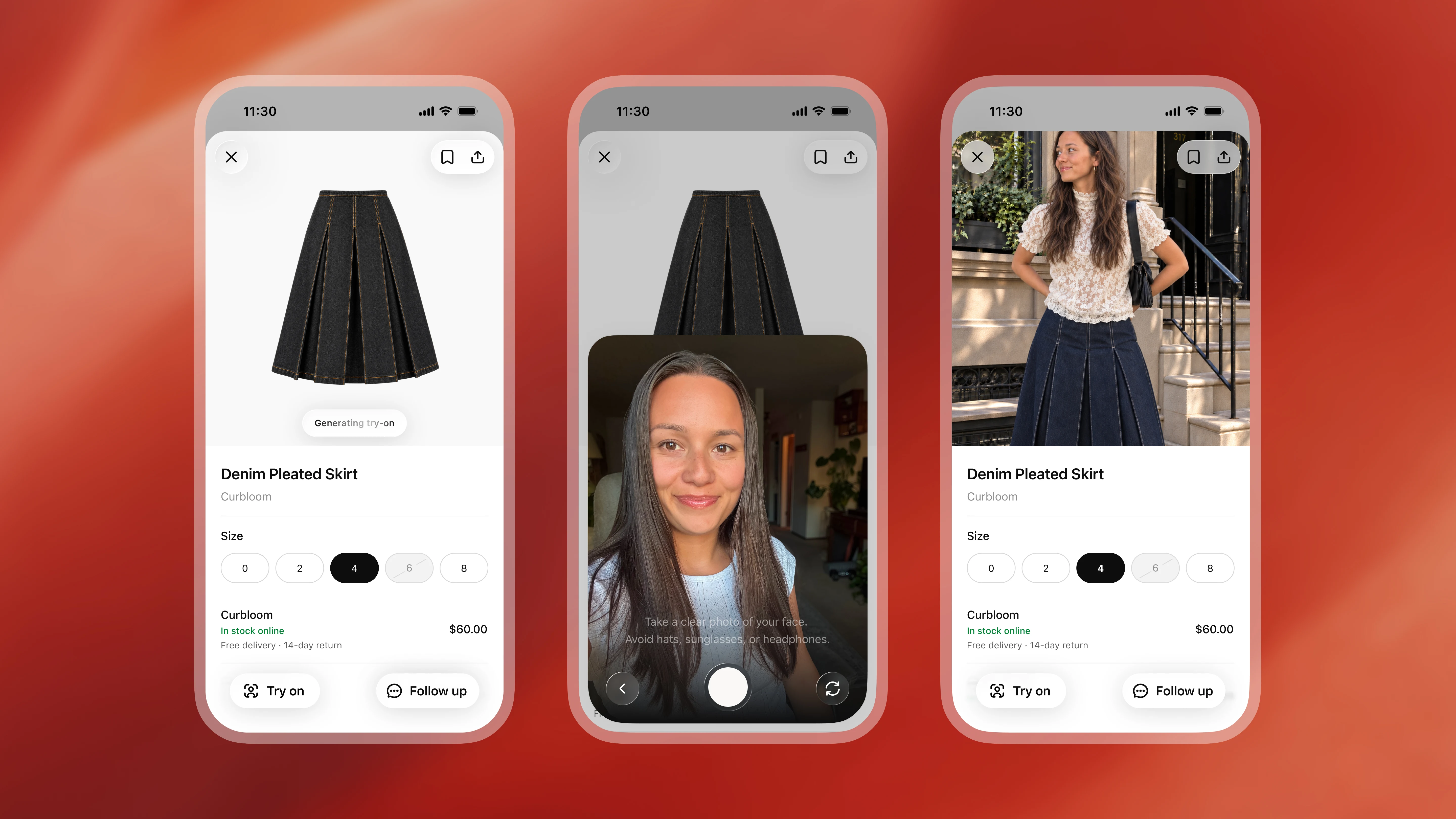
Select Try on on a clothing or accessory listing and take or upload a selfie; ChatGPT Images generates a preview. You can also supply an item image in a conversation. This adds a picture to discuss where you previously had to imagine the product on yourself.
The three demonstration panels make the sequence visible: a denim pleated skirt, a person's selfie, then an outfit preview. A product picture and a personal reference become a visible point of comparison. This is demonstration artwork; we have not compared it with the item after purchase and wear.
Sources and further reading
- OpenAI: October 1 ChatGPT release notesOfficial update · Checked October 2Try-on entry, reference photos, product favorites, and mobile/web availability.
- OpenAI: shopping with ChatGPT SearchOfficial help · Checked October 2Image try-on, photo management, Library favorites, product data, and the difference between a preview and actual fit.
- Public source of OpenAI's demonstration imagesImage attribution · TechCrunchUsed for OpenAI image attribution and the demonstration artwork; feature claims come from official notes and help.
Preview the style and keep the real purchase checks
A preview can start a discussion about liking a style. OpenAI says it may not represent the product or your appearance exactly and cannot guarantee fit; check the merchant's measurements, details and returns. A style preview, actual fabric drape and comfort are different questions.
One small comparison would use a garment you know well, inspect the person and clothing details, then try a prospective item. You could ask to change only a jacket while retaining the rest and inspect the difference. This is our suggested comparison, not evidence that the system always preserves the remaining picture.
Sources and further reading
- OpenAI: shopping with ChatGPT SearchOfficial help · Checked October 2Image try-on, photo management, Library favorites, product data, and the difference between a preview and actual fit.
Keep the candidates and manage your reference photo
Save products to Favorites or folders in ChatGPT Library and return later. Your reference photo is retained for future try-ons; replace or delete it under Settings → Personalization → Reference photos. Saved products and your photo have separate places to manage them.
An outing folder could hold candidates you revisit alongside clothes you already own. The value is continuity without a purchase today. Keeping your reason for choosing an item—shoes to pair, the occasion, or a detail still to check—can make the next visit useful. This is an editorial suggestion, not a multi-day usage test.
Sources and further reading
- OpenAI: October 1 ChatGPT release notesOfficial update · Checked October 2Try-on entry, reference photos, product favorites, and mobile/web availability.
- OpenAI: shopping with ChatGPT SearchOfficial help · Checked October 2Image try-on, photo management, Library favorites, product data, and the difference between a preview and actual fit.
A wardrobe, product search and checkout connect different stages
Our Google Photos wardrobe reading starts with clothes found in your existing photo library: what you own and how to combine it again. ChatGPT's update connects shopping candidates with your photo: whether a prospective outfit looks like the style you want. One can begin with existing clothes; the other begins with shopping.
This is a concrete image-capability integration: Images makes the preview, search and merchant data provide candidates, and Library preserves the choice. It connects to the shopping and checkout line in our Muse topic. A preview, a chosen product, a confirmed order and a delivered item remain different outcomes. This check adds no try-on accuracy or delivered-item comparison.
- Clothes you own: the Google Photos wardrobe
- Image capabilities: GPT Image 2.5 creations and edits
- Shopping services: Muse's merchant and checkout handoff
Sources and further reading
- OpenAI: shopping with ChatGPT SearchOfficial help · Checked October 2Image try-on, photo management, Library favorites, product data, and the difference between a preview and actual fit.