
HISTORICAL DIG · JUL—AUG 2026
Where do an AI workflow’s keys and assets go?
“Frontend-only,” “stored in the browser,” and “exportable workflow” describe three different things. A visual canvas can keep configuration and nodes in the browser while sending a key, prompt, and input image to an external model endpoint; exported JSON may carry only part of that state.
DATA ROUTE · START WITH THE MAP
Five items cannot collapse into one “local” box.
Map storage, transfer, export, and cleanup before supplying a key.
- 01Five inputs
- 02In-browser
- 03External endpoint
- 04Exported file
- 05Separate cleanup

The agate line crosses the device boundary; citrine points mark separate storage, request, export, and cleanup questions. The route comes from pinned-code review—not a live network run.
About this image and its source
BitShovel explainer created August 16, 2026 from storage and request code at pinned commit c443ec4. It contains no upstream interface pixels, key, material, or request outcome.
Open source page ↗HOW IT RELATES TO WORKFLOW 001
Relation to the current subject
After local generation, map where the data goes.
Open note
A generation run can be local or call an external endpoint. A browser canvas can also use localStorage, IndexedDB, downloaded files, and a remote API at the same time. This historical record supplies a Q01 data route—not another canvas recommendation.
Record state at the time
- AI workflows
- Local-first visual workflows
- Standard record
- Developing
- Historical E1 · pinned code and interface rechecked · no real key, request, or cost outcome
THE GUIDANCE AT THE TIME
Judgment at the time
Map the data route before deciding whether to provide a key.
Open full rationale and return rules
Map the data route before deciding whether to provide a key. Give the API key, prompt, input image, result image, and workflow JSON separate rows. For each, record browser storage, export inclusion, request destination, who controls logs and retention, and cleanup. Every cell says observed, did not occur, or unknown—never “local-first” as a substitute.
- Who it was for
- Creators and developers who want to reuse a node-based AI image workflow without beginning with a real long-lived key, client material, or open-ended spend
- Why it mattered then
Open note
When keys, assets, results, autosave, and exports collapse into one claim that everything is local, a person cannot tell who can read them, what one request carries away, or what remains after deleting a node.
- Where the judgment stops
Open note
BitShovel rechecked the pinned commit that remains current for Open Source AI Drawing Board, its MIT license, four fixed interfaces with no real data, and MDN and OWASP browser-storage boundaries. BitShovel entered no valid key, uploaded or generated no image, observed no live provider request, incurred no cost, inspected no provider log, and verified no deletion outcome. Interface and code describe this version; they do not prove that a hosted page, browser extension, third-party script, or model provider is safe.
CHECK BEFORE READING ON
Fit check
Continue only when empty nodes and placeholders can answer most questions first.
This record may help
- The workflow can open settings, expose browser storage, and export a fictional JSON file without running a model.
- If one request is genuinely needed, you can create a capped, revocable key dedicated to this trial.
Do not use it yet when
- The decision would require client work, faces, brand source files, unpublished work, or real business data.
- The page source, third-party scripts, endpoint domain, billing rules, or log-retention policy cannot be established.
- You need a formal security review, privacy-compliance finding, or proof of deletion from an external provider.
HISTORICAL TRIAL · STAGE ONE RUNS NO MODEL
Historical trial
Use a five-row route card for storage and export. A live request is not the starting point.
- Time needed
- 20–30 minutes for a no-generation data preflight
- Likely cost
- Stage one costs nothing; only a later request gets a capped, revocable allowance
- Permission boundary
- 01
First step
Open this step
Do not run a model first. Open settings, use `DEMO_NOT_A_KEY` to observe where a key is saved, create three empty nodes, and export JSON. In developer tools, fill five rows—key, prompt, input, result, and JSON—with browser location, exported fields, external recipient, cleanup action, and unknowns. Only if the route is acceptable and one request is necessary should you create a capped key, send one non-sensitive geometric sample, and revoke it immediately.
- 02
What should exist
Open this step
A five-row data-route card, one inspected fictional JSON file with no valid key, and an explicit list of still-unknown provider logging and retention behavior.
- 03
How to tell it worked
Open this step
All five items have a stated local store, export state, request route, cleanup action, and unknowns. In stage one, no model request appears and no charge is added. If stage two runs, success means only that one request reached the intended endpoint and the key was revoked—not that provider logs were deleted.
- 04
Stop when
Open this step
Stop if a valid key must remain where page scripts can read it, the endpoint is not the expected domain, deletion changes only the interface, the key cannot be capped or revoked, or sensitive material is required.
- 05
How to back out
Open this step
Delete the test source and nodes, clear that origin's localStorage and IndexedDB, and remove downloads. If a request ran, revoke the key and retain the cost/request receipt. Provider logs and backups stay unknown until separately proven.
BITSHOVEL R3 EXPLAINER · PINNED-CODE MAP
Method and interfaces
“Browser-local” splits into configuration, autosave, gallery, export, and external requests.
Open method boundary
The agate line crosses the device boundary; citrine points mark questions that need separate answers. The map comes from pinned code. The next two images show only empty settings and three empty nodes—no key, material, or generated result.
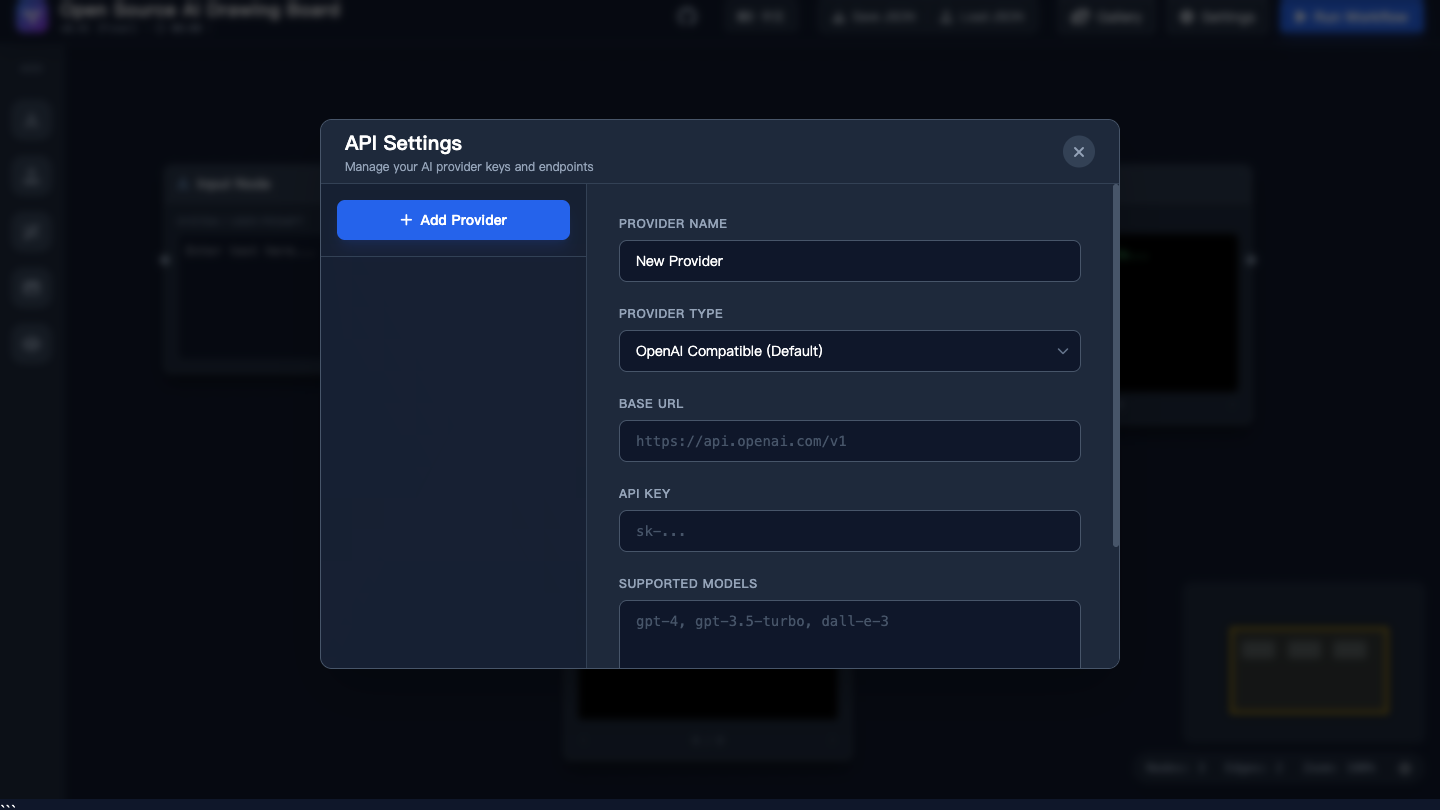
The form shows that configuration includes a provider URL and key. The capture contains upstream placeholders only and was neither saved nor sent.
About this image and its source
Pinned Open Source AI Drawing Board interface, © 2025 Junjun Huai, MIT; reproduced in an offline fixture and converted losslessly to WebP by BitShovel. The upstream author does not participate in or endorse BitShovel.
Open source page ↗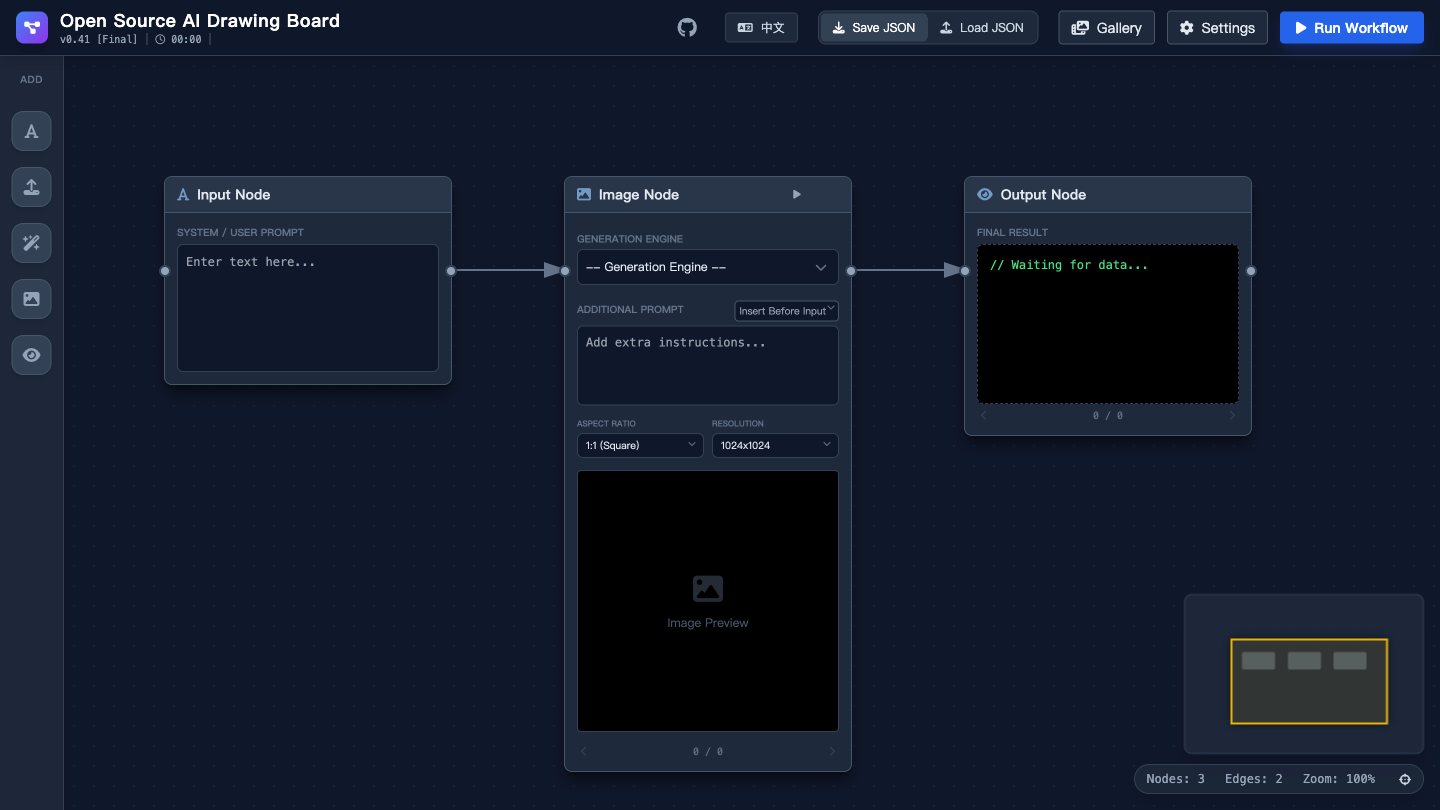
BitShovel imported and exported only three empty nodes. There was no prompt, image, account, valid key, or generated result.
About this image and its source
Pinned Open Source AI Drawing Board interface, © 2025 Junjun Huai, MIT; reproduced without external network access and converted losslessly to WebP. The upstream author does not participate in or endorse BitShovel.
Open source page ↗SOURCES AND EVIDENCE
Sources and evidence
As of August 16, 2026, pinned code can show where this version stores data. MDN and OWASP describe browser-storage boundaries. None substitutes for a controlled network trial or provider review.
Open evidence boundary
The historical E1 relied on a maker practice post. Revision 3 adds the actual storage fields and request routes from pinned code plus independent browser-storage boundaries; there is still no live run or adoption outcome.
- 01Pinned implementation · Rechecked
Repository HEAD remains c443ec4: keys, autosave, and images are split across localStorage and IndexedDB
Open source boundary
The code writes `ai_workflow_api_sources` (including apiKey) and `ai_workflow_autosave` to localStorage, and image blobs to IndexedDB. OpenAI-compatible requests use an Authorization header; Gemini routes place the key in the URL query. This supports only an implementation finding for the pinned version.
Open original source ↗ - 02Pinned license · Rechecked
The pinned commit distributes its code and interface implementation under MIT
Open source boundary
BitShovel keeps a license copy and copyright notice with the four fixed interfaces. This is not participation or endorsement by the author.
Open original source ↗ - 03Browser-storage boundary · Rechecked
MDN: localStorage is origin-partitioned, persistent across closes, and shared by same-origin documents
Open source boundary
Stored in the browser describes origin and persistence; it does not make the value confidential from scripts running in that origin.
Open original source ↗ - 04Security-method boundary · Rechecked
OWASP: do not treat persistent browser storage as confidentiality for secrets
Open source boundary
OWASP notes that localStorage is readable by JavaScript and client-side storage should not be assumed confidential. This Dig therefore requires a capped, revocable key and leaves a real security review outside its boundary.
Open original source ↗ - 05Maker practice post · Rechecked
The creator published the canvas development journey and version progression
Open source boundary
The post helps explain why the node workflow exists. It is not a security review, provider privacy policy, or real-user outcome.
Open original source ↗
REVISION RECORD
Revision record
Revision 3 postpones the first live request until the route is acceptable.
Open 2 revisions
- Revision 2
Changed a product discovery into a check of key and asset destinations, cost, and deletion.
- Revision 3
Split “browser-local” into localStorage, IndexedDB, exports, and external requests. Stage one no longer needs a valid key or image generation; placeholders and empty nodes map the route first.
- What the record said before
- Begin with a small revocable API allowance and non-sensitive material, run one image, then record storage, requests, cost, export, and deletion.
- What changed
- Do not run a model first. Use an invalid placeholder key, empty nodes, browser storage, and exported JSON to complete the data-route card. Create a capped key for one non-sensitive request only if those boundaries are acceptable and a live request still needs confirmation.
WHAT THIS RECORD LEAVES
What this record leaves
Know where five things go before deciding whether the workflow is reusable.
If the five-row route card remains incomplete, a real key is not needed to fill the gaps. Keeping an unknown is more useful than turning “frontend-only” into “nothing leaves the device.”
Back to the Dig index