Agents in the OS and app privacy
Signal blocks screenshots by default: the AI assistant in your phone's OS can read your chats
On November 20, Signal president Meredith Whittaker announced that on iOS 27 the app now prevents screenshots by default, and that on Android it turns on its Screen security setting as soon as it detects an AI assistant trying to read the Signal screen — the same move Signal made against Microsoft's Recall on Windows 11 last year. The reason: Apple and Google are building agentic capabilities deep into their operating systems — Onscreen Awareness in Siri AI, Gemini Intelligence on Android — and these system-level agents “scan” what is on the screen in order to answer questions, so chat content is captured, stored and made available to whatever local database or remote server the agent is using at that moment; end-to-end encryption and a formally verified protocol do not reach this layer. Signal calls this an existential threat. Users can turn the protection off, but Signal says doing so exposes their own and their contacts' content to these agents and breaks its privacy guarantees, and it admits the remedy is incomplete — sneakier paths such as the filesystem are not covered, and on macOS there is no usable API, so macOS 27 users are told to add Signal to the Excluded Apps list in Siri settings. Signal also names third-party agents such as Meta's Muse, which reach app data through deep permissions users are nudged to grant during setup, leaning on accessibility settings, and it asks Apple, Google and Microsoft for an easy developer opt-out and accurate documentation. The argument has a prehistory: when Siri AI launched in September, neither users nor developers could block onscreen awareness (EFF's hands-on test), and an Excluded Apps list in one setting arrived only with iOS 27.2 — a list on the user's side, where what Signal wants is for the app to be out by default.
This piece rests on Signal's official blog post of November 20 (read by this site on November 23) and, to check the other side, on first-party and hands-on materials: Apple's September 14 press release for Siri AI, the Apple Support page “How to get Siri AI”, the iOS 27 update notes, Google's May 12 blog on the security and privacy of Gemini Intelligence, the Android Help page on Gemini Intelligence, and two EFF hands-on posts, September 18 (updated October 28) and October 28 (all read in full); TechCrunch's November 21 relay was read in full to check its wording. Three boundaries: Signal's account of what OS agents do comes from its own months of forensics, alongside its complaint about the lack of documentation, and is one party's technical judgment; Apple's and Google's descriptions of their own designs are quoted as written and do not substitute for Signal's claims, or vice versa; this site ran no screen-reading test on any device, and settings paths are given with their English interface names.
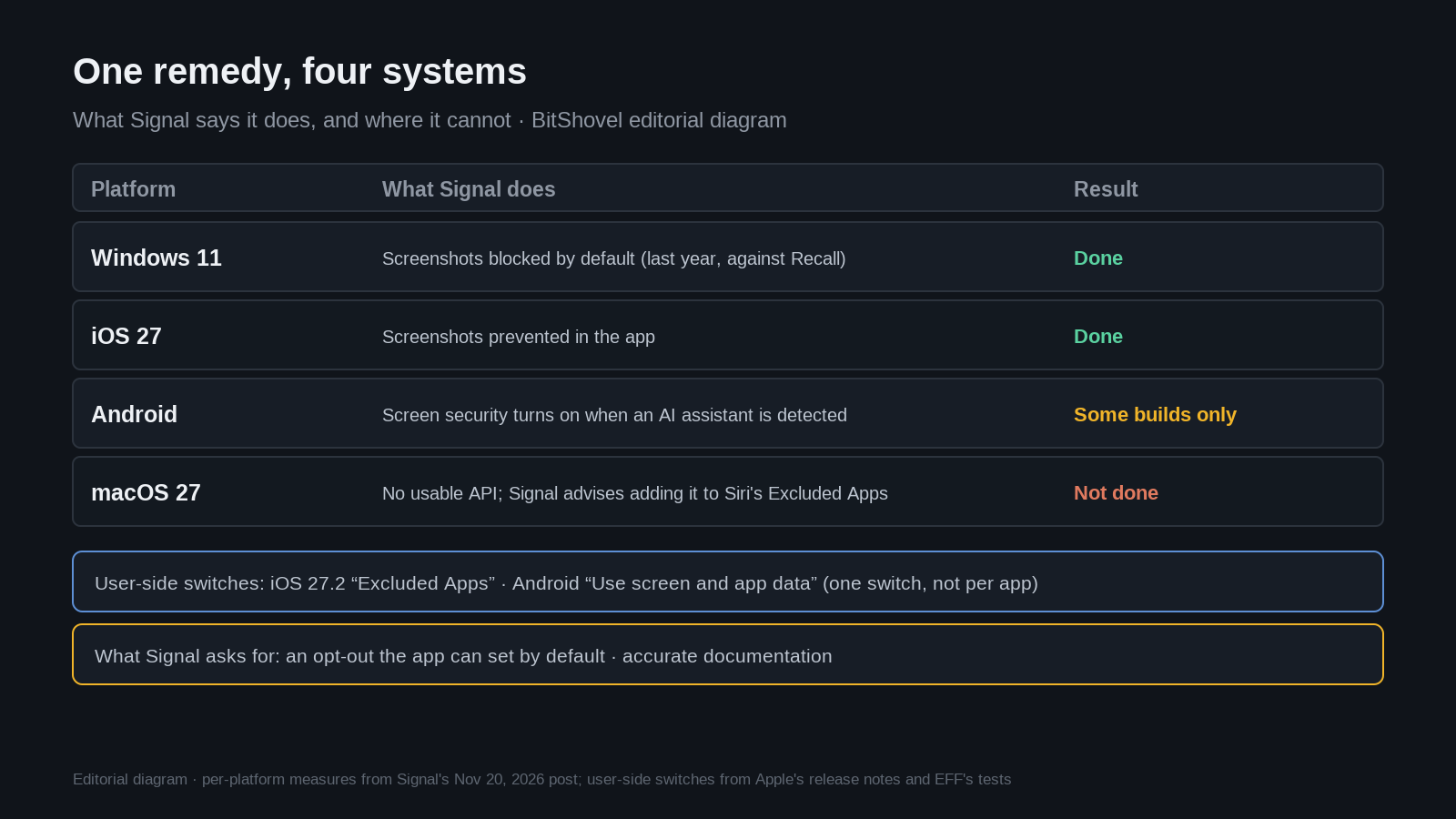
What Signal changed: four systems, three outcomes
On November 20, Signal president Meredith Whittaker announced a change that sounds small on the official blog: restricting the latest AI agents built into mobile operating systems from potentially capturing and storing your Signal data. Signal has done this once before — last year it blocked screenshots by default on Windows so that Microsoft's Recall could not take and store screenshots of Signal messages. As Signal's footnote describes it, Recall captures the screen every few seconds, extracts the text from those screenshots by optical character recognition and populates a searchable on-device database; it could expose and retain Signal data indefinitely, including disappearing messages. This time the same remedy moves to the phone: iOS 27 and Android.
The mechanics differ between the two systems. On iOS 27, Signal simply prevents screenshots inside the app. On Android, what Signal blocks is the act of an AI assistant attempting to capture screen data — the footnote explains why: beyond Google's own Pixel builds there are many versions of Android, and on many vendors' systems, once screenshots are already disabled, Signal has no reliable way to tell that someone tried to take one; rather than have screenshots silently stop working and confuse users, it concentrates on detecting when an AI assistant reaches the screen and, on detecting that, automatically turns on the “Screen security” setting in Signal for Android. After those two comes macOS: Signal writes that it cannot reliably block screenshots there — the available APIs have been deprecated in favor of protections that work only for streaming and other DRM-protected content, and trying to implement the block revealed “a minefield of bewildering decisions”. So its advice to macOS 27 users is manual: add Signal to the Excluded Apps section of System Settings > Siri.
Three things Signal says up front. First, the protection can be switched off: people who want screenshots can disable it in Signal's settings, but Signal says doing so will potentially expose their own and their contacts' Signal content to these AI agents and break its privacy guarantees — one sentence with two parties in it: one person makes the choice, everyone in the conversation lives with it. Second, the remedy is incomplete: restricting screenshots does not address sneakier ways AI agents could reach app data, such as retrieving content already on the device through the filesystem. Third, this is not a matter of Signal choosing not to go further; it cannot: app developers lack robust tools, and even where Signal can detect and block, Google, Apple and Microsoft provide no way for developers to restrict AI data access without drastic compromises to the core user experience — the macOS gap is exactly that. To learn how these agents actually work, Signal says it has spent considerable developer time over the past months on forensic investigations across Android and iOS, for lack of documentation.
Sources and further reading
- Signal's official blog: Signal is Serious About Protecting Your PrivacyThe party's official statement (Meredith Whittaker) · published Nov 20, 2026 · read in full Nov 23Read in full. Signal announces that it is restricting the latest AI agents built into mobile operating systems from potentially capturing and storing Signal data. It did this once before on Windows: last year screenshot blocking prevented Microsoft's Recall AI from taking and storing screenshots of Signal messages on Windows 11 by default (footnote 1: Recall captures the screen every few seconds, extracts text by optical character recognition and populates a searchable on-device database, potentially exposing and retaining Signal data indefinitely, including disappearing messages). Similar measures now apply to iOS 27 and to Android versions where it can detect an AI assistant attempting to read the Signal screen: preventing screenshots in the app on iOS 27, and blocking when AI assistants attempt to capture screen data on Android (footnote 2: beyond Google's Pixel distributions there are many Android versions, and on many vendors' builds there is no reliable way to detect a screenshot attempt once screenshots are already disabled; rather than confuse users, Signal focuses on detecting AI assistant access and automatically enables the “Screen security” setting in Signal Android when it is detected). Framing: Gemini Intelligence with Google Gemini and Onscreen Awareness with Siri AI are integrated deep into the operating systems; the three consumer operating systems are “the oceans in which Signal, and other applications, must swim”; OS AI agents “scan” the information on the screen, Signal data is captured and made available to them, and a guarantee backed for over a decade by an open-source code base and a formally verified protocol is being undermined — sensitive data is captured, stored and made accessible to whatever local database or remote server an OS-level AI agent is using at that moment, outside Signal's control once captured and imperiling every participant. People can disable the protection in Signal's settings, which Signal says will potentially expose their own and their contacts' content and break its privacy guarantees. The remedy is incomplete: it does not address sneakier routes such as retrieving content already on the device via the filesystem. Developers lack robust tools, and even where Signal can detect and block, Google, Apple and Microsoft provide no way to restrict AI data access without drastic compromises to the core user experience — also why the protection cannot be implemented on macOS (footnote 3: screenshots cannot be reliably blocked on macOS; existing screen-protection APIs are deprecated in favor of solutions that only work for streaming and DRM-protected media; macOS 27 users are advised to add Signal to the Excluded Apps section in System Settings > Siri). Documentation is lacking, and Signal has spent months on forensic investigations across Android and iOS. Two asks: developers should have an easy, well-documented way to opt their app out of AI data access and processing (screen reading, filesystem, notifications, APIs and other frameworks), and OS vendors should write better documentation and technical specifications on how these agents function — confidential computing is not a complete solution and leaves the extent of privacy guarantees in the providers' hands. It also flags third-party agents such as Meta's Muse that use deep permissions users are encouraged to grant during setup, leveraging accessibility settings meant to empower people, not to act as a skeleton key. Signal is in conversations across the ecosystem, is “cautiously optimistic” that Google and Apple are engaging, hopes to have more to share soon, and calls itself the canary in the coal mine.
- TechCrunch's relay: Signal restricts mobile screenshotsRelay · published Nov 21, 2026 · read in full Nov 23 · used to check the relay's wordingRead in full (Anthony Ha, a two-minute brief); the lead this story entered through. It matches Signal's post: screenshots were already blocked by default on Windows, similar restrictions now come to Android and iOS, users can disable the setting — which Signal says would “break our privacy guarantees” — and Signal concedes the solution is “incomplete”, not addressing “other more sneaky ways AI agents could potentially access application data”. The relay quotes “existential threat” and the line about undermining Signal's ability to independently guarantee privacy. Not covered: the macOS gap and the advice to users, the naming of third-party agents such as Meta's Muse and accessibility settings, the two specific asks, and the months of forensics done for lack of documentation — those appear only in Signal's own post.
The layer encryption cannot reach: the plaintext on your screen
To see why Signal uses the words “existential threat”, look first at what it thinks has changed. For more than a decade Signal's guarantee rested on two things: an open-source code base anyone can audit, and a formally verified encryption protocol scrutinized by some of the best security experts in the world. That guarantee covers messages as they travel and as they are stored. What is new, Signal says, is that the makers of the three major consumer operating systems — Google with Android, Apple with iOS and macOS, Microsoft with Windows — are integrating agentic capabilities deep into the OS: Gemini Intelligence on one side, Onscreen Awareness in Siri AI on the other. These systems are “the oceans in which Signal, and other applications, must swim”; they set the conditions of life for everything built on them. And to gain information about you, the OS-level AI agents “scan” what is on your screen; your Signal data is captured and handed to these agents so that they can answer your questions and do your bidding.
What happens after capture is where the two accounts truly diverge. Signal's description: sensitive data is captured, stored, and made accessible to “whatever local database or remote server an OS-level AI agent is using at that moment” — once captured it is outside Signal's control, and the privacy of every participant in the conversation is imperiled. Apple's and Google's descriptions of their own designs are another matter. Apple's September 14 release says Siri AI's models run on device and on Private Cloud Compute servers, that when PCC handles requests “their personal data is not stored nor made accessible to Apple or anyone else”, and that outside experts can keep verifying that promise. Google's May 12 blog sets three principles for Gemini Intelligence — explicit user control (“Gemini can only access the apps you allow it to work in”), comprehensive data protection (technologies such as Private Compute Core and Private AI Compute for ambient data), and operational transparency. The two accounts do not quite meet: the vendors answer “will our systems see and store it”, Signal answers “can the app still guarantee anything on its own”. Its reply to the first is one sentence: confidential computing approaches are not a complete solution, because the power to determine the extent of privacy guarantees still rests with these providers.
EFF's September hands-on guide puts the difference more bluntly. Siri AI sometimes processes on the device and sometimes sends data to Private Cloud Compute, and the user cannot see which is which; Apple says what goes to PCC is not stored after processing, but EFF cautions: “‘Private’ means the system is engineered so that Apple shouldn't be able to see or store the data, but it doesn't mean it's encrypted or doesn't leave the device.” That is the real line between end-to-end encryption and onscreen awareness: the first is a promise third parties can verify mathematically — the provider itself cannot read it; the second is trust in engineering and in a pledge. By keeping content off the screenshot path, Signal in effect falls back on the first approach: since it cannot verify what the other side saw, it starts by not handing it over. One more fact matters to readers in Chinese: per Apple's support page, Siri AI does not currently support Chinese and does not work for accounts set in mainland China. For them the threat in this round is not yet on their own phone — though it may well be on the phone of whoever sits at the other end of the chat.
Sources and further reading
- Signal's official blog: Signal is Serious About Protecting Your PrivacyThe party's official statement (Meredith Whittaker) · published Nov 20, 2026 · read in full Nov 23Read in full. Signal announces that it is restricting the latest AI agents built into mobile operating systems from potentially capturing and storing Signal data. It did this once before on Windows: last year screenshot blocking prevented Microsoft's Recall AI from taking and storing screenshots of Signal messages on Windows 11 by default (footnote 1: Recall captures the screen every few seconds, extracts text by optical character recognition and populates a searchable on-device database, potentially exposing and retaining Signal data indefinitely, including disappearing messages). Similar measures now apply to iOS 27 and to Android versions where it can detect an AI assistant attempting to read the Signal screen: preventing screenshots in the app on iOS 27, and blocking when AI assistants attempt to capture screen data on Android (footnote 2: beyond Google's Pixel distributions there are many Android versions, and on many vendors' builds there is no reliable way to detect a screenshot attempt once screenshots are already disabled; rather than confuse users, Signal focuses on detecting AI assistant access and automatically enables the “Screen security” setting in Signal Android when it is detected). Framing: Gemini Intelligence with Google Gemini and Onscreen Awareness with Siri AI are integrated deep into the operating systems; the three consumer operating systems are “the oceans in which Signal, and other applications, must swim”; OS AI agents “scan” the information on the screen, Signal data is captured and made available to them, and a guarantee backed for over a decade by an open-source code base and a formally verified protocol is being undermined — sensitive data is captured, stored and made accessible to whatever local database or remote server an OS-level AI agent is using at that moment, outside Signal's control once captured and imperiling every participant. People can disable the protection in Signal's settings, which Signal says will potentially expose their own and their contacts' content and break its privacy guarantees. The remedy is incomplete: it does not address sneakier routes such as retrieving content already on the device via the filesystem. Developers lack robust tools, and even where Signal can detect and block, Google, Apple and Microsoft provide no way to restrict AI data access without drastic compromises to the core user experience — also why the protection cannot be implemented on macOS (footnote 3: screenshots cannot be reliably blocked on macOS; existing screen-protection APIs are deprecated in favor of solutions that only work for streaming and DRM-protected media; macOS 27 users are advised to add Signal to the Excluded Apps section in System Settings > Siri). Documentation is lacking, and Signal has spent months on forensic investigations across Android and iOS. Two asks: developers should have an easy, well-documented way to opt their app out of AI data access and processing (screen reading, filesystem, notifications, APIs and other frameworks), and OS vendors should write better documentation and technical specifications on how these agents function — confidential computing is not a complete solution and leaves the extent of privacy guarantees in the providers' hands. It also flags third-party agents such as Meta's Muse that use deep permissions users are encouraged to grant during setup, leveraging accessibility settings meant to empower people, not to act as a skeleton key. Signal is in conversations across the ecosystem, is “cautiously optimistic” that Google and Apple are engaging, hopes to have more to share soon, and calls itself the canary in the coal mine.
- Apple Newsroom: Siri AI, a profoundly more capable and personal assistant, is hereApple's official press release · published Sep 14, 2026 · read in full Nov 23Read in full. Apple's definition of Siri AI and its privacy design. Onscreen awareness: Siri AI can answer questions or take actions related to the content on a user's screen — for example, while viewing a sports team's website, asking Siri to find all upcoming home games and add them to the calendar; invoked by “Hey Siri”, the side button or a swipe down from the Dynamic Island, integrated into Spotlight on iPad and Mac, and available in systemwide context menus for images, files or text on screen. Access: personal context understanding (messages, mail, photos and more), app actions, Visual Intelligence. Privacy design: models run on device and on servers using Private Cloud Compute; when PCC handles requests, “their personal data is not stored nor made accessible to Apple or anyone else”, a promise outside experts can continue to verify; the Spotlight index and App Toolbox the orchestrator taps into work entirely on device; Apple calls Siri the world's most private digital assistant. Availability: iPhone 15 Pro models and later, iPhone 16 and later, among others; Siri AI initially unavailable on iOS, iPadOS and watchOS in the EU. Used here as the vendor's own design statement set beside Signal's judgment, not as a response to Signal's post.
- Google's official blog: Android's Agentic Future: Building Gemini Intelligence on a Foundation of Security & PrivacyGoogle's official blog · published May 12, 2026 · read in full Nov 23Read in full (Dave Kleidermacher, VP, Platforms Security and Privacy). Framing: Android is evolving from an operating system into an intelligence system, and Gemini Intelligence lets the device deeply understand context, anticipate needs and complete tasks on your behalf; the principles cover both user-initiated tasks (asking Gemini to automate apps, autofill) and AI operating in the background on your behalf (Magic Cue). Three principles. Explicit user control: whole features can be turned on or off, with granular control over parts (connecting Gemini to Autofill is strictly opt-in); “Gemini can only access the apps you allow it to work in, and not the rest of your device”, and purchases require user confirmation. Comprehensive data protection: technologies such as Private Compute Core, Private AI Compute and protected KVM safeguard ambient data processed by proactive features, on the same architecture that already protects Google products, with new safeguards against prompt injection. Operational transparency: a “View progress” option and an undismissable notification chip while automating an app's interface; the Android Privacy Dashboard will soon show which AI assistants were active and which apps they used in the last 24 hours; key parts of the security architecture are open-source, binary transparent and third-party audited. Used here as Google's design principles; Signal's line that confidential computing is not a complete solution speaks to approaches of this kind.
- Android Help: Learn about Gemini Intelligence on your phoneGoogle's official help document · read in full Nov 23Read in full. Gemini Intelligence indicates that a phone meets the system standards required to run Google's best Gemini experiences: 12GB+ RAM, a qualified system on chip, advanced on-device AI processing and more. Features: automating multi-step tasks across select apps (groceries, reservations, shopping); proactive suggestions that connect the dots across apps to surface relevant information — an airline booking reference, a recommended restaurant — when it is needed; Rambler voice cleanup; Gemini Notebook; writing tools in the keyboard; sign-to-text; custom home-screen widgets; device assistance (alarms and timers, opening apps, reading and replying to notifications). Settings: with Proactive Assistance, “Gemini can understand details on your screen and signals from your device to provide proactive suggestions”; the setup page reads “Gemini can help with what's on your screen”, and users can choose which on-device sources to enable, including messages and screenshots; some features require Personal Intelligence or setting Gemini as the default assistant. Used here to confirm Google's own wording about understanding what is on the screen and where the switch sits.
- EFF: How to Limit What Apple's New Siri AI Can Access in iOS 27EFF's hands-on guide · published Sep 18, updated Oct 28, 2026 · read in full Nov 23Read in full. Once Siri AI is on, Siri and Spotlight are combined; by default it searches Apple apps such as Notes, Messages and Mail, and reaches third-party apps only if the developer opts in — for apps that do not, Siri AI cannot access the contents “(unless it's shared screenshot-style via a new feature called ‘on-screen awareness’)”. Processing is sometimes on device and sometimes on Apple's Private Cloud Compute, meaning data is sent off the device; the Apple Intelligence Report can be consulted, but the user gets no immediate sign of when data leaves. EFF's caution: Apple says what is sent to PCC is not stored after processing, but “‘Private’ means the system is engineered so that Apple shouldn't be able to see or store the data, but it doesn't mean it's encrypted or doesn't leave the device.” The limits available at the time: Settings > Apps > [app] > Search, turning off “Show Content in Search”; the “App Access” settings are mostly about personalization rather than access to contents. On on-screen awareness: one can ask it to summarize a Signal group chat or a meme in WhatsApp, and the data “may be sent to PCC”; “There is currently no way for you or app developers to block this feature”, leaving it to users and those they chat with not to use it; EFF wanted a means for developers to block it and, better, a single control to block all Siri AI features from an app. It also covers opting out of “Improve Siri & Dictation” and reverting to Siri Classic through Screen Time.
The user's list, and the app's default
The argument did not begin on November 20. When Siri AI launched in September, EFF published a guide to limiting it and concluded that onscreen awareness was the worrying part: one could ask it to summarize a Signal group chat being viewed, the data may be sent to PCC, and “There is currently no way for you or app developers to block this feature” — leaving it to you, and those you chat with, not to use it. EFF's ask was plain: you should be able to tell the operating system's AI not to access an app even at the cost of missing some features, and the setting should be easy to understand. iOS 27.2, in late October, delivered Apple's answer in one line of release notes: “Excluded Apps lets you choose which apps Siri, Search, and suggestions can access, all from one setting.” EFF's October 28 hands-on post is titled “Victory!”: once Signal is excluded, even onscreen awareness stops working; once Messages is excluded, Siri AI can no longer read or respond to messages — for EFF, the features breaking is exactly what shows the setting is effective.
On Android, EFF's account shows the distance between “a switch exists” and “the switch is enough”. Gemini's Connected Apps is an opt-in list that can be revoked app by app; Signal is not on it because Signal does not support Gemini's app access feature at all, so Gemini cannot read Signal's content directly. But there are two ways around that: with “Device Assistance” on — needed for basics like setting a timer, so most people likely have it on — Gemini can read notifications; and unless “Device controls > Screen context > Use screen and app data” is turned off in Gemini's settings, it can use screen context. EFF says both may reach Signal's content or notifications, that both can only be switched off as a whole rather than per app, and it asks Google for per-app controls. Set the adjustments side by side and a pattern appears: what the OS vendors provide is a user-side list or a master switch, to be found and filled in by each user; what Signal asks for on November 20 is something else — “Developers should have an easy and well-documented way to opt their app out of AI data access and processing”, covering screen reading, filesystem access, notifications, APIs and other OS frameworks.
Why the default matters comes clear the moment the conversation has two people in it again. A user-side list protects only the phone of the person who finds it and adds the apps they care about; if the person at the other end has not done the same, the same conversation can still be read from that phone. Signal's move flips the default: once the app is updated, the protection applies to everyone — at the price of screenshots stopping for everyone, which is the “drastic compromise to the core user experience” Signal describes, except that this time the app chose it for itself. One more category lies beyond what it can block: third-party agents. Signal names Meta's Muse — agents that users are encouraged to grant deep permissions during setup, leaning on accessibility settings that were meant to help the people who actually need them use their apps, not to serve as a skeleton key for an AI. Signal says it is talking across the ecosystem, is “cautiously optimistic” about its engagement with Google and Apple, and hopes to have more to share soon. It places itself as the canary in the coal mine: it is the first to feel the air go bad, and the whole ecosystem breathes the same air.
Sources and further reading
- Signal's official blog: Signal is Serious About Protecting Your PrivacyThe party's official statement (Meredith Whittaker) · published Nov 20, 2026 · read in full Nov 23Read in full. Signal announces that it is restricting the latest AI agents built into mobile operating systems from potentially capturing and storing Signal data. It did this once before on Windows: last year screenshot blocking prevented Microsoft's Recall AI from taking and storing screenshots of Signal messages on Windows 11 by default (footnote 1: Recall captures the screen every few seconds, extracts text by optical character recognition and populates a searchable on-device database, potentially exposing and retaining Signal data indefinitely, including disappearing messages). Similar measures now apply to iOS 27 and to Android versions where it can detect an AI assistant attempting to read the Signal screen: preventing screenshots in the app on iOS 27, and blocking when AI assistants attempt to capture screen data on Android (footnote 2: beyond Google's Pixel distributions there are many Android versions, and on many vendors' builds there is no reliable way to detect a screenshot attempt once screenshots are already disabled; rather than confuse users, Signal focuses on detecting AI assistant access and automatically enables the “Screen security” setting in Signal Android when it is detected). Framing: Gemini Intelligence with Google Gemini and Onscreen Awareness with Siri AI are integrated deep into the operating systems; the three consumer operating systems are “the oceans in which Signal, and other applications, must swim”; OS AI agents “scan” the information on the screen, Signal data is captured and made available to them, and a guarantee backed for over a decade by an open-source code base and a formally verified protocol is being undermined — sensitive data is captured, stored and made accessible to whatever local database or remote server an OS-level AI agent is using at that moment, outside Signal's control once captured and imperiling every participant. People can disable the protection in Signal's settings, which Signal says will potentially expose their own and their contacts' content and break its privacy guarantees. The remedy is incomplete: it does not address sneakier routes such as retrieving content already on the device via the filesystem. Developers lack robust tools, and even where Signal can detect and block, Google, Apple and Microsoft provide no way to restrict AI data access without drastic compromises to the core user experience — also why the protection cannot be implemented on macOS (footnote 3: screenshots cannot be reliably blocked on macOS; existing screen-protection APIs are deprecated in favor of solutions that only work for streaming and DRM-protected media; macOS 27 users are advised to add Signal to the Excluded Apps section in System Settings > Siri). Documentation is lacking, and Signal has spent months on forensic investigations across Android and iOS. Two asks: developers should have an easy, well-documented way to opt their app out of AI data access and processing (screen reading, filesystem, notifications, APIs and other frameworks), and OS vendors should write better documentation and technical specifications on how these agents function — confidential computing is not a complete solution and leaves the extent of privacy guarantees in the providers' hands. It also flags third-party agents such as Meta's Muse that use deep permissions users are encouraged to grant during setup, leveraging accessibility settings meant to empower people, not to act as a skeleton key. Signal is in conversations across the ecosystem, is “cautiously optimistic” that Google and Apple are engaging, hopes to have more to share soon, and calls itself the canary in the coal mine.
- Apple Support: How to get Siri AIApple Support document · page dated Nov 12, 2026 · read in full Nov 23Read in full. Siri AI (Beta), powered by the next generation of Apple Intelligence, is deeply integrated across Apple devices; it understands personal context across messages, emails, photos and more, “can answer questions about what's on your screen”, and can reach the web for up-to-date information. Its feature list describes onscreen awareness as asking about and taking action on what is on your screen. Privacy and limits: turning it on includes a review of privacy settings; certain Apple Intelligence features that rely on server-side models are subject to daily usage limits, including Siri AI, with expanded access to be available for a fee in the future; Siri AI is not available to users under 13; it is not offered on iOS, iPadOS or watchOS in the EU; it will not currently work if the Apple Account region is in mainland China; supported languages are English, French, Japanese, Korean, Portuguese and Spanish. Device requirements include iPhone 15 Pro models and later and iPhone 16 models or later on iOS 27. Used here to confirm the official definition of onscreen awareness and the availability facts that matter to readers in mainland China.
- Apple Support: About iOS 27 Updates (iOS 27.2 release notes)Apple's iOS 27 update notes · page dated Nov 9, 2026 · read in full Nov 23Read in full. For iPhone 16 models and later and iPhone 15 Pro models, iOS 27.2's Siri AI enhancements include recalling past conversations; drawing from more sources, including photos attached in Messages, Calendar event attendees, voicemails and better results from Safari history and Reading List; “Excluded Apps lets you choose which apps Siri, Search, and suggestions can access, all from one setting”; and availability in more languages — French, Japanese, Korean, Portuguese and Spanish — while remaining unavailable in the EU and mainland China. The notes for the first iOS 27 release say a more capable, conversational Siri is rolling out with personal context understanding, app actions, onscreen awareness and access to broad world knowledge. Used here to establish that Excluded Apps is a user-side switch that arrived with iOS 27.2, more than a month after Siri AI launched.
- EFF: How to Limit What Apple's New Siri AI Can Access in iOS 27EFF's hands-on guide · published Sep 18, updated Oct 28, 2026 · read in full Nov 23Read in full. Once Siri AI is on, Siri and Spotlight are combined; by default it searches Apple apps such as Notes, Messages and Mail, and reaches third-party apps only if the developer opts in — for apps that do not, Siri AI cannot access the contents “(unless it's shared screenshot-style via a new feature called ‘on-screen awareness’)”. Processing is sometimes on device and sometimes on Apple's Private Cloud Compute, meaning data is sent off the device; the Apple Intelligence Report can be consulted, but the user gets no immediate sign of when data leaves. EFF's caution: Apple says what is sent to PCC is not stored after processing, but “‘Private’ means the system is engineered so that Apple shouldn't be able to see or store the data, but it doesn't mean it's encrypted or doesn't leave the device.” The limits available at the time: Settings > Apps > [app] > Search, turning off “Show Content in Search”; the “App Access” settings are mostly about personalization rather than access to contents. On on-screen awareness: one can ask it to summarize a Signal group chat or a meme in WhatsApp, and the data “may be sent to PCC”; “There is currently no way for you or app developers to block this feature”, leaving it to users and those they chat with not to use it; EFF wanted a means for developers to block it and, better, a single control to block all Siri AI features from an app. It also covers opting out of “Improve Siri & Dictation” and reverting to Siri Classic through Screen Time.
- EFF: Victory! You Can Now Exclude Apps from Siri AIEFF's hands-on post · published Oct 28, 2026 · read in full Nov 23Read in full. iOS 27.2 introduced an “Exclude Apps” setting for Siri AI, fulfilling one ask of EFF's Encrypt It Already campaign earlier in the year: users should be able to tell the operating system's AI not to access an app even at the cost of missing some features, through a setting that is straightforward and easy to understand. At launch the controls were confusing — several toggles to block Siri AI from an app, or switching Siri AI off entirely. The new setting is far clearer: Settings > Siri > Excluded Apps > “Add Apps”; Siri AI then cannot access the app's contents, at the price of some features — exclude Apple Messages and Siri AI can no longer read or respond to messages; exclude Signal and even onscreen awareness stops working, so Siri cannot be asked to discern anything in the Signal app. For EFF, the features breaking shows that the setting is effective. On Android: open the Gemini app > profile photo > Settings > Personal Intelligence > Connected Apps to revoke apps; EFF likes that it is opt in but finds it unintuitive — Signal does not appear because Signal does not support Gemini's app access feature at all, so Gemini cannot access Signal's content directly; but with the “Device Assistance” connected app enabled (likely, since it also enables basics like timers) Gemini can read notifications, and it can use screen context unless Device controls > Screen context > “Use screen and app data” is disabled — both may reach Signal's content or notifications, and EFF wants Google to let users turn them off per app. EFF also thinks Apple should go further and offer on-device-only AI features.
What you can check now
From the materials read, the doable things fit on a short list, with interface names in English. On an iPhone updated to iOS 27.2: Settings > Siri > Excluded Apps > Add Apps, and add Signal; EFF notes that onscreen awareness stops working for excluded apps. On macOS 27: Signal's own advice — add Signal under System Settings > Siri > Excluded Apps, because it cannot block screenshots there. On Android: first confirm Signal's Screen security is on; if you would rather Gemini not read the screen, go to Gemini Settings > Device controls > Screen context and turn off “Use screen and app data” — note that it is a single switch, so turning it off affects every app, not only Signal. And one item that sits in no menu: a list covers only your own device; whether the people you chat with did the same is something no menu can manage. This site did not test these paths on any device; everything above comes from the texts of Signal, Apple, Android Help and EFF.
Set back on the line this site follows, it is two faces of one capability. In our personal AI companion topic we recorded Muse making calls for you, Gemini Tasks handling calls, groceries and payments on the free tier, and Duet's proactive briefs — the convenience of “act for you”. Signal's post is the other half of the same thing: the ability to read a screen does not distinguish a recipe from a group chat, and what decides the outcome is the permission structure — who is excluded by default, who has to go and switch it off, and whether the person at the other end of the chat gets a say. Our Muse topic records how it moved from personal agent to wearable hardware; Signal's naming adds a footnote that line did not have: to an app developer, a third-party agent holding deep permissions can look like a way around the app's privacy guarantee. Three things are worth watching: what Signal says it will soon have more to share; whether Apple and Google offer a developer-side opt-out by default; and, across Android vendors' builds, how far Signal's detection actually reaches.
- Read Signal's blog postAbout five minutes; three footnotes explain Recall, the Android detection strategy and the macOS gap.
- Read EFF's hands-on test of Excluded AppsThe iOS 27.2 settings path, what stops working as a result, and the two Android controls that still cannot be set per app.
- Continue with our personal AI companions topicThe convenience side of AI acting for you — calls, shopping and tasks — to be read against this piece.
- Compare our Meta Muse topicThe record of Muse from personal agent to wearable hardware; Signal's November 20 post names the kind of permissions it leans on.
Sources and further reading
- Signal's official blog: Signal is Serious About Protecting Your PrivacyThe party's official statement (Meredith Whittaker) · published Nov 20, 2026 · read in full Nov 23Read in full. Signal announces that it is restricting the latest AI agents built into mobile operating systems from potentially capturing and storing Signal data. It did this once before on Windows: last year screenshot blocking prevented Microsoft's Recall AI from taking and storing screenshots of Signal messages on Windows 11 by default (footnote 1: Recall captures the screen every few seconds, extracts text by optical character recognition and populates a searchable on-device database, potentially exposing and retaining Signal data indefinitely, including disappearing messages). Similar measures now apply to iOS 27 and to Android versions where it can detect an AI assistant attempting to read the Signal screen: preventing screenshots in the app on iOS 27, and blocking when AI assistants attempt to capture screen data on Android (footnote 2: beyond Google's Pixel distributions there are many Android versions, and on many vendors' builds there is no reliable way to detect a screenshot attempt once screenshots are already disabled; rather than confuse users, Signal focuses on detecting AI assistant access and automatically enables the “Screen security” setting in Signal Android when it is detected). Framing: Gemini Intelligence with Google Gemini and Onscreen Awareness with Siri AI are integrated deep into the operating systems; the three consumer operating systems are “the oceans in which Signal, and other applications, must swim”; OS AI agents “scan” the information on the screen, Signal data is captured and made available to them, and a guarantee backed for over a decade by an open-source code base and a formally verified protocol is being undermined — sensitive data is captured, stored and made accessible to whatever local database or remote server an OS-level AI agent is using at that moment, outside Signal's control once captured and imperiling every participant. People can disable the protection in Signal's settings, which Signal says will potentially expose their own and their contacts' content and break its privacy guarantees. The remedy is incomplete: it does not address sneakier routes such as retrieving content already on the device via the filesystem. Developers lack robust tools, and even where Signal can detect and block, Google, Apple and Microsoft provide no way to restrict AI data access without drastic compromises to the core user experience — also why the protection cannot be implemented on macOS (footnote 3: screenshots cannot be reliably blocked on macOS; existing screen-protection APIs are deprecated in favor of solutions that only work for streaming and DRM-protected media; macOS 27 users are advised to add Signal to the Excluded Apps section in System Settings > Siri). Documentation is lacking, and Signal has spent months on forensic investigations across Android and iOS. Two asks: developers should have an easy, well-documented way to opt their app out of AI data access and processing (screen reading, filesystem, notifications, APIs and other frameworks), and OS vendors should write better documentation and technical specifications on how these agents function — confidential computing is not a complete solution and leaves the extent of privacy guarantees in the providers' hands. It also flags third-party agents such as Meta's Muse that use deep permissions users are encouraged to grant during setup, leveraging accessibility settings meant to empower people, not to act as a skeleton key. Signal is in conversations across the ecosystem, is “cautiously optimistic” that Google and Apple are engaging, hopes to have more to share soon, and calls itself the canary in the coal mine.
- EFF: Victory! You Can Now Exclude Apps from Siri AIEFF's hands-on post · published Oct 28, 2026 · read in full Nov 23Read in full. iOS 27.2 introduced an “Exclude Apps” setting for Siri AI, fulfilling one ask of EFF's Encrypt It Already campaign earlier in the year: users should be able to tell the operating system's AI not to access an app even at the cost of missing some features, through a setting that is straightforward and easy to understand. At launch the controls were confusing — several toggles to block Siri AI from an app, or switching Siri AI off entirely. The new setting is far clearer: Settings > Siri > Excluded Apps > “Add Apps”; Siri AI then cannot access the app's contents, at the price of some features — exclude Apple Messages and Siri AI can no longer read or respond to messages; exclude Signal and even onscreen awareness stops working, so Siri cannot be asked to discern anything in the Signal app. For EFF, the features breaking shows that the setting is effective. On Android: open the Gemini app > profile photo > Settings > Personal Intelligence > Connected Apps to revoke apps; EFF likes that it is opt in but finds it unintuitive — Signal does not appear because Signal does not support Gemini's app access feature at all, so Gemini cannot access Signal's content directly; but with the “Device Assistance” connected app enabled (likely, since it also enables basics like timers) Gemini can read notifications, and it can use screen context unless Device controls > Screen context > “Use screen and app data” is disabled — both may reach Signal's content or notifications, and EFF wants Google to let users turn them off per app. EFF also thinks Apple should go further and offer on-device-only AI features.