Model and creation · Multi-image editing
Ten furnishing references, one room: editing with Qwen-Image-2.1
Qwen combines generation, transparent assets and local edits. Start with an official room composition and consider where it fits your image workflow.
Images here are official examples. Corrected after checking the license on October 10: weights are available for non-commercial research or evaluation; commercial use requires a separate license. Hosted application access and terms are separate.
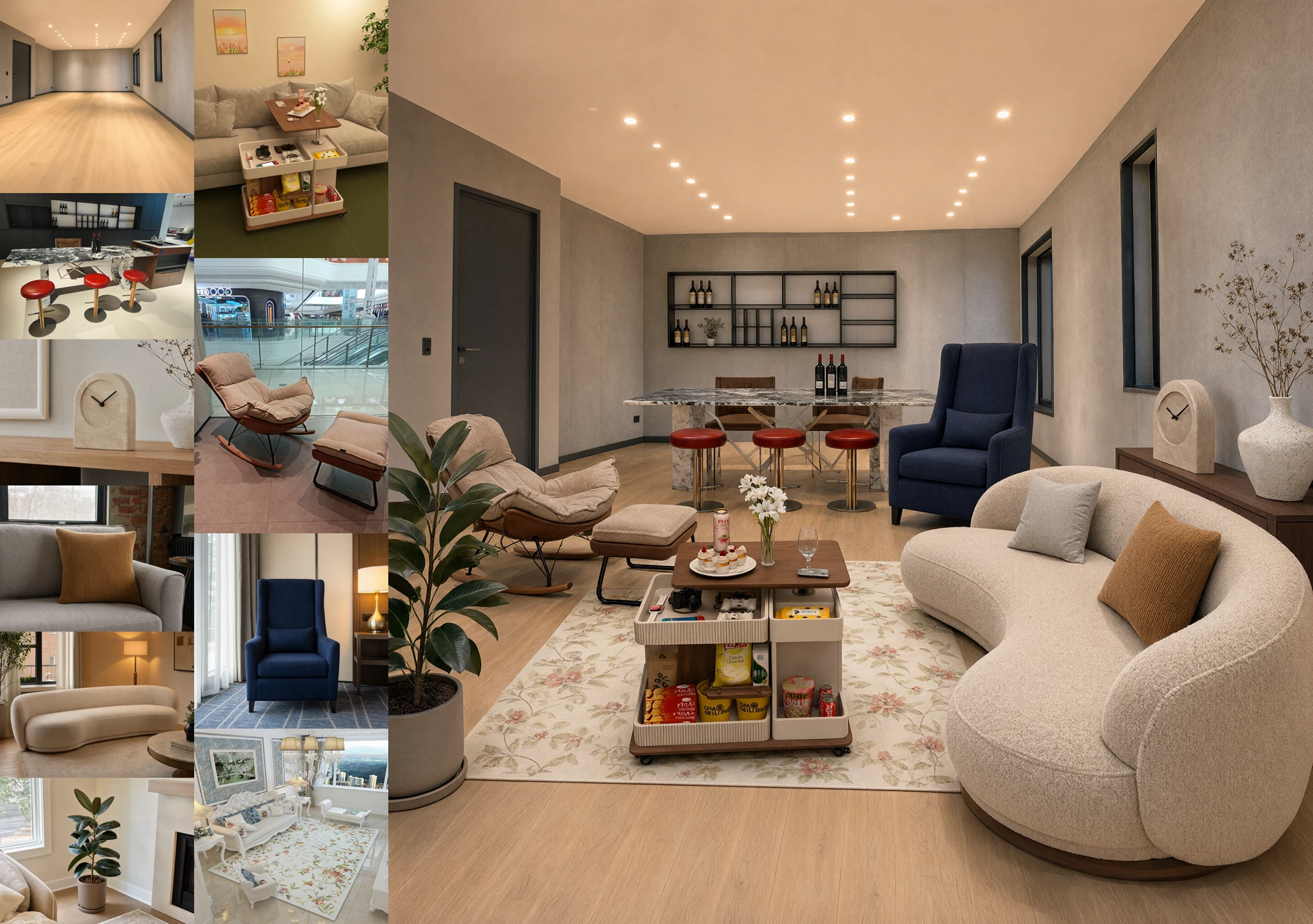
See how the references come together
Released September 20, Qwen-Image-2.1 accepts up to ten reference images. The team combines room and furnishing photos into one interior; another example brings a model, clothing and accessories into a complete outfit.
The starting point can shift from describing an imagined room to combining items you already have. The example demonstrates image composition; it does not establish physical fit, circulation space or a real renovation result.
Sources and further reading
- Qwen-Image-2.1 announcementOfficial · September 20Chinese announcement and images reviewed; capabilities and examples are from the model team.
- Qwen Research License · Original base-model licenseOriginal license · checked October 10Non-commercial research/evaluation and separate commercial permission; application service terms are distinct.
What can you change after generation?
The model unifies text-to-image generation and editing, with native transparent-image support. Examples show changing expressions or text while keeping transparency, and extracting a subject from an ordinary photograph.
Local edits can use circles, painted regions or a separate mask. For poster assets, establish the subject, then revise one detail. Check edges, text and regions that should remain unchanged. This is an editorial workflow suggestion, not our test.
Sources and further reading
- Qwen-Image-2.1 announcementOfficial · September 20Chinese announcement and images reviewed; capabilities and examples are from the model team.
A different step from yesterday’s room planner
Yesterday’s Step 5 example connects a photo to an editable 3D room. Qwen’s example composes multiple references into one image. Image editing can preview a visual combination; moving furniture and changing viewpoint call for a 3D tool.
If you already have an editing tool, compare the same image and requested change. Check subject preservation, text accuracy and ease of further revision before deciding whether to add another tool.
- Continue: a photo becomes a room you can rearrange
- Continue: four references, eight steps and access
- View the official project
Sources and further reading
- Qwen-Image-2.1 announcementOfficial · September 20Chinese announcement and images reviewed; capabilities and examples are from the model team.