Product integration · From answers to the original file
Claude in Google Workspace: keep editing the file you have
Start with an official budget-sheet demo, then distinguish the in-file sidebar from connectors in Claude: where edits land and which route fits the work.
Anthropic opened the Google Workspace add-on and new file connectors in beta on October 6. This reading uses official material checked October 9. Images are original demo frames, not our own account-level reproduction.
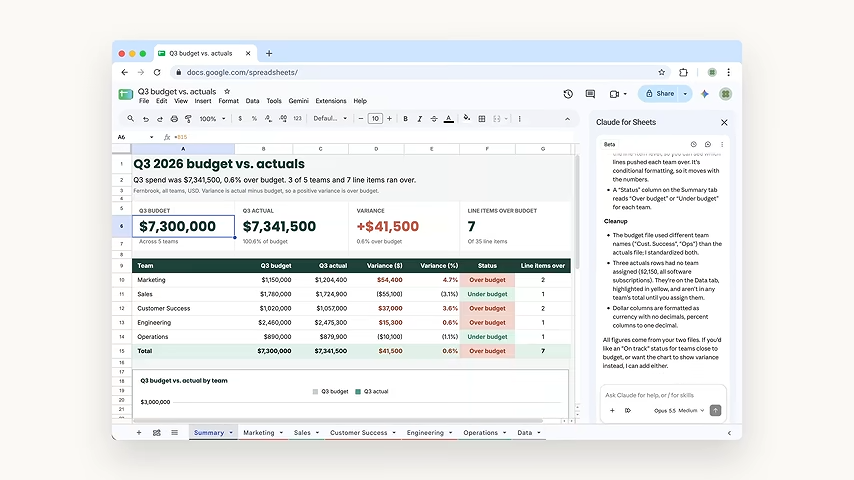
The result stays in the sheet for the next revision
The official demo organizes budget and actuals into a Google sheet with a summary, team tabs, variances and a chart. The conversation remains beside an editable result. Its sidebar shows Opus 5.5 Medium, identifying this example's selection rather than the only model the product supports.
The announcement also describes revising document summaries, turning next steps into a table and extending a deck's existing theme. For an existing file, the useful question is how well a revision continues its content and format.
Sources and further reading
- Anthropic · Google Workspace releaseOfficial release · October 6In-file editing, formatting and two entry routes.
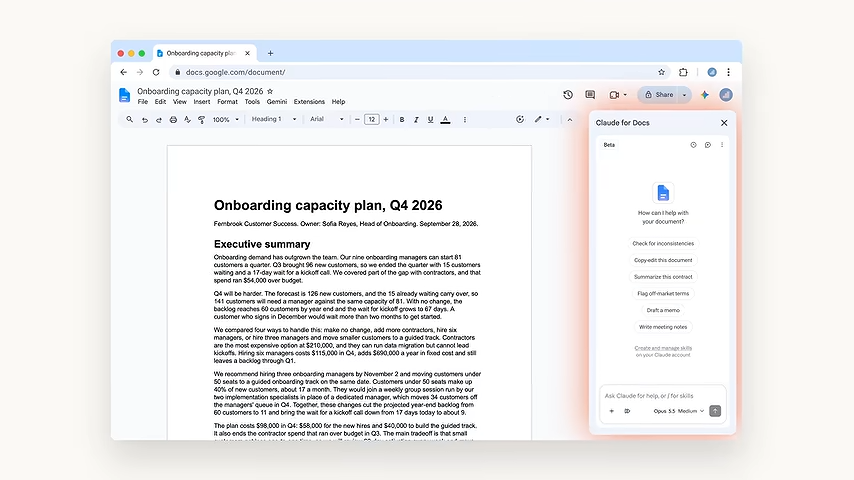
- Claude · One-minute official demoOfficial demonstration · selected framesThe document sidebar at about 12 seconds and budget result at 33 seconds; figures are demo data.
Edit inside the file, or start from Claude?
The add-on reads the open file and selection from a Docs, Sheets or Slides sidebar—useful for a paragraph or formula. The file connectors start in Claude: create or edit Google files by name or link, with a file pane on supported web and desktop setups.
The routes have different scopes. The sidebar cannot create or copy another Drive file; the file connectors can create files within your Google permissions. A Drive search connection does not automatically enable the separate editing connectors.
Sources and further reading
- Claude Help · The in-file sidebarOfficial instructions · checked October 9Plans, installation, edit history and current file/chart limitations.
- Claude Help · Google connectorsOfficial instructions · checked October 9Creating and editing Google files from Claude, distinct from the sidebar.
Check one edit, then the next update
The sidebar's default mode shows an edit card for approval. Changes enter Google's version history under your identity and can be undone or restored. It continues the question in our ChatGPT-in-Word reading: how a draft becomes a usable revision to the original file.
Charts need a further check. The announcement describes native Sheets charts; the sidebar help says new Slides charts are images and existing linked charts need a manual Update. Connector help separately says Slides chart insertion is unsupported. Specify the route and file instead of assuming automatic updates across a whole set of files.
Sources and further reading
- Anthropic · Google Workspace releaseOfficial release · October 6In-file editing, formatting and two entry routes.
- Claude Help · The in-file sidebarOfficial instructions · checked October 9Plans, installation, edit history and current file/chart limitations.
- Claude Help · Google connectorsOfficial instructions · checked October 9Creating and editing Google files from Claude, distinct from the sidebar.
Start with a file and subscription you already have
The sidebar beta supports Pro, Max, Team and Enterprise. Install the Marketplace add-on once, then open Claude from Extensions. Organization accounts may require admin approval. Chrome, Edge and Safari are supported; keep the sidebar open during work.
Our suggested trial is a familiar paragraph or cell range: review the proposed change, then inspect formatting, figures and references. Choose the connector route for a new file or materials across files. Compare your own result; the demo does not establish how an individual account will perform.
Sources and further reading
- Claude Help · The in-file sidebarOfficial instructions · checked October 9Plans, installation, edit history and current file/chart limitations.
- Claude Help · Google connectorsOfficial instructions · checked October 9Creating and editing Google files from Claude, distinct from the sidebar.