Developer creation · The next step on screen
BigArrow puts an agent’s next instruction beside the button
A large arrow and a sentence can mark the PDF control in a print dialog or the animation panel in Keynote. This small Mac tool brings an agent’s handoff into the actual interface: finding the target, drawing the instruction and completing the action are separate jobs.
Franz Enzenhofer shared the project on Hacker News on October 9. This reading follows the creator’s real Mac interface demos and published test record; BitShovel has not installed or run the tool.
Make the next step visible where it happens
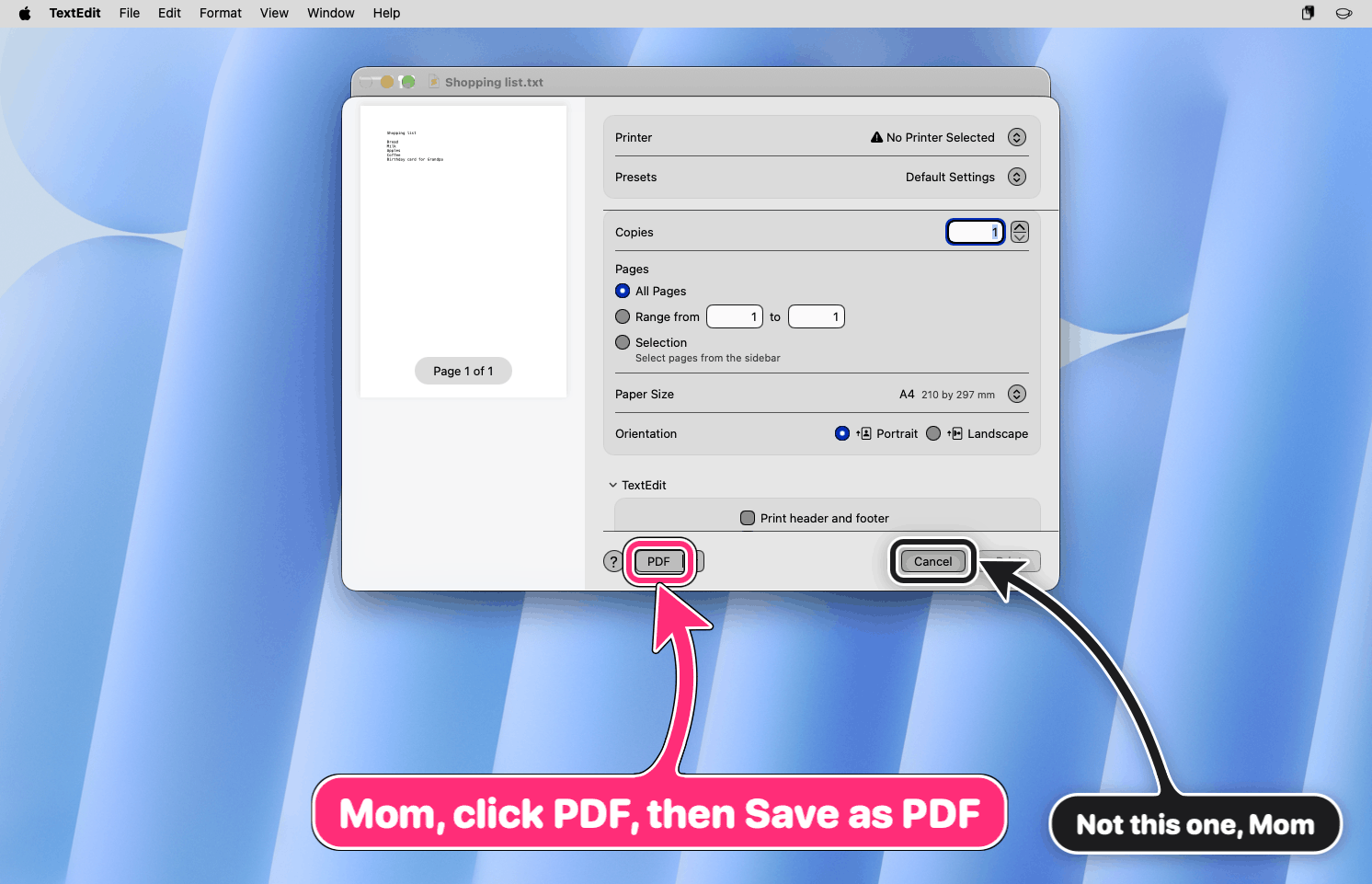
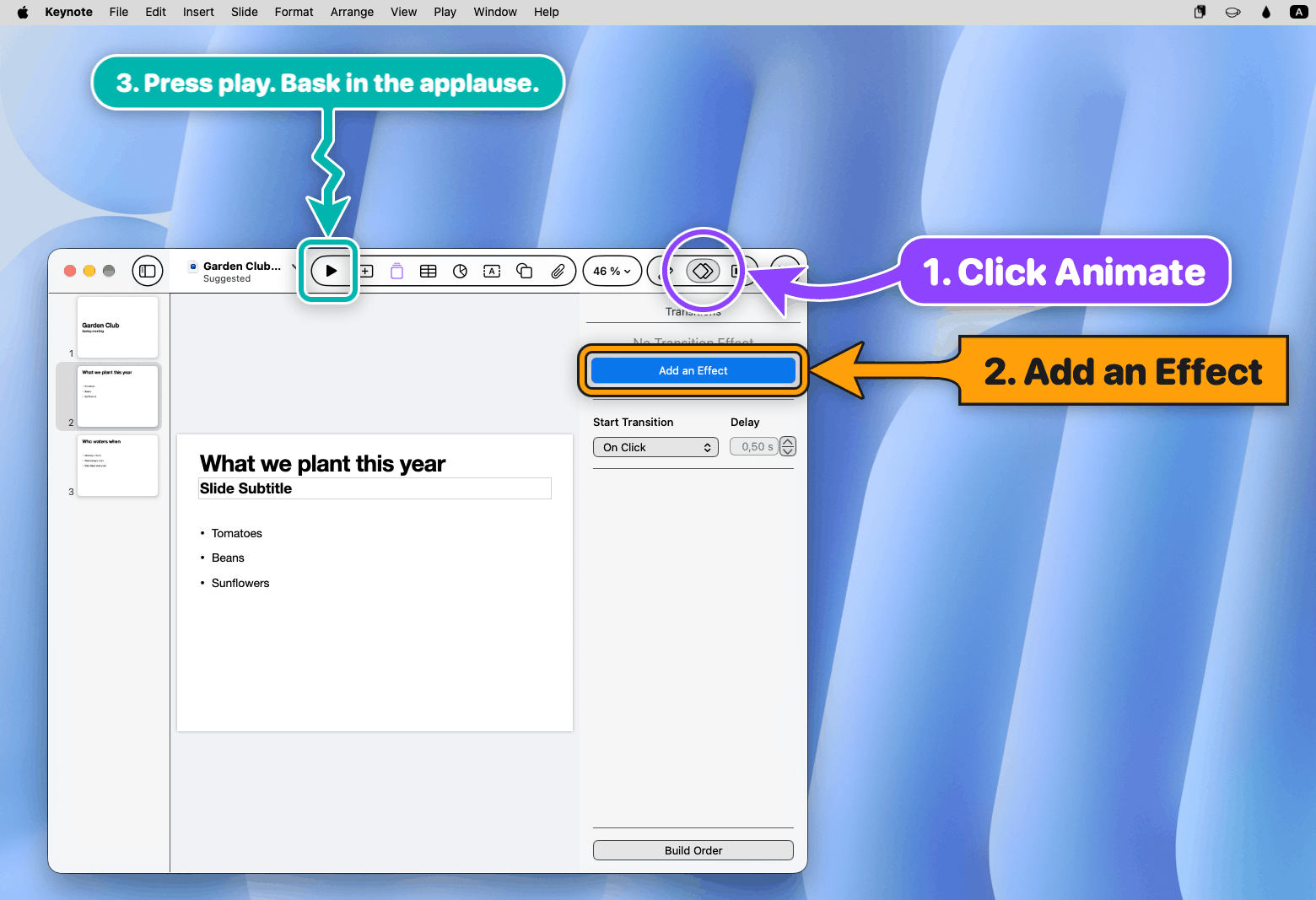
In TextEdit’s print dialog, a pink arrow marks the PDF control and asks the person to continue to saving; a black arrow identifies Cancel. A second image uses a ring, box and arrow to mark Keynote’s animation panel, effect control and Play button. The instructions sit over the actual software, so the person can see the target beside the instruction.
BigArrow is the Mac command-line tool that draws these marks. It contains no AI and does not click, type or capture the screen. Developers can connect it to agents such as Claude Code or Codex, giving the step waiting for a person a visible place on screen.
Sources and further reading
- BigArrow: project description and demosCreator’s project · October 10 source revision reviewedTool responsibilities, real and staged interface distinctions, installation and permissions.
- How the real-app demos were stagedCreator’s demo script · read-only reviewPrepares neutral documents and actual app interfaces on a test Mac, then overlays arrows. BitShovel did not run this script.
The agent finds a target; the person acts
The agent decides what to point out and what the sign should say. It can supply a control label for BigArrow to locate through macOS Accessibility, or provide coordinates it already has. The creator’s Skill asks it to open the precise page or settings panel first, then mark the remaining control. The person decides whether to authorize, sign or pay after seeing what the action means.
In a published October 8 test, a Claude Code subagent found Chrome’s Reload button by label, noticed that a terminal covered the browser, and added a window-raising option to its proposed command. The test explicitly used a dry run: it checked the target and command without drawing or asking a person to click. It also exposed a bug that could raise a window during a dry run; the creator reports fixing it.
Sources and further reading
- Instructions supplied to the agentCreator’s public Skill documentThe agent prepares the entry point and instruction; the person acts, then the result is checked.
- Chrome Reload: one Skill testCreator’s test record · October 8, 2026A Claude Code subagent locates the target by label, using a dry run without drawing an arrow or clicking.
Real apps, with scenes prepared for a demo
The two images here come from the creator’s real-app scenes: actual apps on a test Mac, neutral shopping-list and presentation material, then arrow commands. The README also has a creative gallery made with fake dialogs. These are different kinds of demonstrations; neither establishes that Mom learned to save a file or that an agent independently completed a Keynote presentation.
For a Mac setup, the project provides a Homebrew entry and an accompanying Skill. Its source declares macOS 14 or later and an MIT license. Drawing at supplied coordinates needs no system permission; finding controls by label requires Accessibility, and some window-title targeting also requires Screen Recording. These permissions belong to the terminal or app launching the command.
Sources and further reading
- BigArrow: project description and demosCreator’s project · October 10 source revision reviewedTool responsibilities, real and staged interface distinctions, installation and permissions.
- How the real-app demos were stagedCreator’s demo script · read-only reviewPrepares neutral documents and actual app interfaces on a test Mac, then overlays arrows. BitShovel did not run this script.
- Supported platform and build configurationProject sourceThe Swift package declares macOS 14 as its minimum.
- BigArrow’s MIT licenseProject licenseAllows use and modification; retain the copyright and license notice when copying or redistributing.
After the arrow, return to the actual result
The project suggests a concrete collaboration: an agent prepares the entry point, you complete the step requiring your decision in familiar software, and it checks whether a file appeared, a page changed or the job continued. The creator’s Skill asks for that follow-up check. Dismissing an instruction records its dismissal; a completed save establishes progress on the file task.
This connects to the personal AI companion topic’s task records: what shopping, project handoffs and outreach completed, and where they stopped. BigArrow contributes a way to present the handoff. The arrow still needs the subsequent action and output to become part of a finished job.
Sources and further reading
- Instructions supplied to the agentCreator’s public Skill documentThe agent prepares the entry point and instruction; the person acts, then the result is checked.