AI video · Case study
The Escape: how two AI sequences become one ad
Watch the finished work, then follow how the maker fixed identities, revised a shot's landing and passed a frame from one sequence to the next.
Published · Reviewed
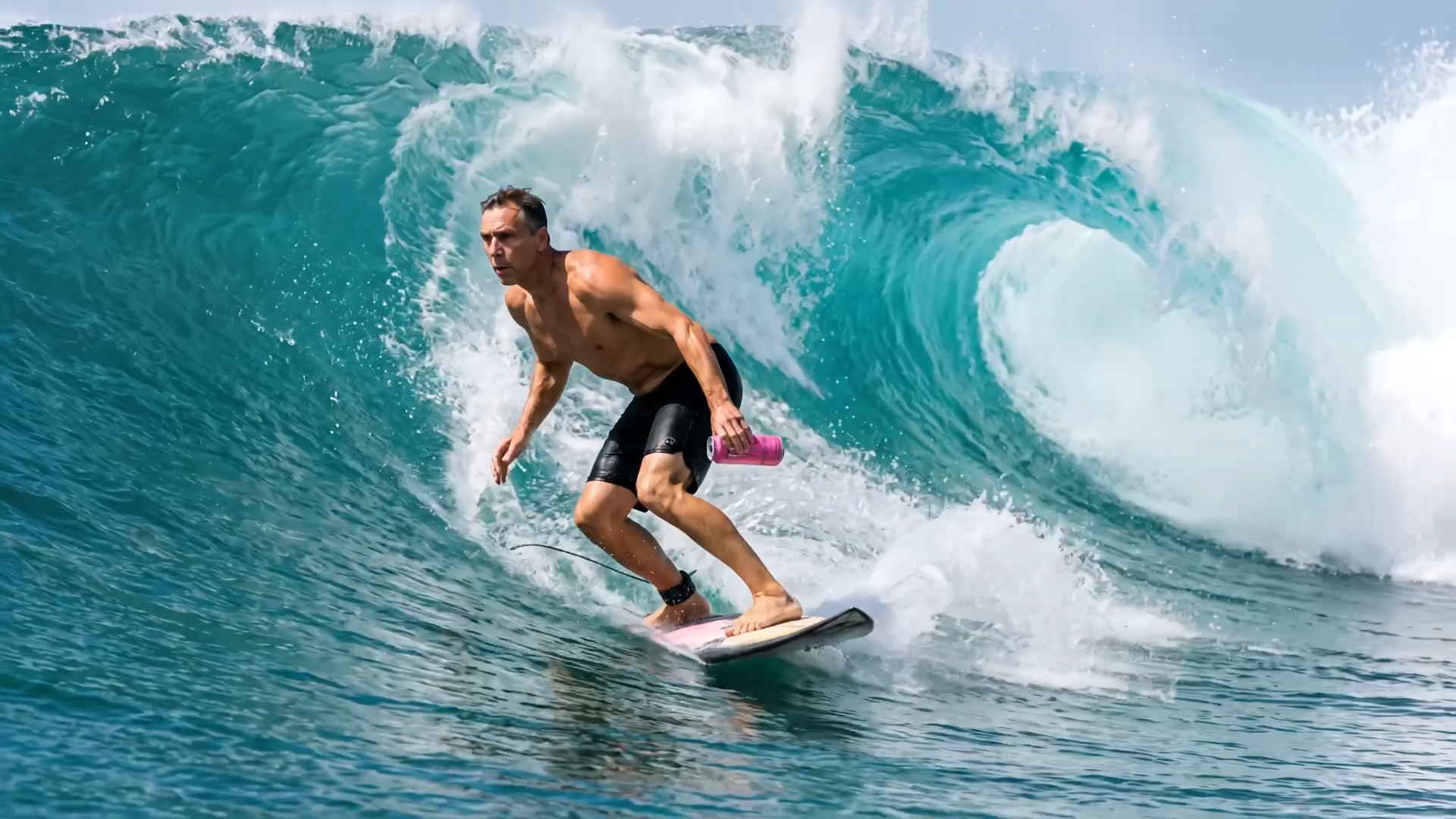 Watch the complete film on the maker's page ↗
Documented outcome · independent spec adA 31-second public film and 14 prompts
The maker's July 6 account labels it a portfolio spec ad, not commissioned by Monster Energy. Orders, a complete bill and income are not public.
Check this resultRead the context and editorial assessment
An ad can move between two different worlds while keeping a recognizable product and character. This material shows how chosen appearances and frames carry forward: Claude helped plan and write prompts, Nano Banana Pro made stills, Seedance 2.0 generated motion, and the maker assembled and finished the film in an editor.
01
Verified material
Watch the product move from studio to wave
See the finished work, then distinguish a generated sequence from the completed edit.
The public file on the maker's page runs for about 31.33 seconds at 1920×1080. A can, juice and ice move through a studio world before a tunnel, clouds, surfer and end card. The maker describes the surf half as one 15-second generation with seven cuts; the full ad still joins two sequences and an end card in the edit.
Sources for this section: Calixte LeBlanc: The Escape production account · The Escape: the original page's public 1080p film · Original pack: README, 14 prompts and key stills
02
Public account
References fix the product and person, not just a style
Each reference has a role, and the instructions must match the intended result.
The pack starts the product reference from a real photo and reuses it for studio boundary stills. Surf shots attach the selected surfer and can; the turn also uses the character sheet. The maker selects files to carry forward. Each prompt's REFERENCES metadata lets you inspect which file serves which role.
The discarded first can had no branding, but its prompt also explicitly requested no text or logos. It cannot by itself prove that text descriptions always lose branding. Check what the input asked for before explaining the result.
 Check visual source ↗
Sources for this section: Original pack: README, 14 prompts and key stills · Maker's selected surfer-reference still
03
Public account
Choose the boundary inputs and the handoff together
Image references, boundary inputs and the next sequence's starting frame serve different jobs.
Studio ROLL 1 uses two images as general references; ROLL 2 assigns them to the first- and last-frame inputs. It also changes the final 360-degree orbit to a slow push-in. The maker reports a better landing, but both choices changed and the two clips are unavailable for comparison. This is not a one-variable test.
The maker says the tunnel still below was exported from the first half, then used as the surf half's starting frame alongside the character, can and key references. It gives the next sequence an existing visual starting point. The maker composites the end card in the editor; the generation prompt leaves black space rather than producing the final typography.
 Check visual source ↗
Sources for this section: Original pack: README, 14 prompts and key stills · Maker's exported tunnel boundary still · Calixte LeBlanc: The Escape production account
04
Our analysis
Try one handoff, then review the motion and sound
Approved stills make decisions concrete; usable motion still needs playback and review.
The pack records selected stills, 1080p motion trials and a later 4K surf master; the public film remains 1080p. Generation prompts request sound effects without music, while the maker says a score was added in the edit. A good still, generated sound and the finished soundtrack are separate stages.
BitShovel suggests using a product or person you may show: choose an appearance reference and ending, then pass an actual exported frame into the next sequence. Test one difficult action or seam, save inputs, outputs, attempts and costs, check identities and direction, then play it completely with sound. This starter suggestion has not been retested; the pack does not grant brand or music rights.
This review inspected the pack, continuous playback and sampled frames. The audio decoded, but full listening and frame-by-frame audiovisual review were not completed. The failed surf version is unavailable here, so this does not establish improvement size, a flawless film or income.
Sources for this section: Original pack: README, 14 prompts and key stills · The Escape: the original page's public 1080p film · Calixte LeBlanc: The Escape production account
Sources and limits
Where the material comes from
- Calixte LeBlanc: The Escape production accountFirst-party process accountPublished Checked
Two-part structure, identity choices, reported rework, editing and spec-ad status; the original event date is retained.
- The Escape: the original page's public 1080p filmCreator's finished filmChecked
The public file is about 31.33 seconds at 1920×1080; the cover is an unaltered frame at 28 seconds. Full listening was not performed.
- Original pack: README, 14 prompts and key stillsCreator's inputs and reference filesChecked
Inspect reference roles, both studio prompts and surf inputs. The pack does not supply failed motion or a complete bill.
- Maker's selected surfer-reference stillCreator-published reference imageChecked
Inspect the identity and appearance carried into the surf sequence; it is not a motion review.
- Maker's exported tunnel boundary stillCreator-published boundary inputChecked
The maker identifies it as an export from the first half used to start the next; the original file and account are available.