Ongoing topic · Compiled September 7, 2026
MicroDuck: how a little robot learns new moves
Connect the physical robot, simulation and open software: what has been demonstrated, what the preorder includes and which follow-ups matter.
01Meet the product中文
A physical robot whose moves can be trained
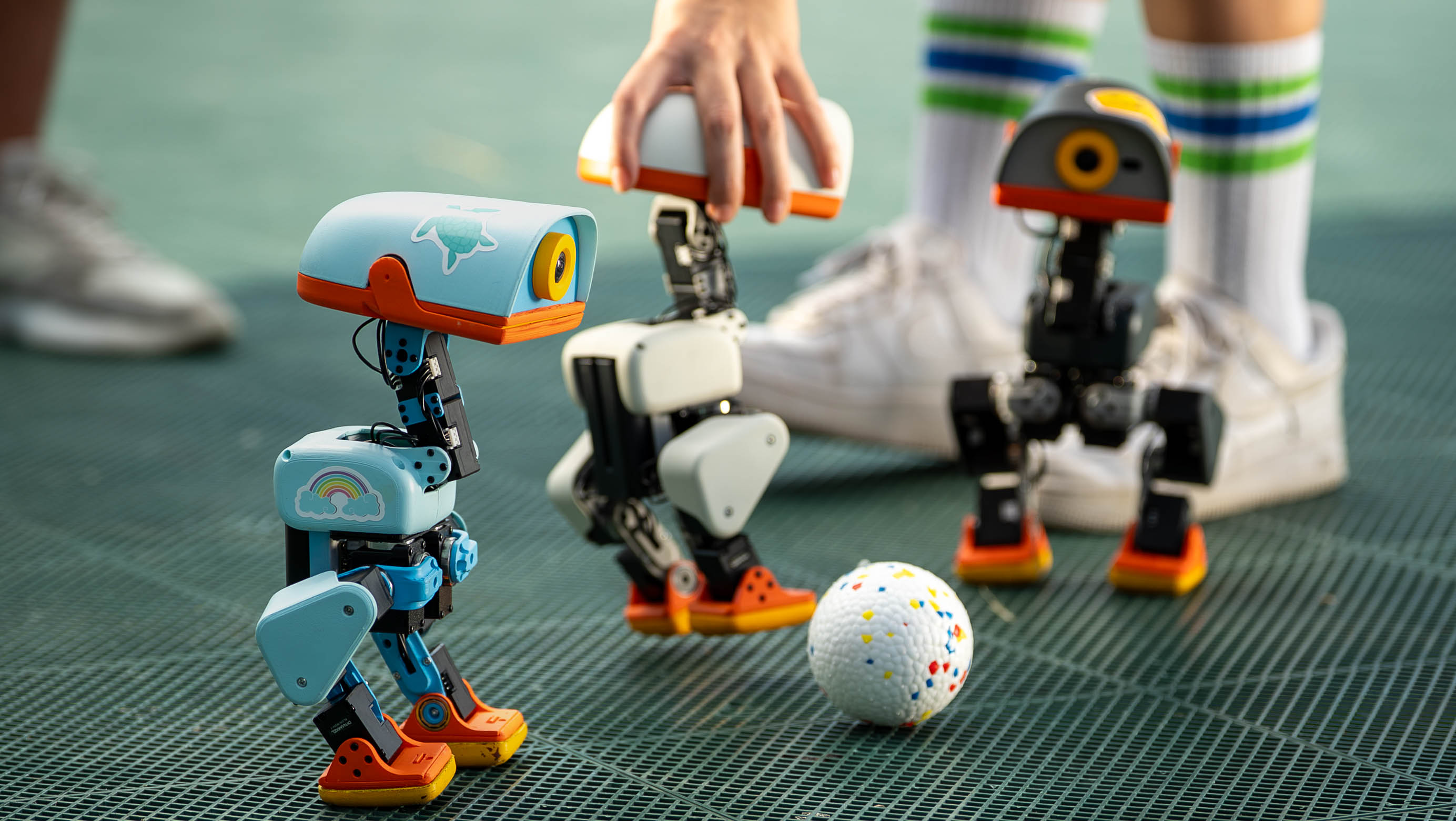
MicroDuck is a biped robot from Pollen Robotics. The official page lists a height of about 25 cm, 15 motors, a camera, LiDAR and two inertial sensors. It combines a playable physical device with simulation and training software for developing further behaviors.
Start with the browser simulator to explore walking and controls, then follow the public software into training and interaction. The physical product, simulator and community projects offer different ways to take part.
- · Pollen introduces MicroDuck
- · Design documents record remote-access progress
- · NVIDIA announces a Hugging Face acquisition agreement
Sources and notes
That makes it both a robot product and an AI development tool. Its movements and interaction may attract interest; suitability for a project depends on control, skill training and delivery conditions. A pet-like appearance does not establish general understanding or household capability.
- Microduck official product page ↗Manufacturer’s account · Checked September 7Form, specifications, preorder and software links; no physical-device trial in this review.
02How training fits together中文
Meet the robot in simulation
The manufacturer describes the simulator as the digital twin used to train the robot, alongside a public SDK, simulation environment and reinforcement-learning stack. The broad workflow is to learn a control policy through repeated attempts in simulation, then deploy it on the physical robot: sim-to-real.
Sources and notes
Training and execution are separate stages. Simulation allows repeated computation; the physical robot must act under real mass, contact and sensor conditions. Demonstrated transferred policies do not guarantee that every user-trained move will transfer reliably. Community projects become more useful when they retain training settings, physical video and failure conditions.
Start with simulated motion and control, then decide whether you need the physical robot. The next section distinguishes the browser experience, running an existing policy and training a new move. We did not train a new policy or operate physical hardware.
03Start on a computer中文
What you can do without the robot
You can begin before buying the robot. Open the official simulator below, let it load, then choose WADDLE IN to enter the 3D scene. Its instructions list arrow keys or WASD for movement, R to sit and Space to reset. On September 7, we entered the scene in desktop Chrome and observed the change into a seated pose. Start by comparing how the body and feet are positioned when standing and sitting.
This experience uses movements that have already been learned. A control policy maps the robot’s current state to motor actions; choosing a seated pose calls on an existing policy. Training a new policy involves repeated simulation and adjustment against a task objective. Playing in the browser is a way to explore the behavior, not to create a newly trained skill.
Sources and notes
- Try the robot in your browser ↗Pollen’s official simulatorExplore existing movements in a desktop browser; allow time for the initial load.
04Explore your own movements中文
From existing movements to a new skill
To investigate an existing movement further, the official training repository documents running exported policies in CPU MuJoCo. This requires the documented software environment and an ONNX policy file. It is a local replay of an existing result, separate from the browser entry that requires no installation. Pick the movement you want to examine before choosing the corresponding policy file.
The training documentation provides CUDA GPU and Hugging Face Jobs cloud paths for developing movements in simulation. Both need the corresponding software and compute resources; physical performance comes later, on the robot.
Sources and notes
For a new movement of your own, the documented training path requires a CUDA GPU, with Hugging Face Jobs offered as a cloud alternative. Simulation training can be done without the physical robot. Cloud use needs the appropriate account and compute resources; closing the terminal does not stop a cloud job. We read a pinned revision of the instructions without testing installation, training or billing, so this is not a claim that the complete workflow runs on any ordinary computer.
A movement that works in simulation still needs checking on the physical robot. Motors, contact friction, battery state and control delay affect the result, and the policy must match the robot’s software. Keep the next experiment specific: observe one existing movement, note what you want to change, then study the training settings. When you reach physical testing, retain the real movements and failure conditions for comparison with simulation.
- Policy replay and training instructions ↗Official repository · Pinned revisionSeparate CPU replay, GPU training and export; installation and training were not tested here.
- Cloud training and job management ↗Official instructions · Pinned revisionRequirements for accounts, submitting, monitoring and cancelling jobs.
05A community lesson中文
It can walk. Now learn how to push the ball
- Upper layer: choose where to go
Search 15 parameters that turn distance and heading into movement commands.
- Lower layer: use existing locomotion
The balance and stepping policy stays fixed and executes those commands.
- Simulation: try and score
Score ball displacement and falls, then use the scores to select upper-layer parameters for the next round.
Based on the author’s source: scores help select control parameters for the next round. Read the source ↗
Learning to walk requires coordinating motors, the body and ground contact. Pushing a ball with a robot that can already walk adds another problem: where to move and when to turn. The community project Microduck School explores this second layer, keeping existing movements while searching for better ways to control them.
In the revision we read, 15 parameters turn task information such as distance and heading into forward, lateral and turning commands for an existing walking policy. The optimizer samples parameter sets, runs each in simulation, scores the task, retains better attempts and continues searching. It learns how to use locomotion while the underlying balance and stepping policy remains fixed.
Sources and notes
A higher learning curve has a specific meaning here. The ball task rewards displacement and penalizes falls; circling uses a different score. The source plots both the best score so far and the batch average. The best-so-far curve cannot decrease because the program retains its best attempt. That alone does not show that every attempt is more reliable, or that a physical robot has acquired the skill.
The baseline matters too. This project sets all upper-layer parameters to zero before training, so the robot issues no movement command. The comparison therefore asks whether search can move it from inaction toward completing the task; it does not establish superiority over a hand-designed controller. This boundary follows from reading the source. Further experiments could vary starting conditions and random seeds to examine consistency.
On September 7, we started the default ball-pushing task on the public page but obtained no usable curve, video or report. This explanation draws on pinned documentation and relevant source, without recording the attempt as successful training or claiming physical transfer. The useful research question remains: does the desired behavior need a new movement, or a new way to control existing movements?
- Microduck School: what is learned ↗Community author’s account · Pinned revisionSeparates frozen locomotion from upper-layer search; the author’s timing has not been verified here.
- Tasks, scores and parameter search ↗lesson.py · Pinned revisionInspect ball scoring and the distinction between best-so-far and batch-average results.
- The comparison baseline ↗nodes.py · Pinned revisionThe before-run uses a zero-parameter controller; it does not establish superiority to other controllers.
06Work and expression中文
A character can express itself without words
Pollen’s launch article distinguishes MicroDuck’s focus on action from Reachy Mini’s conversational interaction, and describes expression through small creature-like sounds. This poses another design question: beyond performing movements, how can a device convey its state and character?
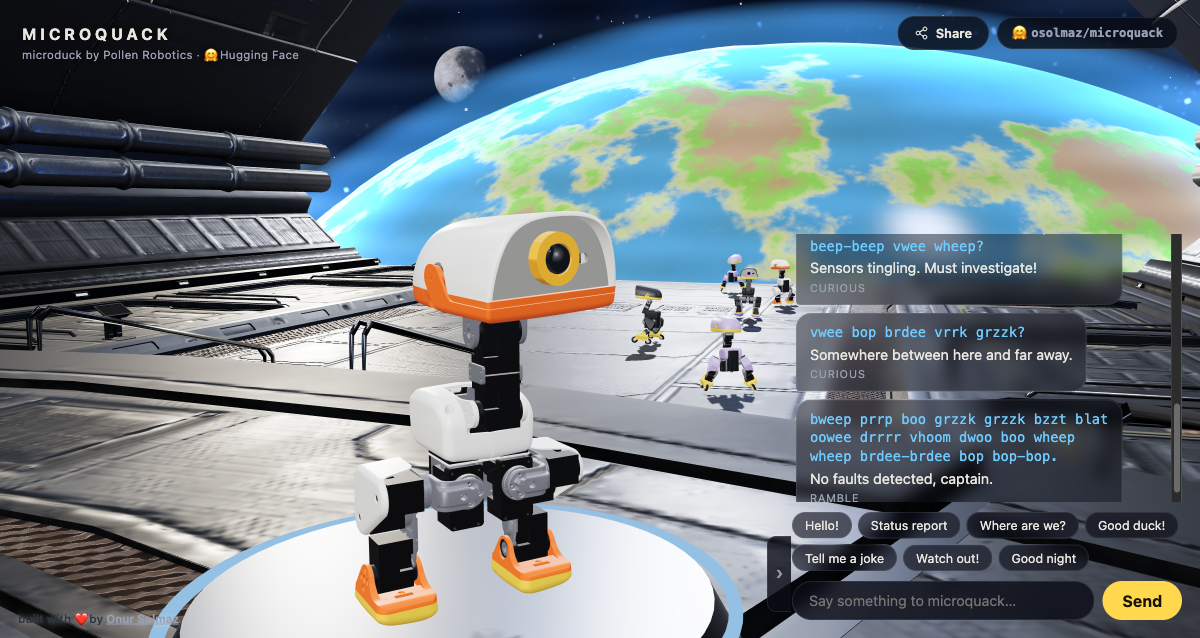
Onur Solmaz’s microquack web work places the robot in a space scene with greeting and status-report interactions. We opened it and clicked Status report: the message panel appended the input, a phonetic sequence and a state label. It offers a concrete example of connecting setting, character and expression.
cat5v’s Quackify turns the robots into a small ensemble. Choose a song from the library or import a MIDI score, assign ducks to bass, tenor, alto and soprano, then export the mix as a WAV file. It uses the robot software’s sound synthesizer to turn creature-like expression into music that can be arranged.
- Open Quackify and play a songArrange the voices of a browser duck ensemble. Playback uses the web project’s synthesized sound.
- Explore the microquack scene
Sources and notes
Quackify is a browser project. The author’s current documentation says new songs cannot yet be sent directly to the physical robot; browser playback also does not replace listening through its speaker.
This observation covers the browser work and visible feedback, without establishing audio quality, unrestricted language understanding or operation on the physical robot. It is still worth exploring as interaction and creative work beyond a specification sheet.
- Open the Quackify duck ensemble ↗Community work by cat5v · Viewed September 10Choose a song, assign voices and export the browser ensemble.
- Quackify sound and song-library notes ↗Author documentation · Pinned revisionSound synthesis, MIDI import and song export.
- Meet Microduck ↗Manufacturer’s launch article · August 27Explains the product’s approach to action, training and expression.
- microquack interactive work ↗Onur Solmaz · Viewed September 7Explore the web scene and interaction; it does not establish physical robot performance.
07What is open中文
The software is open; hardware design files are not
Pollen’s press kit explicitly limits its open-source statement to the software stack; mechanical and electronic design files are not open. Public code supports studying and modifying control methods, but does not provide the complete designs needed to manufacture the robot.
The official page identifies an Apache-2.0 software stack covering the SDK, simulation and reinforcement learning. Follow the repository link to inspect and modify those materials. The training repository separately identifies its 3D model files as Creative Commons BY-SA-NC. Read the software and model-file terms separately; the software description does not establish one set of terms for every asset, hardware design and manufacturing file.
Sources and notes
Useful follow-ups include new policies, development accounts, software changes and reproductions. A small user-built skill can explain a practical use more clearly than another repetition of the specifications.
- MicroDuck open-source scope and provisional specifications ↗Pollen press kit · Checked September 7The manufacturer’s explicit distinction between open software and hardware designs.
08Developing further中文
Separate motion, media and software updates
MicroDuck’s architecture draft separates gamepad, phone and web inputs from the on-robot motion service, with another path for audio and video. This gives developers a useful design idea: adding an interaction need not require rewriting low-level motion control.
This architecture draft targets the first shipped version. The September 2 remote-access document records account-login progress, lists off-network access as further work and retains an independent local mode.
Sources and notes
The draft label matters: the architecture targets the first shipped version. The September 2 remote-access document records account login as built, with further work needed for off-network access, while requiring local mode to remain independent. These documents support design discussion, not a claim that every feature has shipped.
To contribute, follow how an input becomes a motion intent, then choose a small simulation or interaction task. Later checks should compare the documentation with released behavior, including offline use and recovery after updates. We read a pinned documentation revision without connecting a physical device.
- MicroDuck design documents ↗Official repositoryFollow design and implementation work.
- Robot architecture draft ↗Pinned revision · Read September 7First-release targets and responsibilities.
- Remote-access progress ↗September 2 draft · Pinned revisionSeparates completed work from next steps.
09Ordering and delivery中文
What the preorder includes and when delivery is planned
When checked on September 7, the official page offered preorders at an introductory $399 before tax and shipping. The base package lists the robot, a battery, a USB-C cable and a game controller, with separate charger, developer and accessory packs. That is not a delivered total for a reader in China.
The press kit targets first deliveries before Christmas 2026, with North America and Europe as launch markets. This is a manufacturer’s plan, not completed delivery or confirmation of shipping to China. Specifications including camera resolution, field of view and LiDAR range remain provisional.
Sources and notes
Before ordering, check destination availability, estimated timing and total cost in the store. We did not complete checkout and have no delivery receipt. Product and preorder details can be explained now; battery life, reliability, repair and support after delivery need evidence from actual use.
- Delivery target, launch markets and provisional specifications ↗Pollen press kit · Checked September 7See First deliveries, Markets and Not final yet; actual delivery terms still depend on the order.
10A related development中文
Pollen, Hugging Face and the acquisition announcement
MicroDuck comes from Pollen Robotics, part of Hugging Face. NVIDIA announced an agreement to acquire Hugging Face on September 3, stating continued support for multiple clouds and computing platforms. Our earlier robot launch record mentioned acquisition rumors; read that historical context alongside the newer announcement.
Sources and notes
An acquisition agreement does not establish a completed transaction, nor does that announcement demonstrate changes to MicroDuck’s chip, skills or delivery plan. Follow the concrete software, device and service conditions that affect use.
- NVIDIA to Acquire Hugging Face ↗NVIDIA announcement · September 3Establishes the agreement announcement and stated platform commitments, not transaction completion or changes in robot capability.
What we are following
11What comes next中文
What we are following
- What new movements and creative projects are appearing?
- What is changing in the public software, interactions and accessories?
- How are first deliveries and hands-on experiences progressing?