Developer tool · Keep methods that others can continue
How does a team’s way of working carry across AI tools?
How does a personal deployment Skill become a reusable team method? Tencent’s open-source TeamAI distributes reviewed method files through Git and can turn lessons from a session into searchable records. Tool adaptation, version conflicts and sharing lessons each have specific conditions.
The October 10 source update adds built-in adapters for Trae and Trae CN. This reading follows one sharing method from the project documentation. It requires the CLI, a Git repository and supported tools; BitShovel has not installed it or synchronized team resources.
Begin with one concrete method
The documentation’s Deploy Helper example records a sequence: check the branch, run tests, build, then deploy. A colleague can read and revise that procedure. It is a method template, without an actual deployment result.
TeamAI’s workflow pushes the resource to a shared Git repository, reviews and merges it, then pulls it into members’ tools. A structured method can be distributed again when tools change, rather than depending on one person’s entire conversation as the handoff.
Sources and further reading
- Sharing team resources: a deployment Skill exampleProject usage documentationDeploy Helper, push and shared-rule examples; these illustrate a method.
- TeamAI: review and distribution of resourcesProject documentationThe push, review/merge and pull workflow; Context and Improvement remain labeled beta.
One method, different tool adapters
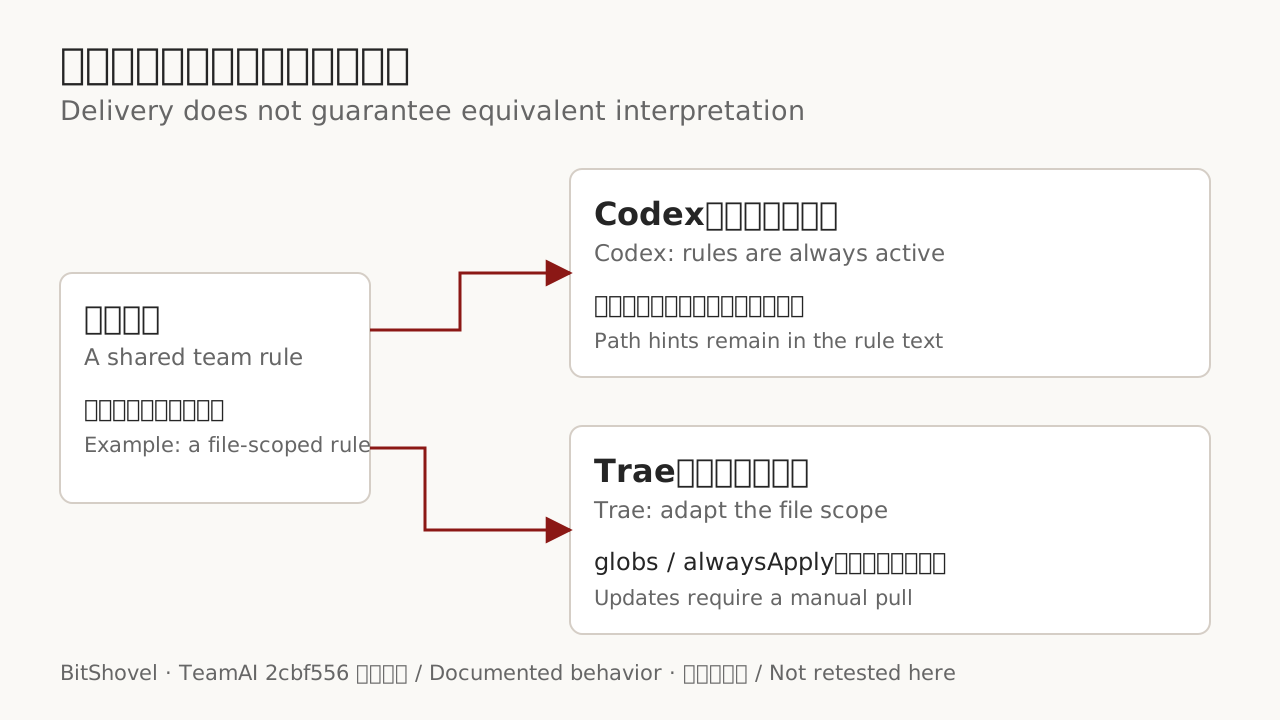
The October 10 Trae and Trae CN update makes adaptation concrete: Skills go into the relevant directories, while team rules are rendered in Trae’s format. A rule intended for particular files needs its path scope expressed correctly; moving the original file alone may not preserve that scope.
Support differs too. The project’s matrix says Codex rules include path hints but are always active, rather than switched by tool-enforced path scope. Trae lacks the required hook interface, so updates need a manual pull. Resource delivery and equivalent interpretation are separate checks.
Sources and further reading
- TeamAI: project description and tool supportOfficial open-source projectGit setup, tool support differences and the two beta capability layers.
- Sharing team resources: a deployment Skill exampleProject usage documentationDeploy Helper, push and shared-rule examples; these illustrate a method.
- Trae / Trae CN adapter updateSource change · October 10, 2026The developer reports checking actual app formats and local fixtures. No hook or subagent interface; pull runs manually.
- How Trae rules are convertedProject sourceConverts a team rule’s path scope into Trae’s globs and alwaysApply fields.
Update versions while keeping local edits visible
Tools with session hooks can pull team updates at the start of a session. Locally edited Skills, rules and agent files are preserved, while untouched copies in other tools can update. When the team version changed too, the member needs to compare, merge and share. A synchronization run does not guarantee identical copies everywhere.
Sources and further reading
- Member guide: synchronization and local changesProject usage documentationSession synchronization, versioned built-in Skills, preserved local edits and conflicts.
Leave a lesson for the next task
Another path shares lessons. In tools with the hooks, interruptions, corrections and repeated failures can prompt a member to summarize what the session taught them. Later tasks can retrieve the saved record by keyword. This carries a written lesson, without automatically transferring the previous conversation’s full context.
Team Context and Team Improvement remain beta. Recall is disabled by default and must be enabled for the built-in sharing workflow. The personal AI companion topic offers a useful comparison: retained files and methods, and whether the next task can find and use them, establish how far a handoff has progressed.
Sources and further reading
- TeamAI: project description and tool supportOfficial open-source projectGit setup, tool support differences and the two beta capability layers.
- Member guide: synchronization and local changesProject usage documentationSession synchronization, versioned built-in Skills, preserved local edits and conflicts.
- Team knowledge: sharing lessons and RecallProject usage documentationFriction-based reminders, lesson summaries, retrieval and Recall being disabled by default.