Creation tools and agents
The agent picks up a brush, not dice: klad paints with you, stroke by stroke
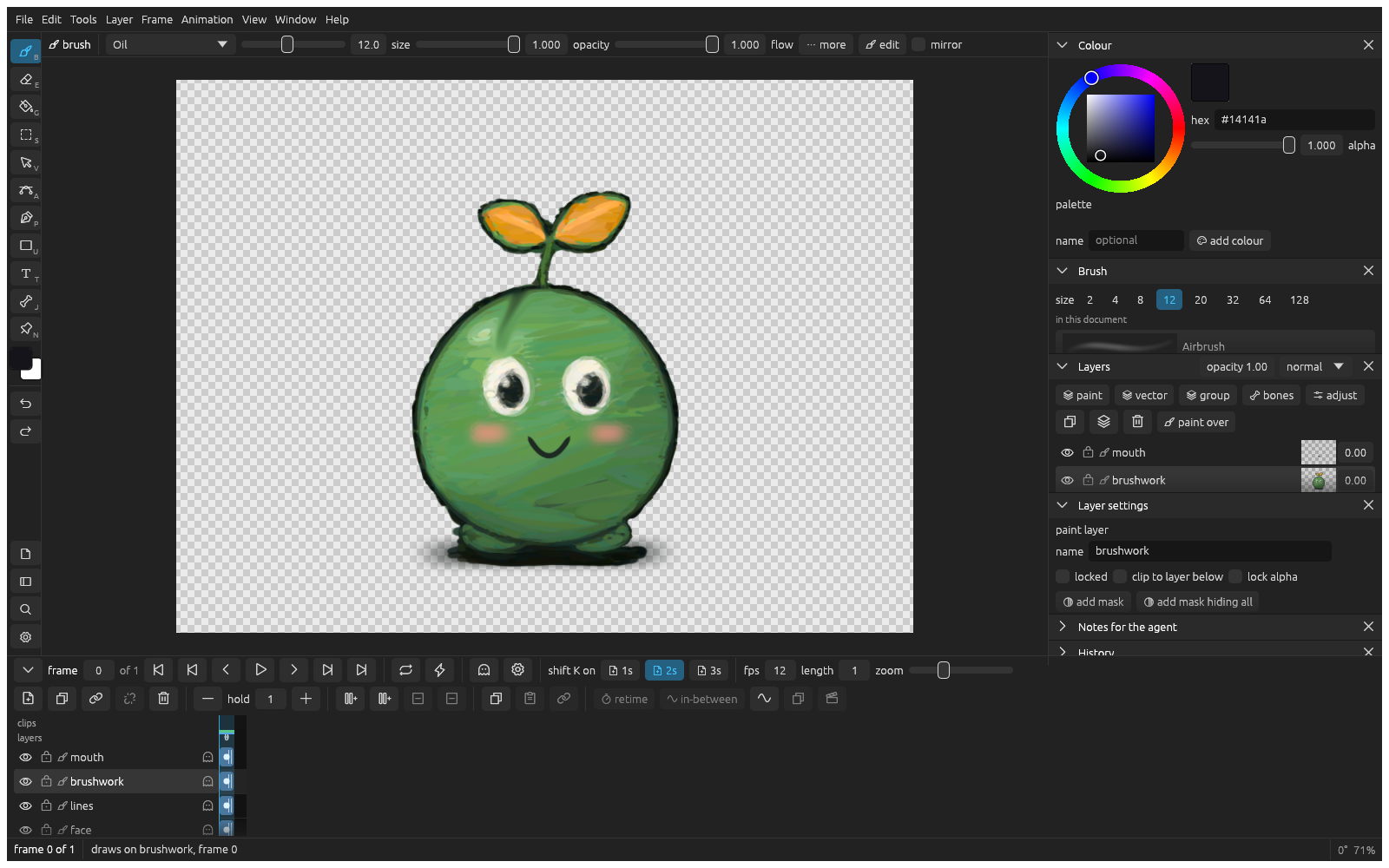
klad is a 2D painting and animation app you share with a coding agent: there is no image model inside — an agent that can run commands decides what to paint through the klad command line while you paint in the editor with a pen, both of you on the same brushes and the same file, each of you seeing the other's strokes about a second after they land. The key design is that every mark stays data: a stroke keeps its path, pressure, brush and colour as separate fields, a shape keeps editable points, a fill keeps its region. When something looks wrong you do not reroll; you find that stroke and fix it. Loaded oil leaves ridges that catch the light, and smudge is itself a stroke — move it later and klad blends again where it lands. The project's own ledger is concrete: asked for "a little sprout creature for my game", an agent running Claude Fable 5.2 painted 4,344 strokes and fills; the human recoloured the leaves, bent the mouth into a smile, moved a smudge and blended the blush; the agent then animated it — parts grouped into five, 205 keys, no frame painted again. The game pipeline adds in-betweens generated from your key drawings, an arc check (a sliding foot or a part sinking under ground gets flagged), colour carried across every drawing, and export straight to sprite sheets or a Godot scene. The file format is documented down to the byte under an MIT licence; a drawing is a plain folder on your machine with no account, happy in git. The boundaries, quoted as given: the project calls itself an early first public version that you build from source (about ten minutes the first time); macOS supports pen pressure, the Linux editor is mouse-only for now, and Windows builds and passes tests but nobody has drawn with it yet; the source-available licence is free for personal use and companies under €500,000 revenue, and the drawings you make are yours. This site has not run the app and reproduced none of the drawings.
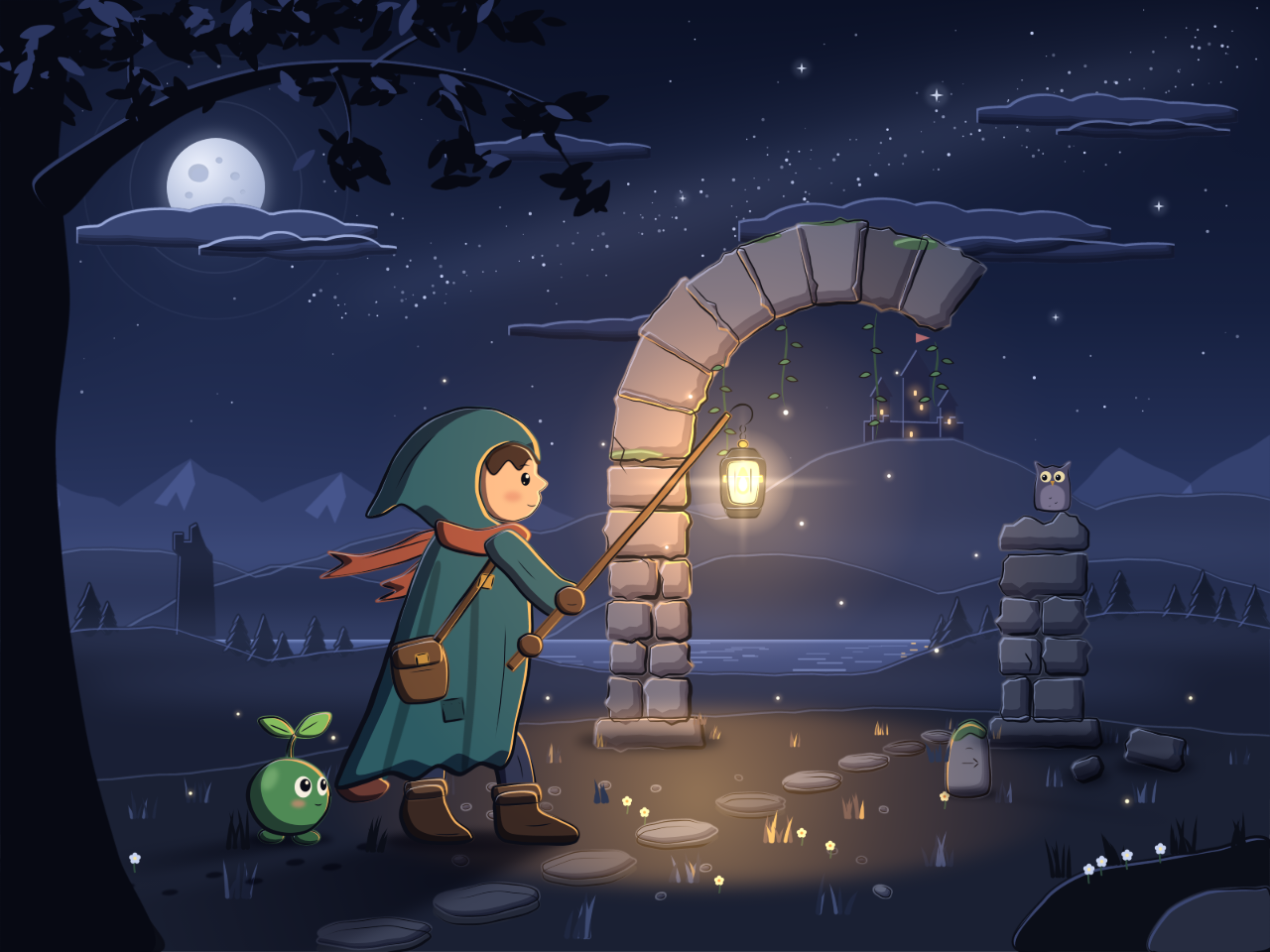
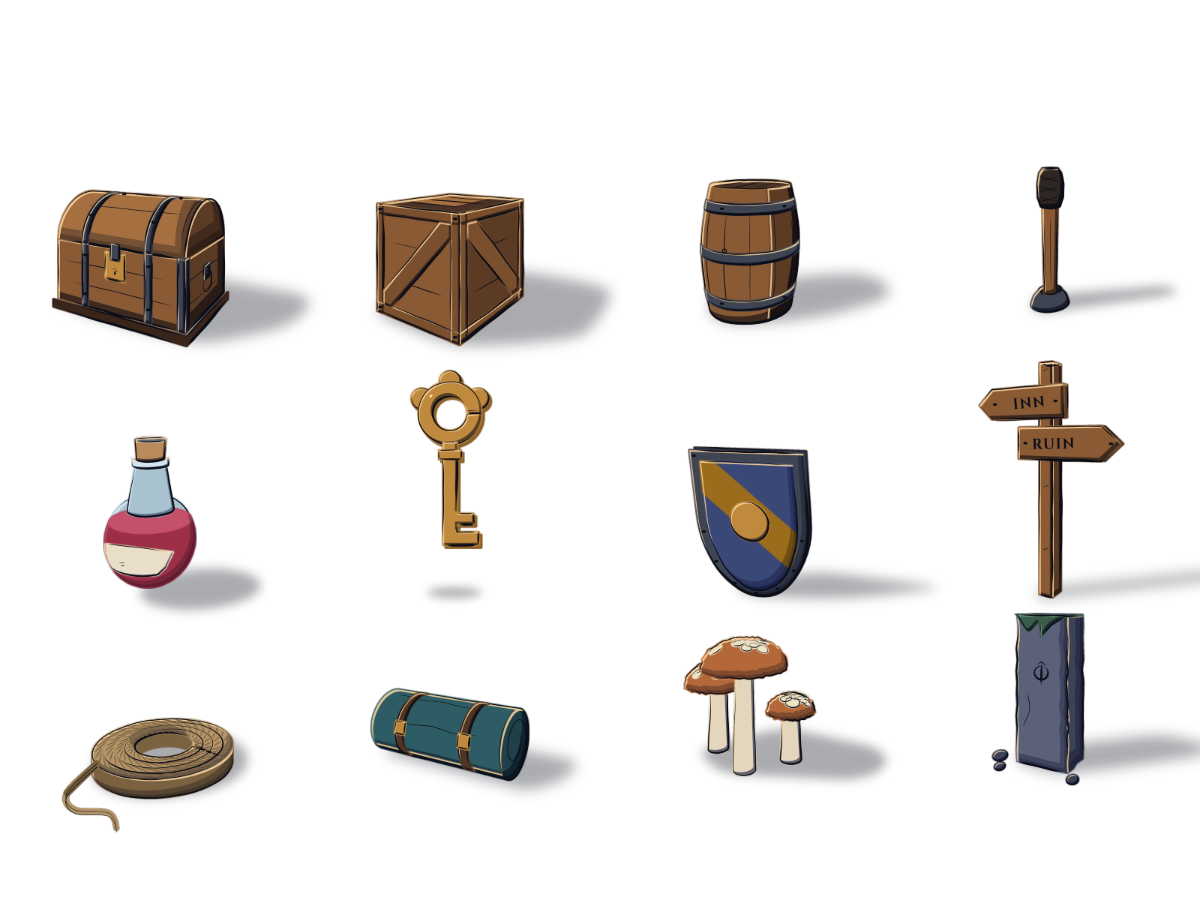
This account draws on the klad repository's own documentation (github.com/klad-app/klad): this site noticed the project via Show HN on November 11 and read the README in full on November 12; the project describes itself as an "early" first public version and carries no release date. The drawings and screenshots in the body are the repository's official documentation images — per the authors, the sprout creature, the night scene and the prop kit were painted stroke by stroke through the klad command line with Claude Fable 5.2 as the agent; they are real outputs, not reproduced by this site. Licence, platform and maturity conditions are quoted as written; this site has not run the app.
Why not just generate another picture
An image generator hands you pixels, and the only edit left is another roll of the dice. klad's authors put the difference in the first paragraph of their README: this is a 2D painting and animation app you share with a coding agent, and there is no image model inside — an agent that can run commands (Claude Code, Codex, anything similar) decides what to paint, and klad gives it brushes, layers and a timeline. You paint in the editor with a pen; the agent paints through the klad command line; whatever either of you puts down stays what it was: a stroke keeps its path, pressure, brush and colour; a shape keeps editable points; a fill keeps its region. If one leaf looks off, you find that leaf and fix it — no regenerating the whole picture and hoping.
And it is not just vectors. A stroke keeps its path and pressure like a vector, but it lands as paint: a loaded oil brush leaves ridges that catch the light, and the smudge tool drags paint already on the layer — while the smudge itself is also a stroke, so move it later and klad blends again where it lands. Vectors are there when wanted: shapes with editable points, gradients, glows and real text, with about fifty open fonts included for posters, covers and cards. There are two dozen brushes plus a brush editor, and layers, masks, clipping and effects are all in the box.
For readers of this site the contrast is a familiar one sharpened: we have covered Canva Craft putting generated images into designs, and robots rehearsed by agents in simulation. klad takes a third road — the era of models dreaming up images has only begun, and klad skips generation altogether: the model works inside a deterministic tool, and the product is auditable and reversible from the first stroke. That is closer to "an agent operating software" than "a model emitting results"; the difference becomes concrete in the sprout creature's ledger below.
Sources and further reading
- klad's official repository READMEOfficial project documentation · self-described early first public version · found via Show HN November 11, read in full November 12Read in full. Checked the key claims: no image model; human and agent share brushes and one file, CLI strokes reaching the editor about a second later; strokes keep path, pressure, brush and colour, shapes keep points, fills keep regions; loaded oil leaves light-catching ridges and smudge is a stroke that re-blends when moved; two agent skills (tool usage and drawing craft), both MIT; the worked ledger — a sprout creature of 4,344 strokes and fills, five part-groups, 205 keys, no frame repainted, painted by Claude Fable 5.2; the game pipeline has in-betweens from key drawings, an arc check, colour carried from the first drawing, and PNG/sprite-sheet/Godot export; the file format documented to the byte under MIT; a drawing is a local plain folder, no account, a once-daily version check you can disable; builds need Rust and just, about ten minutes the first time; macOS pen pressure, Linux mouse-only, Windows undrawn; the licence is PolyForm Internal Use 1.0.0 plus three additions and one limit (free for personal use and companies under €500k revenue, drawings belong to their makers, no redistributing builds), with format/CLI/skills/client crate under MIT.
One canvas, two pairs of hands
The mechanics are simple: every editor action has a command-line twin. You press B and draw with pressure; the agent runs klad stroke art.klad l4 --brush oil --path 'M100 400 C 300 200 500 600 700 400'. To change a stroke later, you pick it in the editor, while the agent edits by address with klad set art.klad c4:s12 size=3.5 color=#3355aa; reading the canvas is klad strokes --json, and pinning notes, reading the selection, generating in-betweens, exporting and undoing are all commands too. About a second after the agent's strokes land in the file, they appear in your open editor — one canvas, both sides watching.
The authors write the workflow as four moves: ask ("a lantern for the inn, lit from the left, on its own layer", in plain words); watch (the agent's strokes land as they happen); point (press N to pin "more moss on this side" on the canvas, or select the part you mean with S — the agent reads both); take over (repaint anything by hand, its strokes as much as yours; the agent's strokes are marked as its own, and every change is one step in a shared history you can undo step by step). The "Notes for the agent" panel at the editor's lower right is the interface to this loop.
klad also ships two MIT-licensed agent skills with the app: klad skill teaches the agent the tool — how to look at a drawing, change it and check the result; klad skill drawing teaches the craft — planning a picture, light on form, values, edges, colour, materials, and how to judge the result. Both files are deliberately MIT so any agent with any tool can use them. In other words, "knowing how to paint" is split in two: tool usage lives in one skill, craft lives in the other, and the judgment of what to paint stays with the person and the model.
Sources and further reading
- klad's official repository READMEOfficial project documentation · self-described early first public version · found via Show HN November 11, read in full November 12Read in full. Checked the key claims: no image model; human and agent share brushes and one file, CLI strokes reaching the editor about a second later; strokes keep path, pressure, brush and colour, shapes keep points, fills keep regions; loaded oil leaves light-catching ridges and smudge is a stroke that re-blends when moved; two agent skills (tool usage and drawing craft), both MIT; the worked ledger — a sprout creature of 4,344 strokes and fills, five part-groups, 205 keys, no frame repainted, painted by Claude Fable 5.2; the game pipeline has in-betweens from key drawings, an arc check, colour carried from the first drawing, and PNG/sprite-sheet/Godot export; the file format documented to the byte under MIT; a drawing is a local plain folder, no account, a once-daily version check you can disable; builds need Rust and just, about ten minutes the first time; macOS pen pressure, Linux mouse-only, Windows undrawn; the licence is PolyForm Internal Use 1.0.0 plus three additions and one limit (free for personal use and companies under €500k revenue, drawings belong to their makers, no redistributing builds), with format/CLI/skills/client crate under MIT.
A sprout creature's ledger: 4,344 strokes and 205 keys
The project's worked example puts a concrete ledger under "an agent operating a tool". The request is one sentence: "a little sprout creature for my game". The agent paints 4,344 strokes and fills. The human takes over: recolour the leaves, bend the mouth into a smile, move a smudge, blend the blush. Then the agent animates: parts go into five groups, 205 keys make it walk — and no frame is painted again. All three official samples (the creature, the night scene, the prop kit) are credited to Claude Fable 5.2 as the agent, painting through the klad command line.
It is worth tying this ledger back to our own records: Fable 5.2 is Anthropic's November 9 release that tops the AA v5.0 board at max 65 in our full-board re-read of November 10. A leaderboard number answers "how capable is the model"; klad's 4,344 strokes answer a different question — what the top-ranked model does when it is plugged into a tool with a narrow command surface, immediate feedback and an artifact that can be revised item by item. The point here is not this site's verdict on whether Fable 5.2 paints well (we ran no test) but the change in working shape: every stroke the agent lays down is an addressable, undoable record, and a mistake becomes a local fix instead of a full-image reroll.
The night scene and the prop kit show the flow is not only for a single mascot: the same commands produce twelve props in one consistent style. The klad.studio site also replays the official samples stroke by stroke — if you want to watch how 4,344 strokes land, that is where to look.
Sources and further reading
- klad's official repository READMEOfficial project documentation · self-described early first public version · found via Show HN November 11, read in full November 12Read in full. Checked the key claims: no image model; human and agent share brushes and one file, CLI strokes reaching the editor about a second later; strokes keep path, pressure, brush and colour, shapes keep points, fills keep regions; loaded oil leaves light-catching ridges and smudge is a stroke that re-blends when moved; two agent skills (tool usage and drawing craft), both MIT; the worked ledger — a sprout creature of 4,344 strokes and fills, five part-groups, 205 keys, no frame repainted, painted by Claude Fable 5.2; the game pipeline has in-betweens from key drawings, an arc check, colour carried from the first drawing, and PNG/sprite-sheet/Godot export; the file format documented to the byte under MIT; a drawing is a local plain folder, no account, a once-daily version check you can disable; builds need Rust and just, about ten minutes the first time; macOS pen pressure, Linux mouse-only, Windows undrawn; the licence is PolyForm Internal Use 1.0.0 plus three additions and one limit (free for personal use and companies under €500k revenue, drawings belong to their makers, no redistributing builds), with format/CLI/skills/client crate under MIT.
From drawing to moving: a small production line for games
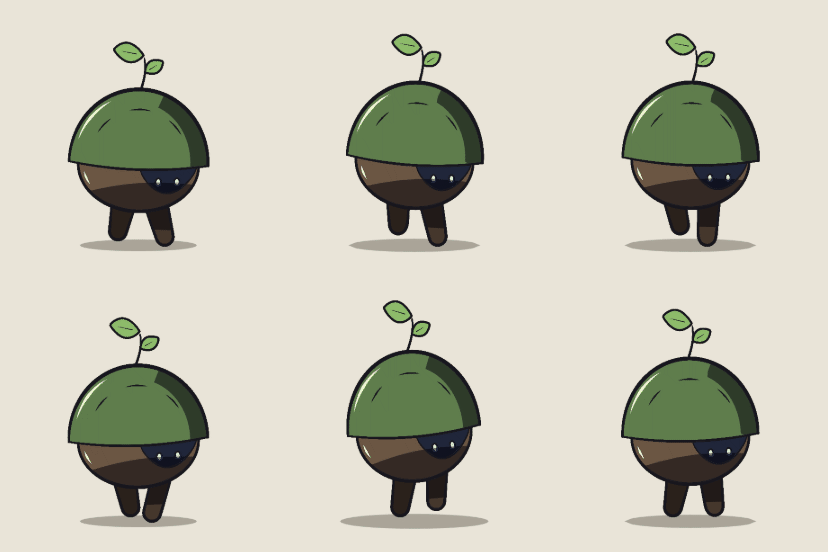
A game asset's endpoint is not one picture but a set of moving parts. klad's animation pipeline: draw the key poses and klad generates the in-betweens part by part; a built-in arc check flags errors like a sliding foot or a part sinking under the ground; colour carries from the first drawing to the last; and export runs to PNGs, sprite sheets, or straight into a Godot SpriteFrames scene with each clip's timing. The creature's walk cycle (the GIF above) is this pipeline's output: five groups, 205 keys, nothing repainted along the way.
The design choices underneath are developer-friendly too: the file format is documented down to the byte in docs/format.md under the MIT licence, so other apps and engines can read and write klad drawings without klad installed; a small Rust crate, klad-client, runs commands, applies JSON edits and reads drawings back for scripts. A drawing itself is a plain folder on your machine with no account; the app checks for a new version once a day and you can switch that off; an edit touches only the files of what it edits, so drawings live well in git — a practical benefit for small teams that need review, rollback and shared work.
Sources and further reading
- klad's official repository READMEOfficial project documentation · self-described early first public version · found via Show HN November 11, read in full November 12Read in full. Checked the key claims: no image model; human and agent share brushes and one file, CLI strokes reaching the editor about a second later; strokes keep path, pressure, brush and colour, shapes keep points, fills keep regions; loaded oil leaves light-catching ridges and smudge is a stroke that re-blends when moved; two agent skills (tool usage and drawing craft), both MIT; the worked ledger — a sprout creature of 4,344 strokes and fills, five part-groups, 205 keys, no frame repainted, painted by Claude Fable 5.2; the game pipeline has in-betweens from key drawings, an arc check, colour carried from the first drawing, and PNG/sprite-sheet/Godot export; the file format documented to the byte under MIT; a drawing is a local plain folder, no account, a once-daily version check you can disable; builds need Rust and just, about ten minutes the first time; macOS pen pressure, Linux mouse-only, Windows undrawn; the licence is PolyForm Internal Use 1.0.0 plus three additions and one limit (free for personal use and companies under €500k revenue, drawings belong to their makers, no redistributing builds), with format/CLI/skills/client crate under MIT.
Getting started: conditions, licence and boundaries
The shortest path to trying it today: install Rust and just, clone the repository and run just compile (about ten minutes the first time), then klad install puts the command on the path for you and your agent; start your coding agent in the folder where the drawing should go, have it read klad skill and klad skill drawing, and say what to paint; open klad open in another terminal to watch the strokes land, pinning notes with N and taking over with S whenever you like. The README's starter prompt is that night-scene request, ready to paste.
Read the conditions first: the project calls itself an "early" first public version with no installers yet (signed builds are planned; klad.studio takes emails); the editor is made on a Mac — the Linux build starts but is mouse-only with no tablet pressure so far, and Windows builds and passes tests yet "nobody has drawn with it"; some illustration basics are missing — multi-select, align and distribute, snapping, a grid, and SVG import/export; bones are a preview whose commands may change; format upgrades arrive with migrations. For pen pressure plus an agent, the smoothest combination today is a Mac.
The licence is source-available, not open source: the app itself runs on PolyForm Internal Use 1.0.0 with three additions and one limit — free to build and use for yourself and inside your company (companies with under €500,000 revenue in their last tax year; above that, a bought licence per user); drawings you make are yours to share; distributing builds or source is not allowed. The file format, command reference, agent skills and client crate are MIT, free for any program and any agent. For readers of this site, the line matters because it is a hands-on sample of something bigger: plug a top-of-board model into a real creation tool, and the artifact is yours from the first stroke — your files, your layers, your keys. Beyond generative AI, another road to "AI creation" is being built into a tool you can run.
- Read the klad repository and its documentationThe source of every fact and figure here, with the starter prompt, command reference and full licence.
- Watch the samples replay stroke by stroke on klad.studioStroke-by-stroke replays and guides for the official samples; leave an email for the pre-built release.
- Our Fable 5.2 release explainer and model pageThe agent model behind klad's samples: the release and its safety ledger, its AA board position and the catalog entry.
Sources and further reading
- klad's official repository READMEOfficial project documentation · self-described early first public version · found via Show HN November 11, read in full November 12Read in full. Checked the key claims: no image model; human and agent share brushes and one file, CLI strokes reaching the editor about a second later; strokes keep path, pressure, brush and colour, shapes keep points, fills keep regions; loaded oil leaves light-catching ridges and smudge is a stroke that re-blends when moved; two agent skills (tool usage and drawing craft), both MIT; the worked ledger — a sprout creature of 4,344 strokes and fills, five part-groups, 205 keys, no frame repainted, painted by Claude Fable 5.2; the game pipeline has in-betweens from key drawings, an arc check, colour carried from the first drawing, and PNG/sprite-sheet/Godot export; the file format documented to the byte under MIT; a drawing is a local plain folder, no account, a once-daily version check you can disable; builds need Rust and just, about ten minutes the first time; macOS pen pressure, Linux mouse-only, Windows undrawn; the licence is PolyForm Internal Use 1.0.0 plus three additions and one limit (free for personal use and companies under €500k revenue, drawings belong to their makers, no redistributing builds), with format/CLI/skills/client crate under MIT.