Skip to content
CURRENT INVESTIGATIONSources checked 2026-07-29

AI video creation

Need a publishable AI video: Grok or Seedance 2.0?

See the official demos, requirements, and limits. Anything BitShovel has not tested stays clearly marked.
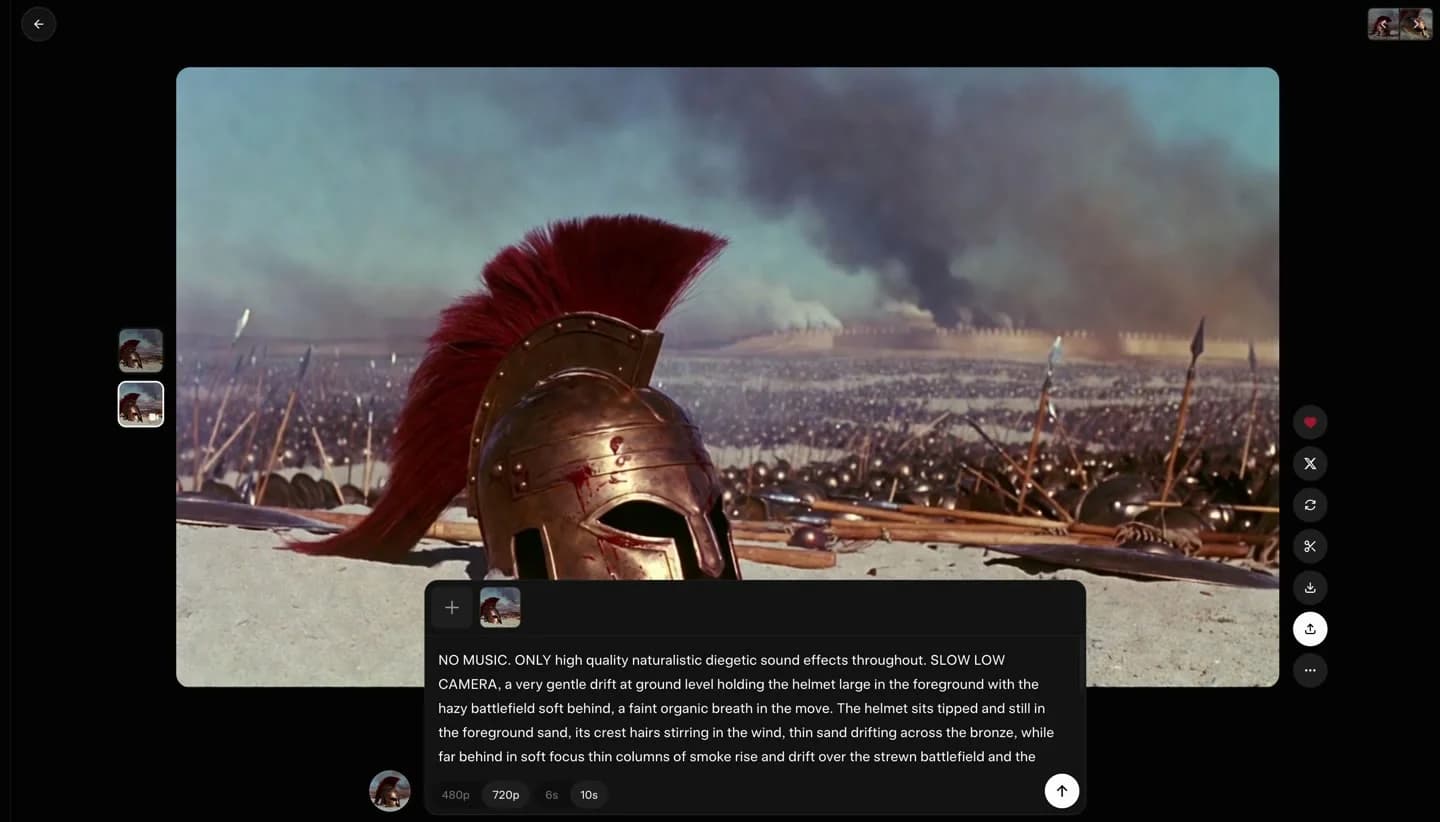
MAKER DEMOGrok Imagine Video 1.5
Official xAI Grok Imagine Video 1.5 interface showing a starting image, motion and audio prompt, resolution and duration options, and a video preview
Input: one image + motion, camera, and audio promptResult: a video preview in the official interface

Maker demo, not an independent BitShovel test.
Watch official demo
MAKER DEMOSeedance 2.0
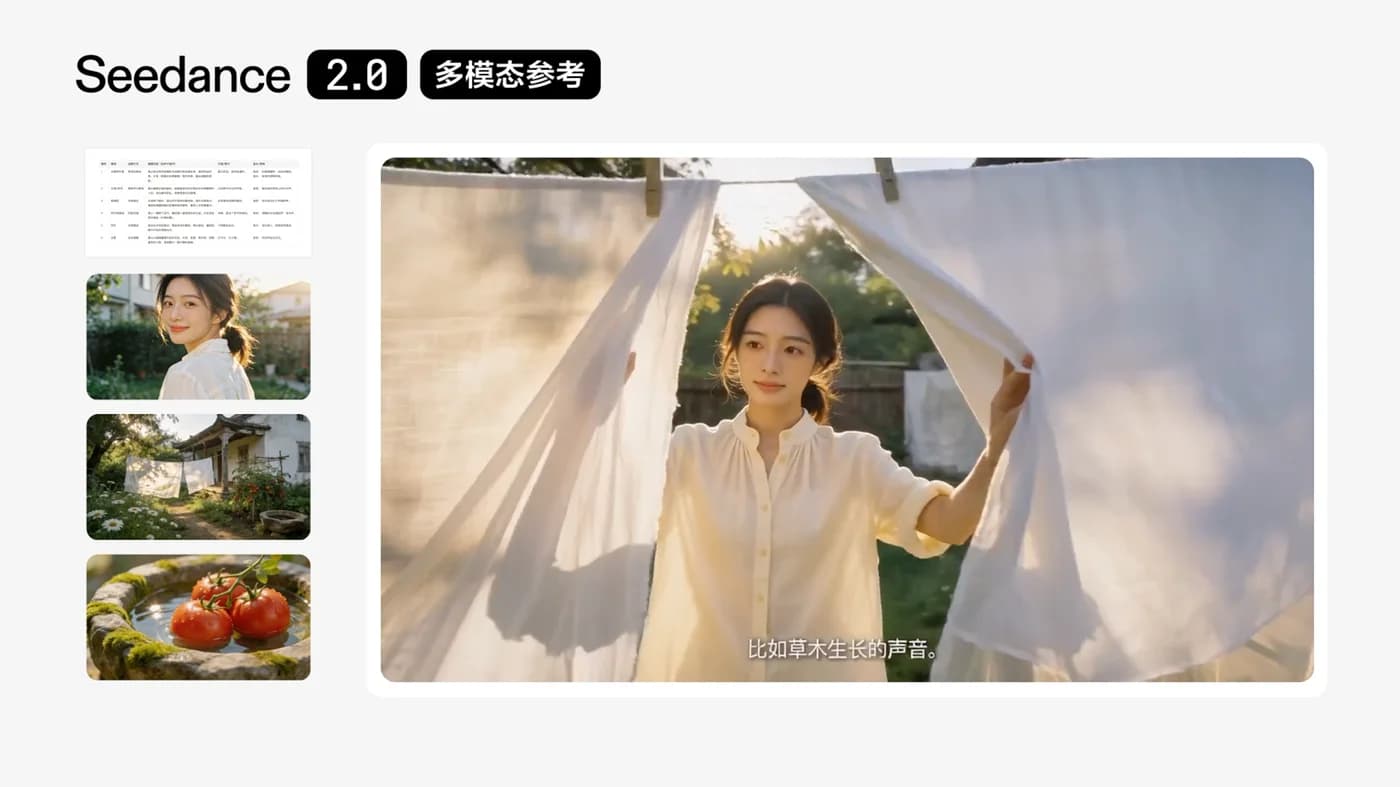
Official Seedance 2.0 demo with storyboard, character, scene, and prop references on the left and the generated 15-second multi-shot video on the right
Input: storyboard, character, scene, propsResult: a 15-second multi-shot video with audio

Maker demo, not an independent BitShovel test.

Watch official demo

These images come from different maker demos with different inputs. They show each product's claimed capability, not which one produces better results.

You need one quick clip up to 15 seconds and already use Grok

Try Grok first

Open Grok Imagine

It is the shortest path in; consumer videos carry a Grok watermark.

Check access, live quota, and the watermark after opening.

You need a Chinese-language entry point and want storyboard, image, video, or audio control

Confirm Seedance 2.0 in Jimeng first

Open Jimeng and check the model

It offers more control and asks you to prepare more material.

Check the exact model label, credits, and price after opening.

You need a finished 30–60 second video or something longer

Neither is a one-click answer

You still need multiple shots, continuity work, and editing.

No form or workflow to learn first. Official entries may require sign-in; trust the live account price.

Single generation
Up to 15 sec
One-shot 30–60 sec finished video
Neither
Official sources
Verified
Independent test
Pending

01 / VISUAL EVIDENCE FIRST

See the result—and what it took to create it

These are maker demos. We keep the source, date, and unknowns visible instead of presenting promotional output as an ordinary user's reproduced result.

OFFICIAL DEMONOT YET TESTED BY BITSHOVEL

ByteDance Seed · 2026-02-12

Seedance 2.0

How reference material becomes a multi-shot clip

Open official page
Official Seedance 2.0 demo with storyboard, character, scene, and prop references on the left and the generated 15-second multi-shot video on the right
Input: storyboard, character, scene, propsResult: a 15-second multi-shot video with audio

The official demo places its references and output in one frame. BitShovel extracted this preview frame from the official video without altering the content.

CONFIRMED

  • Official model material supports text, image, video, and audio references, including up to 9 images, 3 video clips, and 3 audio clips.[9][10]
  • The documented single-generation range is 4–15 seconds at up to 1080p; Chinese consumer entry points include Jimeng and Doubao.[9][11][12]

NOT YET PROVEN

  • BitShovel has not tested how many revisions an ordinary user would need to approach the demo result.
  • Quotas, resolution, and features are not guaranteed to match across Jimeng, Doubao, Dreamina, and Volcano Engine.

The maker has publicly shown this kind of result. That does not mean your first attempt will reproduce it.

OFFICIAL DEMONOT YET TESTED BY BITSHOVEL

xAI · 2026-06-03

Grok Imagine Video 1.5

How one image enters Grok's video generation interface

Open official page
Official xAI Grok Imagine Video 1.5 interface showing a starting image, motion and audio prompt, resolution and duration options, and a video preview
Input: one image + motion, camera, and audio promptResult: a video preview in the official interface

xAI's official frame shows the starting image, detailed prompt, and video preview together. It is still a curated maker demo, not an ordinary user's first-output record.

CONFIRMED

  • The official preview shows an image, motion and audio prompt, 480p/720p and 6/10-second options; Video 1.5 supports native sound effects, ambience, and dialogue.[3][2]
  • Grok's consumer page lists text-to-video up to 15 seconds at 720p; website and app output carries a non-removable Grok watermark.[1][5]

NOT YET PROVEN

  • The official demo cannot prove that a first attempt will match this result or how many retries it took.
  • xAI does not promise that Imagine Video outperforms other products on Chinese dialogue, lip sync, or prompt following.

The maker has publicly shown this kind of result. That does not mean your first attempt will reproduce it.

02 / MAKE THE DECISION

Choose based on what you need to finish

This is not a ranking of output quality. It is a decision about which one to try first under your conditions.

01

YOUR NEED

Make one quick clip up to 15 seconds

TRY FIRST

Grok

WHAT TO KNOW

If you already use Grok, this is the shortest trial path; consumer output has a watermark.
02

YOUR NEED

Guide a short video with storyboards and multiple references

TRY FIRST

Confirm Seedance 2.0 in Jimeng first

WHAT TO KNOW

Official material lists more reference types; more control also means more preparation.
03

YOUR NEED

Start from an official Chinese-language product

TRY FIRST

Confirm Seedance 2.0 in Jimeng first

WHAT TO KNOW

Official surfaces include Jimeng, Doubao, and Volcano Engine; this does not prove better Chinese output quality than Grok.
04

YOUR NEED

Edit or extend an existing short clip

TRY FIRST

Either, with conditions

WHAT TO KNOW

Some Grok editing and extension capabilities are API workflows; product surfaces are not equivalent.
05

YOUR NEED

Generate a finished 30–60 second video in one step

TRY FIRST

Neither

WHAT TO KNOW

Current public documentation supports short-clip creation, not reliable one-click long-form production.

03 / WHAT PROMOTION LEAVES OUT

Check these limits before choosing

A finished demo does not reveal cost, failure rate, usage rights, or whether the result is ready to publish.

  • A 15-second generation is a shot or clip, not a complete video.
  • Consumer Grok videos include a watermark, with no official removal setting.
  • ByteDance still acknowledges limits in multi-subject consistency, text accuracy, and complex edits.
  • Official demos are curated results, not expected first attempts.
  • Pricing, quotas, resolution, and features vary by product surface, API, region, and plan.
  • Confirm rights and privacy rules before uploading faces, voices, client work, or confidential material.

04 / HOW TO START AFTER CHOOSING

No form—open the official entry and run one small test

Check the account, region, exact model label, and quota first, then generate once with authorized material. The success and stop conditions are explicit.

Grok Imagine

Verify access before paying

For someone who can already access Grok, needs one short shot, and can accept the consumer watermark.

KNOWN BEFORE STARTING

  • An xAI account is required; official sign-in supports X, email, Google, and Apple.[7]
  • Grok is free to start, but xAI does not promise a fixed free-video count; trust only the live balance under Settings → Usage.[6][5]
  • xAI's terms list sanctioned-region restrictions but not a complete consumer availability list, so access, sign-in, and payment in mainland China cannot be promised.[8]
FIRST STEP
Use one image you are allowed to upload and one sentence describing only the motion and camera move. Generate one clip.
CONTINUE WHEN
Continue or upgrade only if duration, audio, resolution, and the watermark are acceptable.
STOP WHEN
Stop if you require watermark-free output, the official entry is unavailable, or your account's quota and cost are unacceptable.
Seedance 2.0

Check the exact model label before uploading

For someone who needs a Chinese consumer surface, can prepare reference material, and will verify the exact model label first.

KNOWN BEFORE STARTING

  • Jimeng AI generation requires sign-in and legally required identity verification; a mobile number is necessary.[14]
  • On the review date, the public entry showed “Seedance 2.0 all-in-one reference / video creation,” but required accepting the terms and signing in before creation. Record the actual in-account model selector; mini, fast, and full 2.0 are not the same test.[13][14][11]
  • Quotas and pricing differ by surface, account, and model; trust only the model name, point cost, and checkout price shown after sign-in.[13][15]
FIRST STEP
After confirming the model label, use one authorized reference and one short-shot prompt for a single generation.
CONTINUE WHEN
Buy more credits only if subject consistency, on-screen text or dialogue, and the usable-output rate are acceptable.
STOP WHEN
Stop if only mini/fast is available but you need to validate full 2.0, or if the model name, points, or price is unclear.

05 / GENERAL CONDITIONS

No form. Just check five things

If any one of these fails, pausing is more useful than signing up and hoping.

  1. 01

    Do you need one short shot or a complete long-form video?

  2. 02

    Do you have the images, footage, audio, or storyboard references you need?

  3. 03

    Can you accept watermarks, quotas, and multiple attempts?

  4. 04

    Are you using a consumer product or an API? Their capabilities and prices differ.

  5. 05

    Do you have permission to upload the material, and is any of it private or confidential?

06 / EVIDENCE STATUS

How far can you trust this conclusion?

Facts, maker demos, BitShovel testing, and ordinary-user reproduction are different evidence layers.

Verified

Official documentation and demos

Not completed

Independent BitShovel testing

Not verified

First-time user reproduction

Still unknown

Regions, plans, and product surfaces

EXPLORE ANOTHER REAL PROBLEM

You do not need to know a tool's name first

Start with the work or everyday problem in front of you, then inspect the available methods, conditions, and limits.

Browse all problems
Need a publishable AI video: Grok or Seedance 2.0? — BitShovel