Developer work · Handwriting, feedback and understanding
Penmentor brings AI feedback beside handwritten maths
A misplaced plus sign is marked on the original line. This open-source project connects annotations, staged hints and adjustable graphs to handwriting—and shows why a demo, real grading and local processing are different claims.
The code first appeared on October 17, with additional model command-line routes added October 20. We checked the source and original demo on October 21. This is a reading of a Linux learning tool. The author discloses scripted handwriting and a fixed example response in the recording; it does not measure live grading accuracy. We have not installed it or tested new problems.
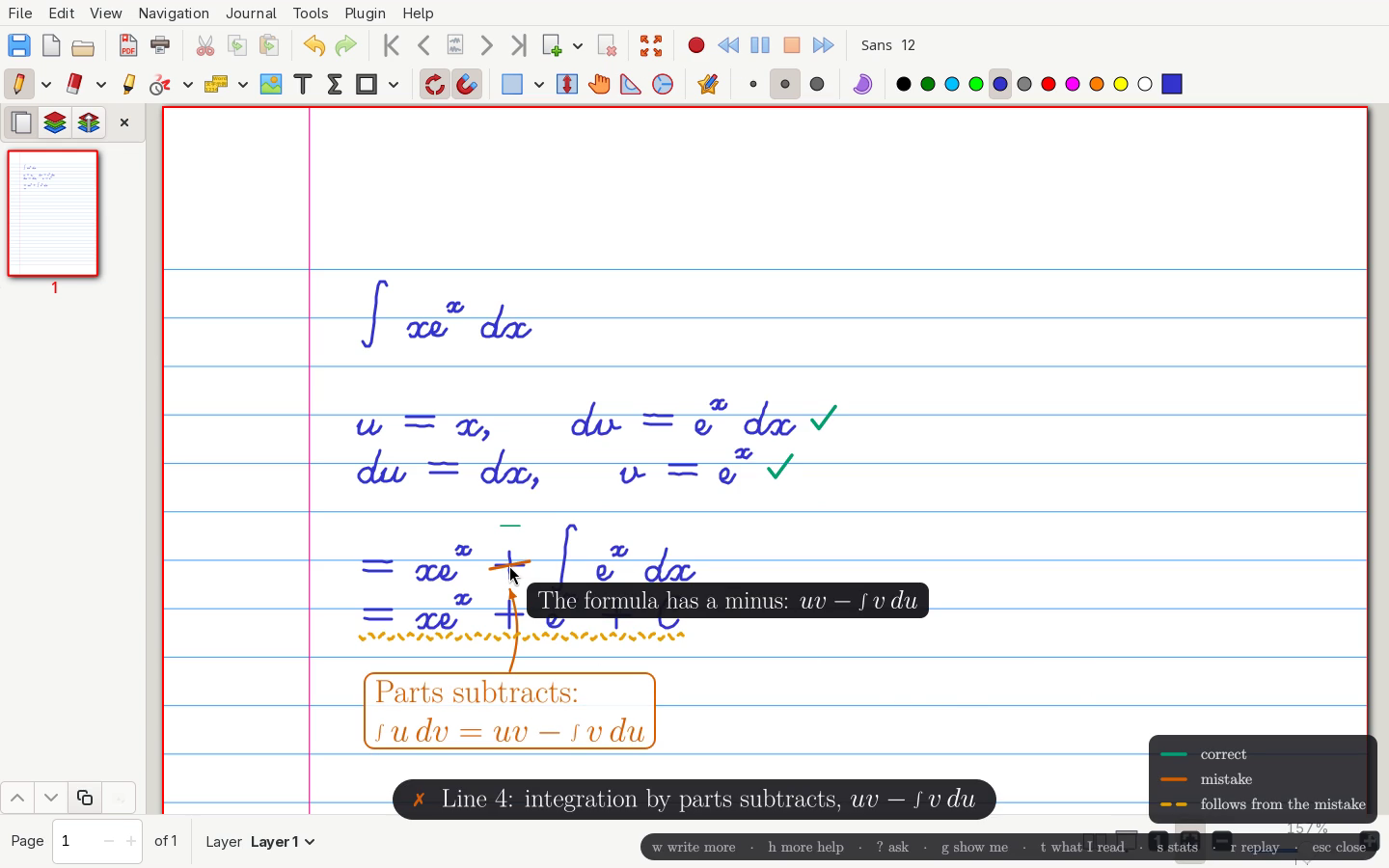
Place the correction beside the mistaken sign
In the demo, the written solution to ∫x eˣ dx chooses u and dv correctly, then uses a plus where integration by parts needs subtraction. The example ticks earlier steps, marks the sign and underlines a later line that inherits it. Feedback stays beside the student's reasoning rather than in a separate screen of solutions.
The prompt asks for line-by-line transcription before a verdict, boxes and annotation types; uncertain symbols should be marked as uncertain. That makes recognition and grading inspectable steps. Check what it read first: a neat annotation may be correcting a minus sign the model misread as a plus.
Sources and further reading
- Author introduction and demo disclosureOriginal project READMEThe author's learning use, hint-first aim and explicit disclosure of scripted handwriting and a fixed answer.
- How annotations and hints are requestedPinned source · prompts.pyLine transcription, error/uncertainty marks, hint stages and plot fields; design instructions are not proof of accuracy.
- Watch the author's 45-second demoOriginal repository video · no audio trackVisible writing, annotations and an interactive graph; a fixed demonstration does not measure live reasoning speed or learning outcomes.
Let the learner choose the next amount of help
A small hint highlights one useful feature. More help can progress to naming a technique, ghosting the next line and finally showing a correction. Another mode highlights clues before asking the learner to choose a method; a quiz asks about key steps in their own work.
The useful design choice is that feedback leaves room to continue writing. Whether it improves recall depends on solving a different problem independently, not on a smooth recording. A self-learner can compare their next step with the hint and ask whether it addressed the actual sticking point.
Sources and further reading
- Functions, requirements and data flowAuthor's full guideStaged help, whole-page context, screenshot scope and Linux X11 requirements.
- How annotations and hints are requestedPinned source · prompts.pyLine transcription, error/uncertainty marks, hint stages and plot fields; design instructions are not proof of accuracy.
Turn the formula into a graph you can change
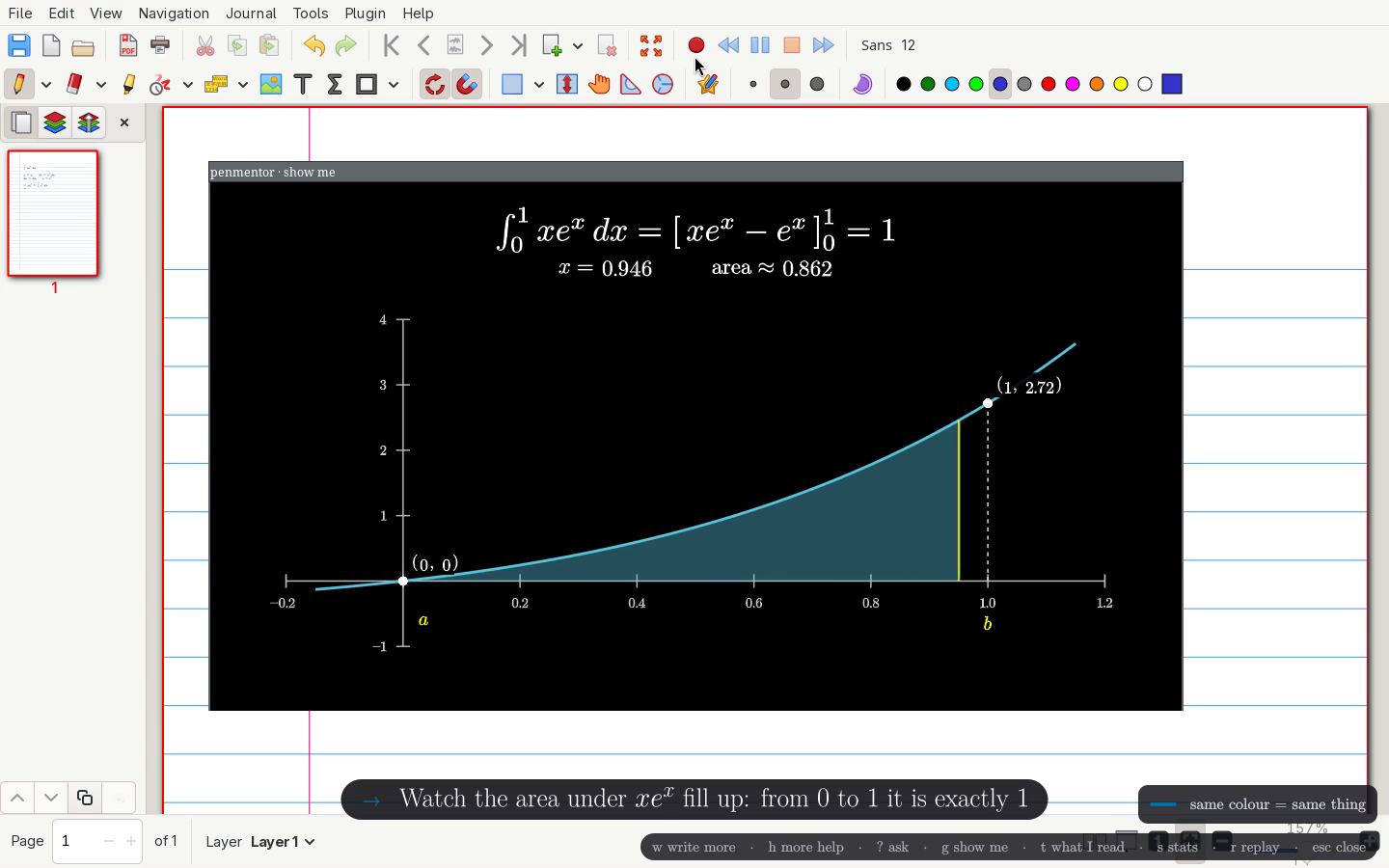
Boxing a formula can open a separate Show me window. The demo turns the integral into area under a curve and moves a cursor to inspect the changing area. The guide separately documents editing functions and bounds, and lists Riemann sums, solids of revolution, series and Taylor polynomials. Adjustable quantities invite questions about what changes, beyond a final illustration.
The code receives structured fields such as plot type, function and bounds, then draws them through preset Manim scenes. Expression parsing accepts a listed mathematical syntax. The contribution is a link from the current problem to manipulable graphics, rather than arbitrary animation code written on demand. The function and bounds still need checking against the original problem.
Sources and further reading
- Functions, requirements and data flowAuthor's full guideStaged help, whole-page context, screenshot scope and Linux X11 requirements.
- How annotations and hints are requestedPinned source · prompts.pyLine transcription, error/uncertainty marks, hint stages and plot fields; design instructions are not proof of accuracy.
- How formulas enter the plotPinned source · expr.pyAllowed mathematical expression syntax, rather than direct execution of arbitrary model code.
- Implementation of adjustable graphsPinned source · plot.pyPreset scenes, parameter controls and a Manim window; graphics and model grading need separate checks.
- Watch the author's 45-second demoOriginal repository video · no audio trackVisible writing, annotations and an interactive graph; a fixed demonstration does not measure live reasoning speed or learning outcomes.
A local interface still sends screenshots to the chosen model
The current setup targets Linux X11, with xournal++ and a pen tablet in the author's workflow, plus an installed and signed-in model command-line agent. A local harness handles capture, calls and annotation; it does not establish offline inference. The guide says screenshots of every monitor and, with the plugin, the whole current notes page go to the chosen model—not only the boxed expression.
Anyone trying it should first check system requirements, account allowances and other material visible on their screens. The October 20 code supports Claude Code, Codex and Antigravity, but an extra route does not establish equal recognition accuracy. A useful follow-up would compare transcription, false corrections and hints on the same unfamiliar handwritten problems. We do not yet have that test.
Sources and further reading
- Functions, requirements and data flowAuthor's full guideStaged help, whole-page context, screenshot scope and Linux X11 requirements.
- Model routes and screenshot callsPinned source · harness.pyClaude Code, Codex and Antigravity calls, image inputs and response structure; a local program does not establish an offline model.
- October 20 multi-route changeAuthor commit recordAdditional Codex and Antigravity routes and persistent live-screen marks; the demo file remains from October 17.