Model access · Official usage examples
GLM and Kimi on Bedrock: how models reach coding tools
Connect cloud models to OpenCode on a computer: who reasons, who edits files, and how model capability reaches an existing workspace.
AWS and Bedrock access are required; the GLM 5.3 announcement is for eligible enterprise customers.
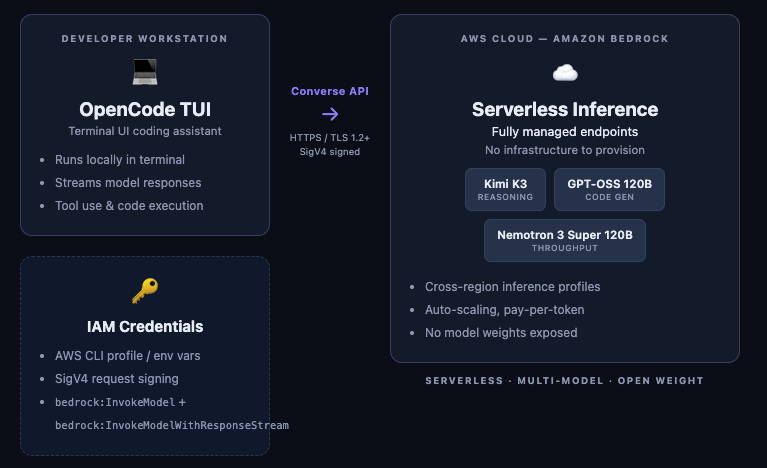
The code is local. Where does the model run?
In AWS’s September 23 example, Kimi K3 is asked to analyze two program tasks waiting on each other. Relevant files supply the context for an explanation and proposed fix. This is an official usage example, not a result reproduced by BitShovel.
The workflow has two parts: OpenCode on the computer organizes code context, displays responses and provides file operations; Bedrock handles cloud model calls. The coding tool is local, while inference is remote. The diagram separates those roles and explains how one workspace can connect to different models.
Sources and further reading
- AWS: OpenCode and open-weight modelsOfficial walkthrough · September 23, 2026Local-tool versus cloud-inference roles, and the Kimi K3 debugging example.
- OpenCode: providers and Bedrock accessTool documentation · checked October 6Providers, model-access requirements and configuration.
GLM 5.3 gains a managed access route
On October 5, AWS announced GLM 5.3 on Bedrock for eligible enterprise customers. The announcement shows a model selection and chat interface in Playground, alongside API integration material. This managed route removes the need to operate a model-serving server yourself.
The connection runs from a model release, through a cloud platform, into tools assembled by developers. It adds a model option for existing AWS environments. Rankings and completed tool-based work remain separate questions for evaluation and practical use; platform availability alone does not establish either.
Sources and further reading
- AWS: GLM 5.3 on BedrockOfficial announcement · October 5, 2026Enterprise eligibility, managed APIs and the Playground image.
Separate the model, the tool and the service
OpenCode documents Bedrock, Moonshot AI and Z.AI as distinct providers. A model name still needs a specific service, model ID and access entitlement. A chat subscription, a cloud account and downloadable weights provide different routes into using a model.
Our existing GLM apartment and Kimi SVG examples show what a model can help write. This reading adds one way to bring that capability into an existing workspace. Works, evaluations and access routes together make the parts behind a result easier to understand.
| Layer | Role here |
|---|---|
| GLM / Kimi model | Reason and generate from supplied context |
| OpenCode tool | Organize project context and provide file and command operations |
| Bedrock service | Provide managed model calls and access configuration |
Sources and further reading
- AWS: GLM 5.3 on BedrockOfficial announcement · October 5, 2026Enterprise eligibility, managed APIs and the Playground image.
- AWS: OpenCode and open-weight modelsOfficial walkthrough · September 23, 2026Local-tool versus cloud-inference roles, and the Kimi K3 debugging example.
- OpenCode: providers and Bedrock accessTool documentation · checked October 6Providers, model-access requirements and configuration.