Everyday use · Give the recommender a preference
Tell Facebook what you want to see more of
Facebook’s Your algorithm lets people manage interests and explain feedback on a post. Follow its visible controls to see how a preference becomes a recommendation signal.
Meta announced these features October 13. This reading checks its explanation and original video frames on October 17, without signing in, submitting preferences or comparing a personal feed before and after.
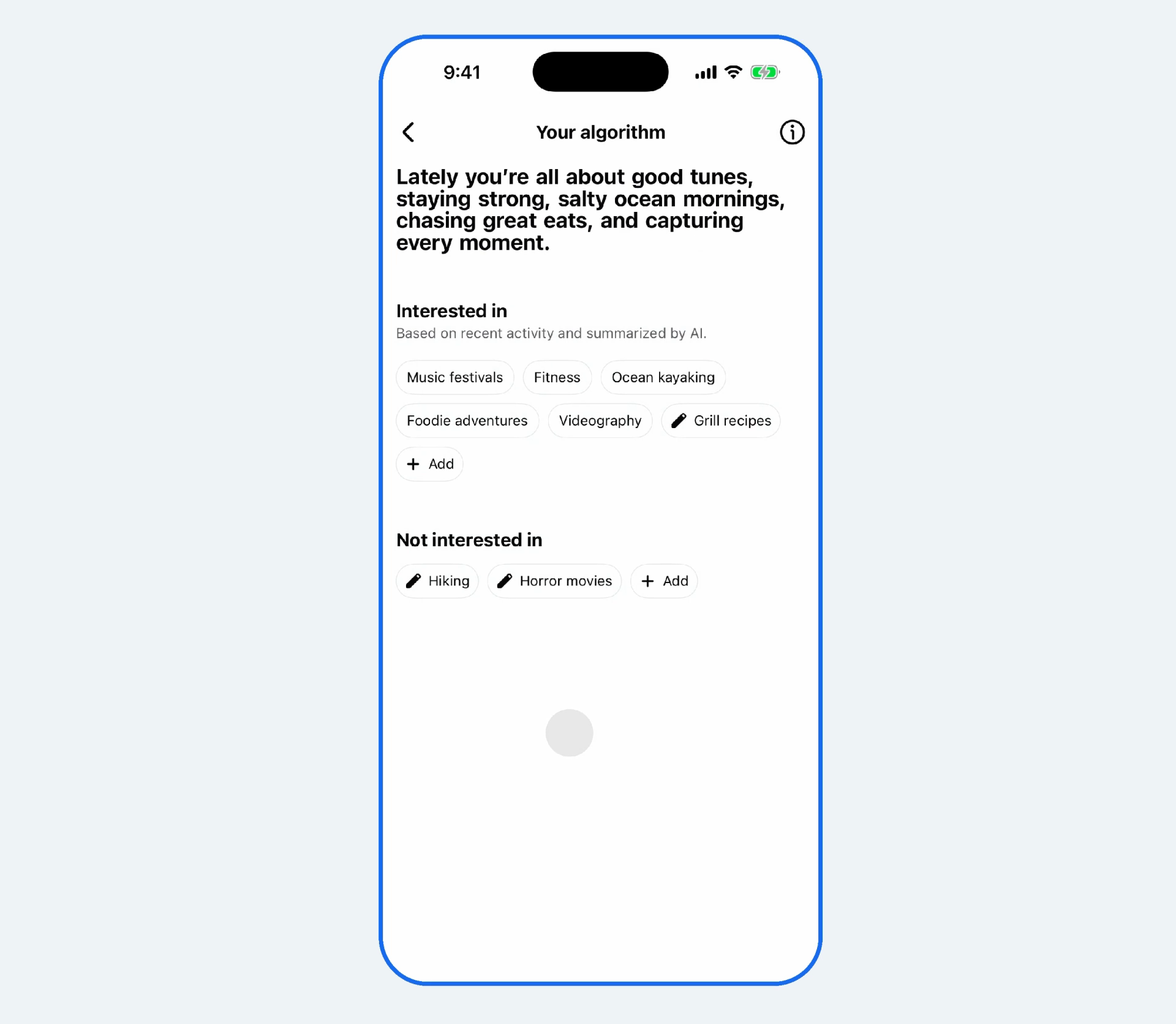
Start with the interests the system has inferred
The official video opens a post’s three-dot menu and enters Your algorithm. It lists interests such as music, fitness and food, plus a separate not-interested group. The page identifies these as an AI summary of recent activity, with add and edit controls.
An editorial starting point is to inspect whether that summary matches what you want now, then adjust it. A topic you briefly watched may not be one you want repeatedly. A visible list gives you something concrete to review.
Sources and further reading
- Meta · Original interests-list videoOfficial interface demo · original release mediaThree-dot menu and interests list; the reading uses an original frame at about 7.6 seconds.
Explain what interested you in one coffee post
A second demo pauses on coffee. Suggested reasons distinguish latte art, coffee culture and pour-over, with a text box for another explanation. A general positive reaction can become more specific feedback. The clip demonstrates the controls, not a verified recommendation outcome.
You might explain that you enjoy the making process or the composition of the photo. These are suggested ways to express a preference, rather than results tested in the original video.

Sources and further reading
- Meta · Original post-feedback videoOfficial interface demo · original release mediaA coffee post’s reason options and free-text field, shown in an original frame at about 2.3 seconds.
How does a written preference enter the feed?
Meta describes controls for Feed and Reels, with possible follow-up questions after positive or negative feedback. Language models interpret interests, context and intent alongside existing engagement signals. The company says recommendations can adapt within a session; BitShovel has not tested that speed or effect.
A preference becomes one input to ranking. It does not establish a guaranteed filter or direct editing of the recommender’s code. A useful question is whether the specific preference you expressed becomes recognizable in what you see later.
Sources and further reading
- Meta · Shape Facebook recommendations in your own wordsOfficial release · October 13, 2026Feed, Reels and text-feedback integration; immediate adaptation is a vendor claim, not our account test.
Check your own entry before adjusting further
The announcement describes a rollout without a complete regional or account-eligibility list. Check your own three-dot menu. This reading does not assume universal availability or identify a particular model behind the feature.
If you try it, start with one clear preference whose effect you can recognize later. A direct feedback route still leaves you to judge whether the system understood the detail you cared about and whether another adjustment would help.
Sources and further reading
- Meta · Shape Facebook recommendations in your own wordsOfficial release · October 13, 2026Feed, Reels and text-feedback integration; immediate adaptation is a vendor claim, not our account test.