From image to design
Canva Craft: how to keep editing after image generation
Change a poster’s date or move a balloon: does the whole image need generating again? Follow Craft and Magic Layers to distinguish an image, a placed asset and an editable design.
This account uses official illustrations and documentation, without generating or converting an image. Dream Lab and preview APIs have different access conditions; Magic Layers also needs its own permissions and shared AI allowance. Check eligibility and remaining allowance in your account.
Start with one selectable element
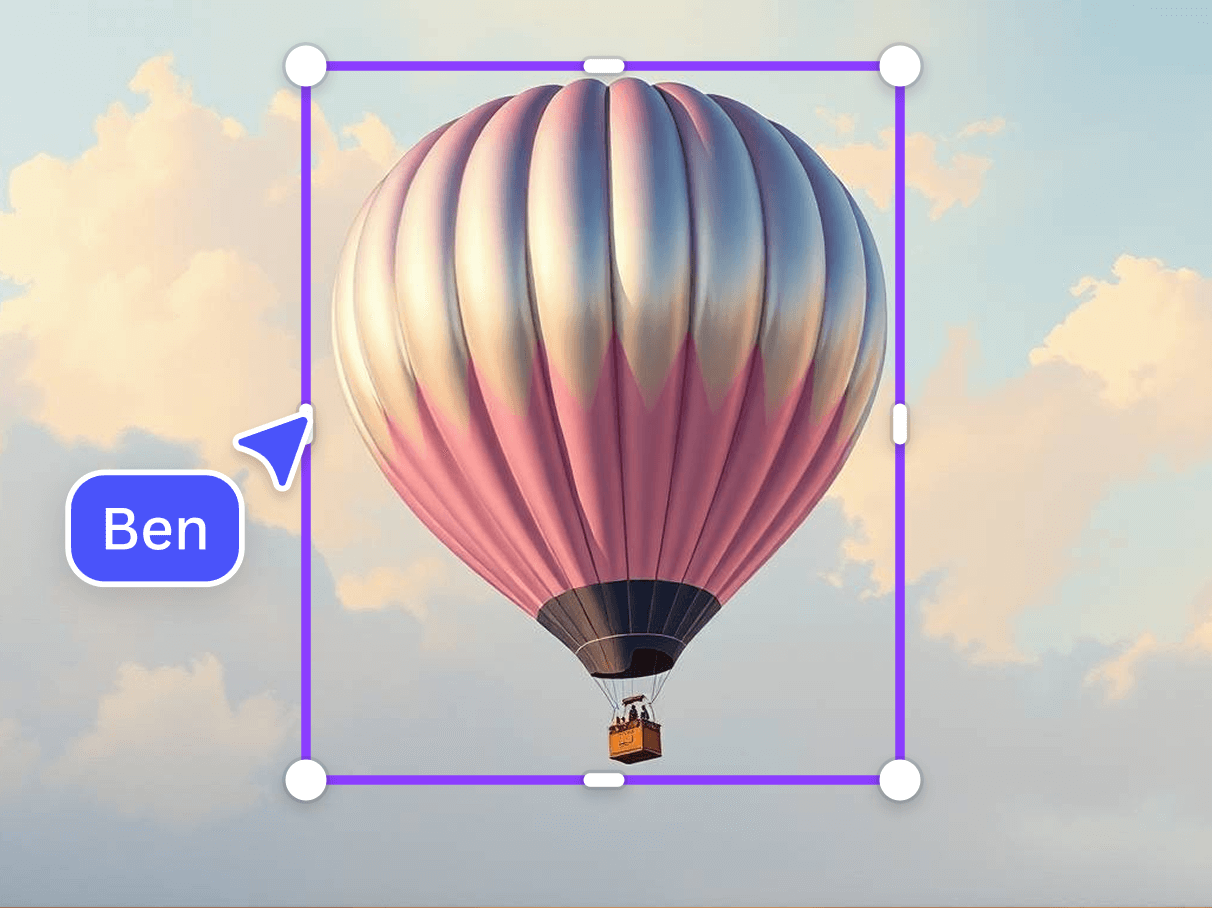
A balloon, a background and a heading can share one image. Continuing the design depends on selecting an element separately. Canva’s Magic Layers illustration places a purple selection box around the balloon: the intended control is over an object, color or text, rather than only the complete flat image.
Changing a poster’s date is a useful example: retaining a picture you like while changing its lettering is different from generating another similar poster. Magic Layers documents selection, movement, deletion, independent resizing and replacement. It also accepts images from other generators. Continued editing therefore depends on the design tool that takes over, as well as the model that made the picture.
- See the official element, color and text illustrationsOfficial feature illustrations, not an independent matched-input test.
Sources and further reading
- Magic Layers input and editing guideOfficial help · UI usage scopeUsed for single-page PNG/JPG, the 5000px longest-edge limit, preference for graphic designs and variable photographic separation. UI and API input scopes are read separately.
- Official element, color and text illustrationsOfficial feature illustrations · not our operationThe body image comes from this page. It illustrates intended element editing, without an original project or matched before/after result for this review. It is not evidence that Craft generated the image.
Craft plans the composition, then renders it
Introduced on October 22, Craft is described by Canva as Canva Research’s first image foundation model trained from scratch. Canva separates composition planning—elements, relative scale, hierarchy and lettering—from rendering an image at up to 2K. This published architecture explains how the company organizes generation; the usefulness of its composition and text still depends on actual outputs.
The public generation job returns an image download and, optionally, an uploaded image asset. Placing that asset into a design can still place it as one flat image. Converting its contents into separately editable elements is another task. The reference distinguishes these uses: ordinary Create design placement uses no AI allowance, while Magic Layers image-to-design import starts a new AI conversion.
Sources and further reading
- Original Craft introductionPublisher material · read October 26Used for Canva’s planning/rendering account, Dream Lab access, Magic Layers relationship and future features. Quality and 55-language text support are publisher claims, not our tests.
- Canva’s official publication indexOfficial index · original event dateThe index dates Introducing Canva Craft to October 22, 2026. October 26 is this editorial account, not a new model launch.
- Image generation job and resultOfficial API reference · current preview contractUsed for craft_v1_2k, user authorization, image_generation capability, image assets, download URLs and the six current aspect-ratio values. No call was made; the product’s 30-plus ratios are not substituted for this endpoint.
- Magic Layers image-to-design jobOfficial API reference · separate from generationUsed for an existing asset_id, design:content:write and image_to_design_imports, allowance and the distinction from Create design. Its broader raster-format schema is separate from the UI help’s PNG/JPG list.
An image asset and a design are different results
The result types make the distinction concrete: generation supplies an image; a successful image-to-design job supplies a Canva design and editing link. Conversion uses an image asset already in the account and checks design-write permission and image-to-design capability. Generation has its own asset-write permission and capability. Access to one does not establish access to both. A developer connecting the stages must handle both capabilities and each job’s result.
Constructing an editable design from a raster image does not guarantee restoration of the author’s fonts, hidden elements or original project structure. The help page favors distinct graphic elements, illustrations and stylized visuals. A single-page PNG or JPEG is a common starting point; the UI also lists a 5000px longest-edge limit. Photographic separation may vary. The API lists additional raster formats, so the UI’s shorter list is not a universal input specification.
Sources and further reading
- Image generation job and resultOfficial API reference · current preview contractUsed for craft_v1_2k, user authorization, image_generation capability, image assets, download URLs and the six current aspect-ratio values. No call was made; the product’s 30-plus ratios are not substituted for this endpoint.
- Magic Layers image-to-design jobOfficial API reference · separate from generationUsed for an existing asset_id, design:content:write and image_to_design_imports, allowance and the distinction from Create design. Its broader raster-format schema is separate from the UI help’s PNG/JPG list.
- Converted design and editing linkOfficial result contract · no actual job result obtainedOnly successful jobs contain result.design. Editing links are user-bound and temporary. Example IDs are not treated as public designs or our output.
- Magic Layers input and editing guideOfficial help · UI usage scopeUsed for single-page PNG/JPG, the 5000px longest-edge limit, preference for graphic designs and variable photographic separation. UI and API input scopes are read separately.
Inspect the small change that matters
Access needs the same separation. Canva announces Craft in Dream Lab, while the generation and image-to-design APIs remain previews that prevent public apps or integrations using them from passing general distribution review. Starting generation and conversion each uses account AI allowance; polling the conversion does not. Eligibility, balance and debit amounts cannot be inferred from an illustration. Craft MCP remains coming soon in the announcement.
With a small poster to revise, inspect the change you actually need: correct characters and spacing after replacing a date, plausible background and overlap after moving an object, and preservation of the elements you already like. The publisher’s 55-language text claim does not replace checking a complete Chinese poster. The value of continued editing lies in these small changes that can be selected and inspected.
Sources and further reading
- Original Craft introductionPublisher material · read October 26Used for Canva’s planning/rendering account, Dream Lab access, Magic Layers relationship and future features. Quality and 55-language text support are publisher claims, not our tests.
- Image generation job and resultOfficial API reference · current preview contractUsed for craft_v1_2k, user authorization, image_generation capability, image assets, download URLs and the six current aspect-ratio values. No call was made; the product’s 30-plus ratios are not substituted for this endpoint.
- Magic Layers image-to-design jobOfficial API reference · separate from generationUsed for an existing asset_id, design:content:write and image_to_design_imports, allowance and the distinction from Create design. Its broader raster-format schema is separate from the UI help’s PNG/JPG list.
- Shared AI allowance guideOfficial help · separate from account verificationMagic Layers is listed as a shared-allowance Premium AI tool. Eligibility wording differs from Free-trial wording on regional pricing pages; no free, unlimited or uniform-debit promise is made.
- Official UK plan and feature pageRegional plan material · no signed-in eligibility checkRead for public Free-trial and shared-allowance wording. UK prices and estimated uses are not generalized to other regions, all accounts or the price of one Craft generation.